ML Project Lifecycle
Docs: Google: Rules of ML · Google: Problem framing · scikit-learn user guide
Overview
The model is the easy part. Training is one afternoon out of weeks of work; the time goes into framing the problem, wrangling the data and keeping the model alive in production. This section walks the whole lifecycle on one problem from the factory floor: predicting machine breakdowns before they happen. It's the same problem the Classification page uses to compare models. The failure people hit is starting at stage 5: a model with a great AUC that no decision depends on.
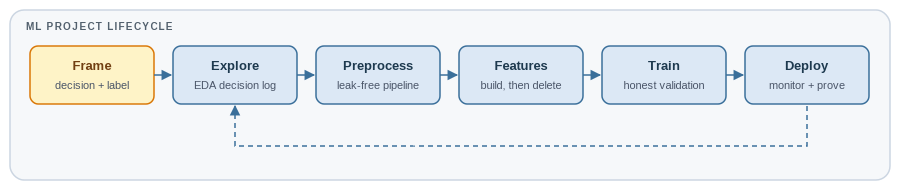
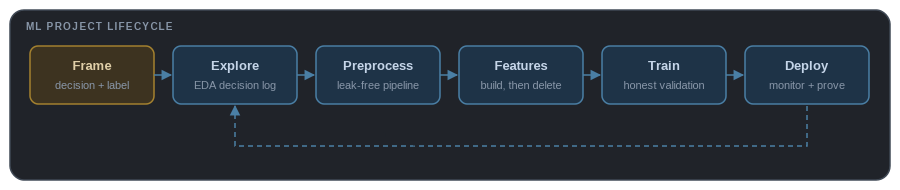
Figure L0-1: The six stages. Amber is framing, the stage this page owns. The dashed loop is what drift sends you back to.
Key concepts
Stages at a glance
| Stage | Page | The one mistake that kills projects here |
|---|---|---|
| Frame the problem | This page | Building a model nobody asked a decision of |
| Explore | Exploratory Data Analysis | Plots without decisions; a broken label found in week three |
| Preprocess | Data Preprocessing | Leaking the future into training data |
| Features | Feature Engineering & Selection | Adding features instead of deleting them |
| Train & evaluate | Model Training & Evaluation | Validating on data the model couldn't have at prediction time |
| Deploy & monitor | Inference & Production | Shipping the model and walking away |
Roughly 80% of a project is stages 1–4 and 6. A plan that gives most of the schedule to "modelling" is wrong.
The decision
A model predicts; a project changes a decision. If no decision changes, don't build the model. Write the decision down first.
| Goal statement | Result |
|---|---|
| "Predict failures" | ❌ Fixes nothing: no metric, no cadence, no deliverable |
| "Every month, give the planners a ranked list of at-risk machines so they spend limited inspection hours on the right ones" | ✅ Fixes the metric (precision and recall at a budget-driven threshold, per the threshold example), the cadence (monthly batch) and the deliverable (a list, not an API) |
The label
"Failed" sounds obvious and isn't.
A machine has failed if it has an unplanned breakdown at any point in the 30 days after the snapshot date. Planned maintenance stops don't count.
Every word is load-bearing.
| Definition change | Result |
|---|---|
| Count planned stops as failures | ❌ The model learns the maintenance schedule |
| 7-day window instead of 30 | A different problem: different base rate, different model |
| No snapshot date in the definition | ❌ No way to tell which data the model may use |
The snapshot date
The snapshot date is the moment you freeze time. Every feature uses only data from before it. The label comes only from the window after it. This rule prevents the most expensive bug in applied ML: leakage.
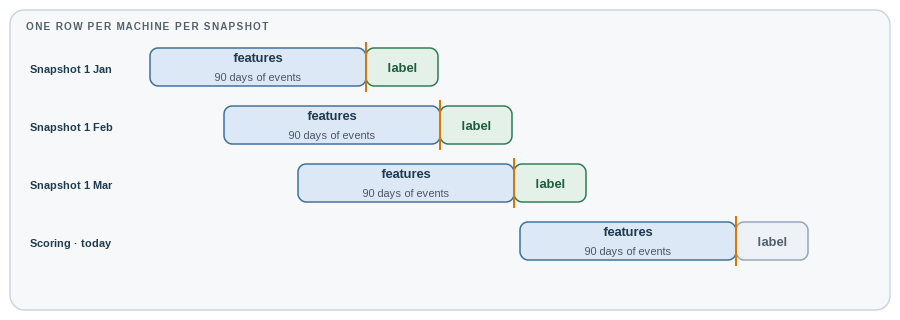
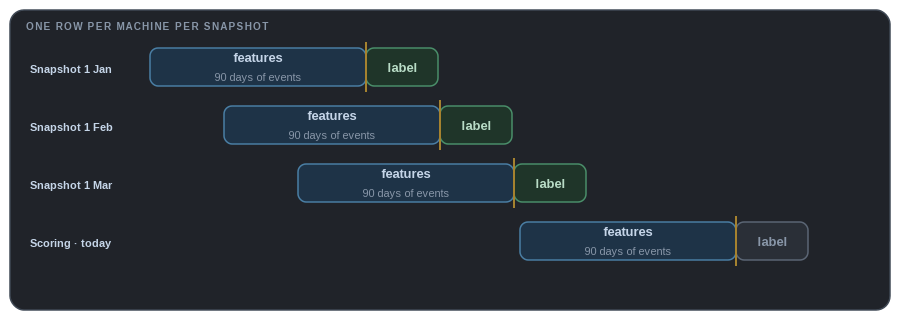
Figure L0-2: How snapshot dates build the training set. Blue is the feature window, green is a known label, grey is a label not yet known. Amber lines are snapshot dates.
Training data is many historical snapshots, one row per machine per snapshot. Scoring is the same computation with today as the snapshot. Every later page refers back to this figure.
Is ML needed?
Build the rule-based baseline first. The model must beat it to earn its complexity.
| Option | Strength | Use it when |
|---|---|---|
| CMMS rule: active temperature alarm or over 5,000 hours since service | Explainable, free, ships today | It catches most breakdowns (here: PR-AUC 0.24) |
| Model | Finds interactions a rule can't | It beats the rule by enough to pay for monitoring and retraining (here: 0.46) |
Business metric and ML metric
Agree the mapping up front. If you can't write it down, you'll ship a model with a great AUC that nobody uses.
| Side | Metric | Who owns it |
|---|---|---|
| Business | Downtime hours prevented per $1,000 of inspection budget | Plant manager |
| Model | PR-AUC | Data scientist |
| The bridge | The decision threshold, set from inspection cost vs breakdown cost | Both, together |
The running example
10,000 machines across the plant network, ~300 unplanned breakdowns per 30-day window (3%), with features from vibration, temperature, load cycles, service history and work orders.
| Stage | What happens to the failure problem |
|---|---|
| EDA | The label audit, the failure-rate-by-segment chart, and the leak scan that should have caught the 0.99 bug |
| Preprocessing | Missing oil-analysis scores, 24/7-line outliers, and the leaked column that scored AUC 0.99 |
| Features | Rolling sensor windows from the snapshot date, then deleting most of them |
| Training | Why random k-fold lies on this problem and a time-based split doesn't |
| Production | Monthly batch scoring, drift after a rush order, and proving impact with a control group |
This section owns the decisions. AI Engineering owns the serving code.
Gotchas
- Starting with a model. Without a written decision, nothing tells you what metric or cadence to build for. Write the goal statement first.
- A label without a window. "Failed" with no time window can't be computed consistently. Fix the window and what counts.
- Counting planned stops. The model learns your maintenance calendar. Exclude planned stops from the label.
- Skipping the rule baseline. You can't show the model is worth its upkeep. Score the CMMS rule first.
- No business-to-ML mapping. A good AUC doesn't become a decision. Agree how the threshold converts one into the other.
Scenario questions
Q1 ★ A plant manager asks you to "use AI to predict failures". What do you ask first?
Model answer
- Clarify: what would you do differently with a prediction, and how often?
- Observe: planners schedule inspections monthly, with a fixed budget of inspection hours.
- Hypothesise: the real need is a ranked monthly list, not a real-time alarm.
- Fix: write the goal statement: a monthly ranked list for limited inspection hours.
- Prevent: no data work before the decision, label and metric are written down. The trade-off is a slower start.
Q2 ★★ How would you define the label for machine failure?
Model answer
- Clarify: what counts as a failure, and how far ahead is useful for planners?
- Observe: the CMMS records both planned stops and unplanned breakdowns.
- Hypothesise: including planned stops would teach the model the maintenance schedule.
- Fix: an unplanned breakdown within 30 days after the snapshot date.
- Prevent: the definition lives in one written query, reviewed with the reliability engineers. The trade-off is a narrower label that ignores near-misses.
Q3 ★★★ A simple rule already catches most breakdowns. Should you still build a model?
Model answer
- Clarify: what does a missed breakdown cost, and what does the rule miss?
- Observe: the rule scores PR-AUC 0.24; a quick logistic regression scores 0.31.
- Hypothesise: a model pays off only if it clears the rule by enough to cover monitoring, retraining and on-call.
- Fix: build a time-boxed model. Ship it only if it clearly beats the rule (here 0.46, about double).
- Prevent: the rule stays as the fallback and the yardstick. The trade-off is maintaining two systems for a while.
Summary
- A project changes a decision. Write the decision first; it sets the metric, cadence and deliverable.
- The label is a definition. Unplanned breakdowns, 30 days after the snapshot date, planned stops excluded.
- The snapshot date freezes time. Features from before it, labels from after it, on every page that follows.
- Beat the rule first. A model that can't clearly beat the CMMS query shouldn't ship.
- Map business to ML. The threshold turns PR-AUC into downtime hours prevented.
Next → Exploratory Data Analysis