Architecture
Read for context; the Deeper dive blocks are optional. Phase 1 of the Learning Path.
Docs: Cluster architecture · Controllers · Objects
Overview
A cluster has two halves. The control plane decides: the API server stores desired state in etcd, and the scheduler and controllers act on it. Worker nodes execute: each kubelet runs what the API server says belongs on its node. This page covers each component, how they connect, and what breaks when one fails. For the model they implement (desired state, reconciliation, and the chain behind every kubectl apply), start with the Mental Model. Figure 1-2 below is the loop that model is built on.
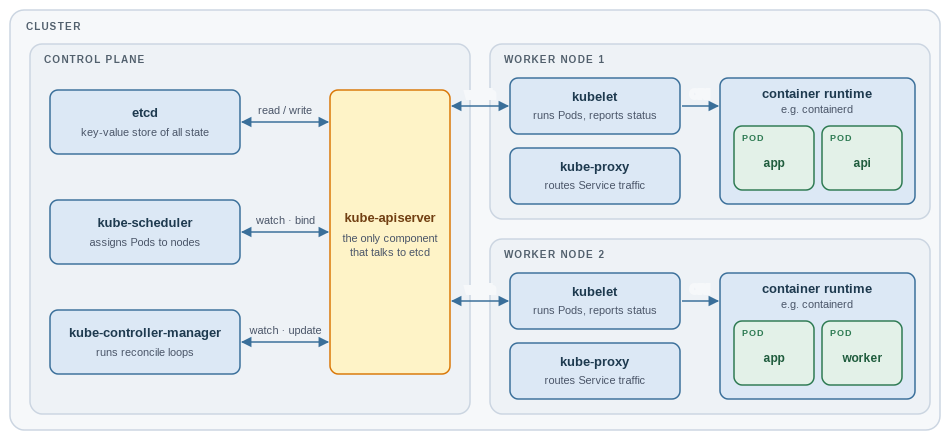
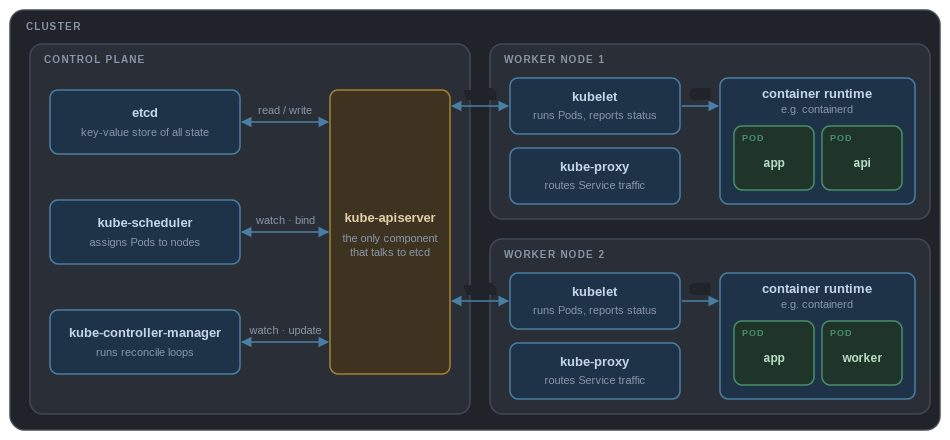
Figure 1-1: Control plane vs worker nodes. Amber marks the API server: every arrow ends there. No component talks to another directly.
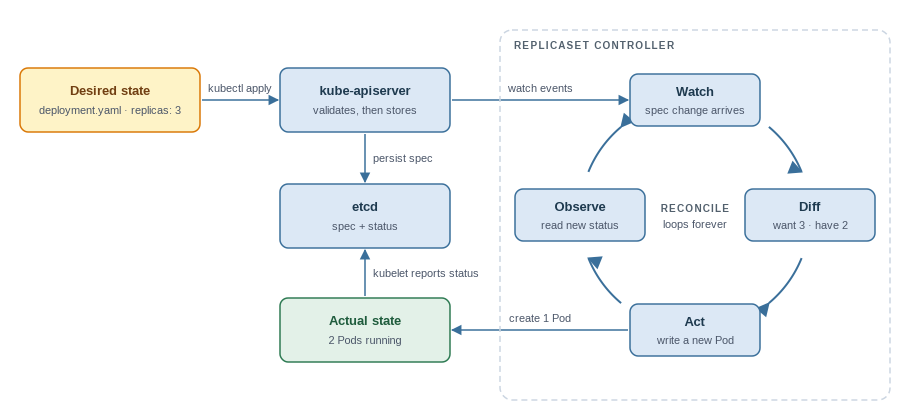
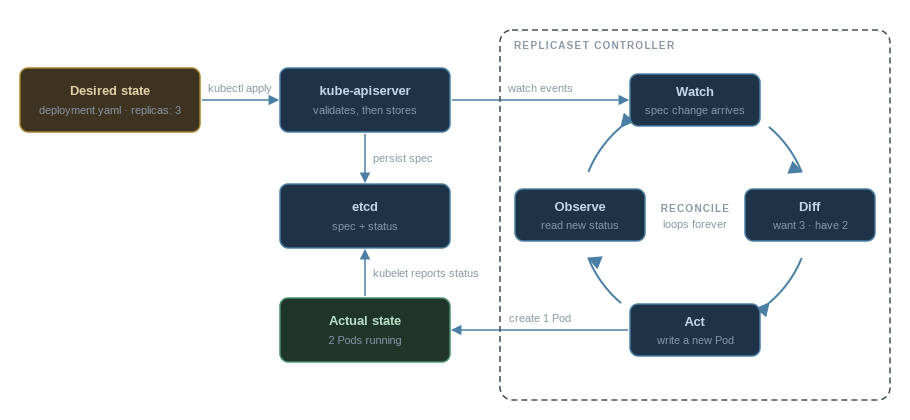
Figure 1-2: The reconciliation loop. Amber is desired state, green is actual state. A controller's only job is to close the gap between them, forever.
Key concepts
Components
| Component | Runs on | Job | When it fails |
|---|---|---|---|
| kube-apiserver | Control plane | Validates, authorizes and serves every read and write. The only client of etcd. | kubectl fails. Running Pods keep serving. Nothing new is scheduled or healed. |
| etcd | Control plane | Stores every object: spec and status. | The cluster's memory is gone. Restore from a snapshot. |
| kube-scheduler | Control plane | Picks a node for each unscheduled Pod: resources, affinity, taints. | New Pods stay Pending with no node assigned. |
| kube-controller-manager | Control plane | Runs the built-in controllers: ReplicaSet, Deployment, Job, Node, EndpointSlice. | Nothing reconciles. Deleted Pods are not replaced. Rollouts stall. |
| cloud-controller-manager | Control plane (cloud only) | Creates cloud load balancers and syncs node lifecycle with the provider. | LoadBalancer Services stay <pending>. |
| kubelet | Every node | Watches Pods bound to its node, starts them through the runtime, runs probes, reports status. | Node goes NotReady. Its Pods are evicted after about 5 minutes. |
| kube-proxy | Every node | Programs iptables/IPVS so Service IPs reach Pod IPs. Some CNIs (Cilium) replace it. | Service IPs stop resolving to Pods on that node. Pod IPs still work. |
| Container runtime | Every node | Pulls images and runs containers through the CRI (containerd, CRI-O). | Pods on that node never start. |
Where a change lives
Every object has spec (what you want, written by you) and status (what exists, written by controllers). The question is whether your change is in the spec that will be applied next.
| Change made with | Survives the next kubectl apply from Git? | Use when |
|---|---|---|
kubectl apply -f from a file in Git | Yes. The file is the source of truth. | Real work. Repeatable and reviewable. |
kubectl create / run / expose | No record exists to re-apply. | The exam. Fastest path to a working object. |
kubectl edit / set image / scale on a live object | No. Overwritten by the next apply. | Emergency only. Commit the same change straight after. |
| Editing or deleting a Pod owned by a ReplicaSet | No. The controller replaces it within seconds. | Never. Change the Deployment instead. |
API groups and versions
apiVersion is group/version. A manifest using a removed version fails with no matches for kind "X" in version "Y"; kubectl explain <kind> prints the current one.
Deeper dive
Versions move alpha → beta → GA, and old versions are removed after a published deprecation period (→ API deprecations).
| apiVersion | Kinds you will use |
|---|---|
v1 (core group) | Pod, Service, ConfigMap, Secret, Namespace, ServiceAccount, PersistentVolumeClaim |
apps/v1 | Deployment, ReplicaSet, StatefulSet, DaemonSet |
batch/v1 | Job, CronJob |
networking.k8s.io/v1 | Ingress, NetworkPolicy |
rbac.authorization.k8s.io/v1 | Role, RoleBinding, ClusterRole, ClusterRoleBinding |
autoscaling/v2 | HorizontalPodAutoscaler |
→ See the deprecated API migration guide.
kubectl essentials
Orient yourself in an unknown cluster:
kubectl config get-contexts                        # which clusters can I reach?
kubectl config use-context <ctx>                   # exam: every task names one, run it first
kubectl config set-context --current --namespace=<ns>
kubectl cluster-info
kubectl get nodes -o wide                          # status, IPs, kubelet and runtime versions
kubectl get pods -n kube-system                    # control plane Pods (kubeadm clusters only)
Look up the API without leaving the terminal:
kubectl api-resources                              # every kind: short name, group, namespaced?
kubectl api-resources --namespaced=false           # cluster-scoped kinds (Node, PV, ClusterRole)
kubectl explain deployment.spec.strategy           # field docs and the current apiVersion
kubectl explain pod.spec.containers --recursive | less
Watch the loop run:
kubectl get pods -w                                # stream changes
kubectl get events --sort-by=.metadata.creationTimestamp
kubectl describe pod <pod>                         # the Events section shows which component acted
Generate YAML instead of typing it:
kubectl create deployment web --image=nginx --replicas=3 --dry-run=client -o yaml > web.yaml
Every object has the same four top-level fields:
apiVersion: apps/v1          # group/version
kind: Deployment
metadata:
  name: web
  labels: {app: web}
spec:                        # desired state: you write this
  replicas: 3
  selector:
    matchLabels: {app: web}
  template:
    metadata:
      labels: {app: web}
    spec:
      containers:
      - name: nginx
        image: nginx
status:                      # actual state: controllers write this, never you
  readyReplicas: 2
🧪 Lab
Requires: Standard lab setup · Lab 1-1 · How the tiers work.
Name the components behind each step. Builds on Lab 1-1, which covers self-healing and ownership.
Goal
- Create namespace
lab1-2and a Deploymentweb(imagenginx, 3 replicas) in it. - Delete one of its Pods, then use events to name the component that created the replacement, the one that placed it, and the one that started it.
- Scale the Deployment's ReplicaSet (not the Deployment) to 5. Predict what happens, then check.
Verify
kubectl -n lab1-2 get deploy,rs,pods                      # web 3/3, one ReplicaSet at 3
kubectl -n lab1-2 get events --sort-by=.metadata.creationTimestamp \
  -o custom-columns=REASON:.reason,SOURCE:.source.component,MESSAGE:.message | tail -n 15
🟡 Hints
- Same as Lab 1-1 step 1, in
lab1-2. - Each event records the component that reported it in
.source.component, but the default table hides it. "See who did it" in Command Patterns. Look forSuccessfulCreate,ScheduledandStarted. kubectl scaleworks on any object with replicas, includingrs/<name>. The revert is too fast to watch, so read the events afterwards.
🟢 Guided
-
Create the lab namespace.
kubectl create namespace lab1-2 -
Create a Deployment with 3 replicas and wait for it.
kubectl -n lab1-2 create deployment web --image=nginx --replicas=3kubectl -n lab1-2 rollout status deployment/web -
Stream Pod changes in the background.
kubectl -n lab1-2 get pods -w & -
Delete one Pod to trigger a replacement.
kubectl -n lab1-2 delete "$(kubectl -n lab1-2 get pods -o name | head -n 1)" -
Stop the background watch.
kill %1 -
List recent events in time order, with the component that reported each one. The default
get eventstable has no source column, so ask for it.kubectl -n lab1-2 get events --sort-by=.metadata.creationTimestamp \-o custom-columns=REASON:.reason,SOURCE:.source.component,MESSAGE:.message | tail -n 8SuccessfulCreate replicaset-controller Created pod: web-5fc9f4bf66-k7qlhScheduled default-scheduler Successfully assigned lab1-2/web-5fc9f4bf66-ct585 to ckad-control-planePulling kubelet Pulling image "nginx"SuccessfulCreate replicaset-controller Created pod: web-5fc9f4bf66-ct585Killing kubelet Stopping container nginxPulled kubelet Successfully pulled image "nginx" in 1.525s ...Started kubelet Container startedCreated kubelet Container createdreplicaset-controllerruns inside kube-controller-manager and created the replacement.default-schedulerplaced it. Thekubeletpulled and started it. -
Scale the ReplicaSet directly, behind the Deployment's back.
kubectl -n lab1-2 scale "$(kubectl -n lab1-2 get rs -o name | head -n 1)" --replicas=5 -
Check the count, then the events that explain it.
kubectl -n lab1-2 get rskubectl -n lab1-2 get events --sort-by=.metadata.creationTimestamp \-o custom-columns=REASON:.reason,SOURCE:.source.component,MESSAGE:.message | tail -n 6NAME DESIRED CURRENT READY AGEweb-5fc9f4bf66 3 3 3 13sSuccessfulCreate replicaset-controller Created pod: web-5fc9f4bf66-r6fr2SuccessfulCreate replicaset-controller Created pod: web-5fc9f4bf66-v2wvpSuccessfulDelete replicaset-controller Deleted pod: web-5fc9f4bf66-v2wvpSuccessfulDelete replicaset-controller Deleted pod: web-5fc9f4bf66-r6fr2Scheduled default-scheduler Successfully assigned lab1-2/web-5fc9f4bf66-r6fr2 to ckad-control-planeScalingReplicaSet deployment-controller Scaled down replica set web-5fc9f4bf66 from 5 to 3Still 3. The ReplicaSet created 2 Pods to reach 5. Within a second
deployment-controllerscaled it back from 5 to 3, and the 2 new Pods were deleted. The Deployment owns the ReplicaSet's replica count, just as the ReplicaSet owns its Pods. -
Run the ✅ Check below, then delete everything the lab created.
kubectl delete namespace lab1-2
✅ Check
t() { [ "$2" = "$3" ] && echo "PASS $1" || echo "FAIL $1: got '$2', want '$3'"; }
t "3 Pods Ready"               "$(kubectl -n lab1-2 get deploy web -o jsonpath='{.status.readyReplicas}')" "3"
t "one ReplicaSet, back at 3"  "$(kubectl -n lab1-2 get rs -o jsonpath='{range .items[*]}{.spec.replicas}{end}')" "3"
t "Deployment scaled it back"  "$(kubectl -n lab1-2 get events --field-selector reason=ScalingReplicaSet -o jsonpath='{.items[*].message}' | grep -c 'from 5 to 3')" "1"
Gotchas
- Editing the child instead of the owner. Pods belong to ReplicaSets, ReplicaSets to Deployments. Change the top-level owner or the controller undoes your edit. Check
metadata.ownerReferences. - Wrong context or namespace. Each exam task names a context. Work done in the wrong one scores zero. Run the given
use-contextcommand every time. kubectl get allis not all. It skips ConfigMaps, Secrets, Ingress, PVCs, ServiceAccounts and RBAC objects. Name the kinds you want.- Static Pods. On kubeadm clusters the control plane runs as static Pods from
/etc/kubernetes/manifests. Deleting one withkubectldoes nothing lasting. The kubelet recreates it from the file. - Managed clusters hide the control plane. On GKE, EKS and AKS,
kube-systemshows no API server or etcd Pods. They still exist; you just can't touch them. - Removed API versions. Old manifests (
extensions/v1beta1Ingress,batch/v1beta1CronJob) fail on current clusters.kubectl explain <kind>prints the version to use.
Scenario questions
Q1 ★ You delete a misbehaving Pod and it comes straight back. A teammate says to delete it again. What's going on?
Model answer
- Clarify: do they want this Pod replaced, or the workload gone?
- Observe:
kubectl get pod <pod> -o jsonpath='{.metadata.ownerReferences[0].kind}'returnsReplicaSet, owned in turn by a Deployment. - Hypothesise: the ReplicaSet controller saw 2 of 3 replicas and created a new one. This is the system working.
- Fix: to stop the workload, scale the Deployment to 0 or delete it. To fix a bad Pod, fix the Pod template in the Deployment.
- Prevent: treat Pods as disposable. Every change goes to the owner.
Q2 ★★ A hotfix applied with kubectl set image in production disappeared after the next CI deploy. Why?
Model answer
- Clarify: how does CI deploy?
kubectl applyfrom Git, Helm, or a GitOps controller? - Observe:
kubectl rollout history deploy/<name>shows the hotfix revision followed by a revision with the old image.kubectl diff -fagainst Git shows what apply would change. - Hypothesise: the hotfix only lived in the live object. CI re-applied the spec from Git, which still held the old image.
- Fix: commit the hotfix to Git and let CI roll it out.
- Prevent: make Git the only writer. Restrict production write access (RBAC) to the CI identity. A GitOps controller (Argo CD, Flux) flags drift before it is overwritten.
Q3 ★★ One node shows NotReady and its Pods are being recreated on other nodes. Walk me through it.
Model answer
- Clarify: one node or several? Any recent change such as an upgrade, new DaemonSet, or network change?
- Observe:
kubectl describe node <node>and read Conditions.Kubelet stopped posting node statusmeans the API server lost contact.DiskPressureorMemoryPressuremeans the node is struggling. On the node:systemctl status kubelet,journalctl -u kubelet,crictl ps. - Hypothesise: kubelet stopped, container runtime crashed, disk full, or a network partition between the node and the API server.
- Fix: restart the kubelet or runtime, or free disk. If the machine is unhealthy,
kubectl cordonandkubectl drainit, then replace it. - Prevent: run enough replicas spread across nodes (
topologySpreadConstraints), protect them with PodDisruptionBudgets, and alert on node conditions.
Q4 ★★★ The API server is down. What keeps working and what stops?
Model answer
- Clarify: one API server replica or all of them? Managed or self-hosted control plane?
- Observe:
kubectltimes out. Existing applications still answer requests. - Hypothesise: the data plane runs without the control plane. Containers keep running, the kubelet restarts crashed containers locally, and kube-proxy rules stay in place. Anything that needs a decision stops: no scheduling, no scaling, no replacement of Pods lost with a node, and no endpoint updates, so Services can keep routing to a dead Pod.
- Fix: restore the API server. Check etcd health first, because the API server cannot serve without it.
- Prevent: run an HA control plane: several API servers behind a load balancer and 3 or 5 etcd members for quorum. Take regular
etcdctl snapshot savebackups and test restoring them.
Summary
- Everything goes through the API server. Components never talk to each other directly. They watch the API and write back to it.
- Controllers reconcile; they never finish. Watch, diff, act, observe, repeat. Self-healing, scaling and rollouts are all this loop.
- Spec is yours, status is theirs. Debug by comparing the two, then ask which controller should have closed the gap.
- Change the owner, not the child. Edits to Pods or ReplicaSets under a Deployment are undone.
- The data plane outlives the control plane. Losing the API server freezes the cluster. It doesn't stop running apps.
Next in path → Pods & Multi-Container (Phase 2)