Config & Secrets
Drill until fluent: hands-on rounds test this directly. Phase 3 of the Learning Path.
Docs: ConfigMaps · Secrets · Good practices for Secrets · Encrypting data at rest
Overview
Build one image and configure it per environment. A ConfigMap holds non-sensitive settings; a Secret holds credentials, tokens and keys. Both are namespaced key-value objects that Pods consume as environment variables or as files in a volume. The choice between the two matters more than it looks. Environment variables are copied once when the container starts. Mounted files are refreshed by the kubelet while the Pod runs. Most "I changed the config and nothing happened" incidents come from that difference.
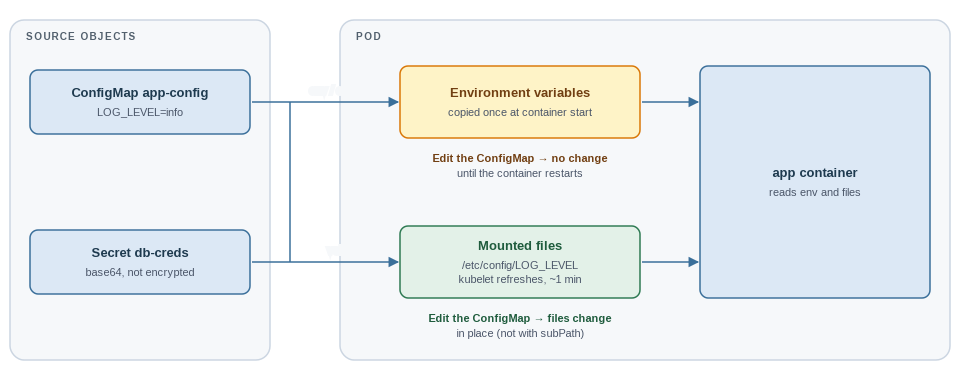
Figure 7-1: Env vs volume injection. Amber is frozen at container start, green follows edits while the Pod runs. Files mounted with subPath behave like amber.
Key concepts
ConfigMap vs Secret
| ConfigMap | Secret | |
|---|---|---|
| For | Settings, config files, feature flags | Passwords, API tokens, TLS keys, registry credentials |
| Stored as | Plain text | base64 in data, plain text accepted in stringData. Not encrypted by default. |
| Size limit | 1 MiB | 1 MiB |
| Extra protection | None | Can be encrypted at rest (cluster setting). Kept in tmpfs on nodes, not on disk. |
| Typical types | n/a | Opaque, kubernetes.io/tls, kubernetes.io/dockerconfigjson |
base64 is encoding, not encryption. Anyone who can read the Secret, or create a Pod that mounts it, can read the value. Restrict both with RBAC (→ Security).
Injection methods
| Method | Sees updates while running? | Result when the key is missing |
|---|---|---|
env[].valueFrom.configMapKeyRef / secretKeyRef | No | CreateContainerConfigError unless optional: true |
envFrom (all keys as env vars) | No | Keys that aren't valid env names are skipped |
volumes[].configMap / secret | Yes, after the kubelet sync (about a minute) | Pod stays ContainerCreating |
Volume with subPath | No. The file is a copy. | Same as volume |
immutable: true on the object | Never changes. Edits are rejected. | n/a. Lighter on the API server at scale. |
Getting a config change into running Pods
| Approach | Result |
|---|---|
| Edit the ConfigMap, do nothing else | Env-based Pods keep old values indefinitely. Volume-based Pods update, but the app must re-read the file. |
Edit, then kubectl rollout restart | New Pods read new values. Rollback of config is manual. |
| New ConfigMap name per version (Kustomize generator hash) | The name change edits the Pod template, so a normal rollout happens and rollout undo restores old config too |
→ See Helm & Kustomize for configMapGenerator.
kubectl essentials
Create from literals, files and env files:
kubectl create configmap app-config --from-literal=LOG_LEVEL=info --from-literal=MODE=prod
kubectl create configmap nginx-conf --from-file=nginx.conf              # key = file name
kubectl create configmap app-env --from-env-file=app.env                # KEY=VALUE per line
kubectl create secret generic db-creds --from-literal=username=app --from-literal=password='s3cr3t!'
kubectl create secret tls web-tls --cert=tls.crt --key=tls.key
kubectl create secret docker-registry regcred --docker-server=registry.example.com \
  --docker-username=bot --docker-password="$TOKEN"
Read and wire:
kubectl get secret db-creds -o jsonpath='{.data.password}' | base64 -d; echo
kubectl set env deployment/web --from=configmap/app-config              # one env entry per key (configMapKeyRef)
kubectl set env deployment/web --list                                   # what the container gets
kubectl exec deploy/web -- env | grep LOG_LEVEL
Every injection method in one Pod:
apiVersion: v1
kind: Pod
metadata:
  name: config-demo
spec:
  containers:
  - name: app
    image: busybox:1.36
    command: ["sh", "-c", "sleep 3600"]
    env:
    - name: LOG_LEVEL                      # one key from a ConfigMap
      valueFrom:
        configMapKeyRef: {name: app-config, key: LOG_LEVEL}
    - name: DB_PASSWORD                    # one key from a Secret
      valueFrom:
        secretKeyRef: {name: db-creds, key: password}
    envFrom:
    - configMapRef: {name: app-config}     # every key as an env var
      prefix: CFG_
    volumeMounts:
    - {name: config, mountPath: /etc/config, readOnly: true}
    - {name: creds, mountPath: /etc/creds, readOnly: true}
  volumes:
  - name: config
    configMap: {name: app-config}          # one file per key, refreshed
  - name: creds
    secret:
      secretName: db-creds
      defaultMode: 0400
A Secret written by hand. stringData saves the base64 step:
apiVersion: v1
kind: Secret
metadata:
  name: db-creds
type: Opaque
stringData:
  username: app
  password: s3cr3t!
🧪 Lab
Requires: Standard lab setup · How the tiers work.
See env and volume diverge.
Goal
- In namespace
lab3-1, create ConfigMapapp-configwithLOG_LEVEL=info. - Create a Deployment
cfg(busybox:1.36, commandsleep 3600) that readsLOG_LEVELas an env var and mountsapp-configat/etc/config. - Change
LOG_LEVELtodebug. Within two minutes, compare the env var and the file. - Make the running Pods see
debugin the env var too.
Verify
kubectl -n lab3-1 exec deploy/cfg -- sh -c 'echo "env=$LOG_LEVEL file=$(cat /etc/config/LOG_LEVEL)"'
# after step 3: env=info  file=debug
# after step 4: env=debug file=debug
🟡 Hints
- "Store settings" in Command Patterns.
kubectl set env --from=configmap/...handles the env var. The volume needs YAML:kubectl editorkubectl patch, with the fields fromkubectl explain pod.spec.volumes.configMap.- Re-create the ConfigMap with
--dry-run=client -o yamland pipe it tokubectl replace -f -. Wait about a minute for the kubelet to sync. - Env vars are read once, at container start. Which command restarts every Pod?
🟢 Guided
-
Create the lab namespace.
kubectl create namespace lab3-1 -
Create the ConfigMap with one key.
kubectl -n lab3-1 create configmap app-config --from-literal=LOG_LEVEL=info -
Create a Deployment whose container just sleeps.
kubectl -n lab3-1 create deployment cfg --image=busybox:1.36 -- sleep 3600 -
Inject every ConfigMap key as an env var.
set env --fromwrites oneenventry per key, each aconfigMapKeyRef, not anenvFrom.kubectl -n lab3-1 set env deployment/cfg --from=configmap/app-config -
Add a volume from the ConfigMap and mount it at /etc/config (or do the same with kubectl edit).
kubectl -n lab3-1 patch deployment cfg --type=json -p '[{"op":"add","path":"/spec/template/spec/volumes","value":[{"name":"config","configMap":{"name":"app-config"}}]},{"op":"add","path":"/spec/template/spec/containers/0/volumeMounts","value":[{"name":"config","mountPath":"/etc/config"}]}]' -
Wait for the Pod with the volume to be Ready.
kubectl -n lab3-1 rollout status deployment/cfg -
Overwrite the ConfigMap in place with the new value.
kubectl -n lab3-1 create configmap app-config --from-literal=LOG_LEVEL=debug \--dry-run=client -o yaml | kubectl -n lab3-1 replace -f - -
Give the kubelet time to sync the mounted file.
sleep 90 -
Compare:
env=infofile=debug.kubectl -n lab3-1 exec deploy/cfg -- sh -c 'echo "env=$LOG_LEVEL file=$(cat /etc/config/LOG_LEVEL)"' -
Replace every Pod so env vars are read again.
kubectl -n lab3-1 rollout restart deployment/cfg -
Wait for the new Pod.
kubectl -n lab3-1 rollout status deployment/cfg -
Compare again:
env=debugfile=debug.kubectl -n lab3-1 exec deploy/cfg -- sh -c 'echo "env=$LOG_LEVEL file=$(cat /etc/config/LOG_LEVEL)"' -
Run the ✅ Check below, then delete everything the lab created.
kubectl delete namespace lab3-1
✅ Check
t() { [ "$2" = "$3" ] && echo "PASS $1" || echo "FAIL $1: got '$2', want '$3'"; }
t "env and file both debug" "$(kubectl -n lab3-1 exec deploy/cfg -- sh -c 'echo "env=$LOG_LEVEL file=$(cat /etc/config/LOG_LEVEL)"')" "env=debug file=debug"
Gotchas
- Missing key or object. A
configMapKeyRefto a key that doesn't exist givesCreateContainerConfigError.kubectl describe podnames the key. echoadds a newline.echo s3cr3t | base64encodess3cr3t\n. Useecho -n, orstringData, orkubectl create secret.subPathnever updates. Mount the whole directory if the app must see changes.- The app must re-read files. The kubelet updates the file. Most apps read config once at startup anyway.
- Namespaced. A Pod can only reference ConfigMaps and Secrets in its own namespace.
- Secrets in env vars leak. They show up in crash dumps,
/proc, and child processes. Prefer files for credentials. - Pod creation = Secret access. RBAC that lets a user create Pods in a namespace lets them read every Secret there by mounting it.
Scenario questions
Q1 ★ A new Pod is stuck in CreateContainerConfigError. What do you check?
Model answer
- Clarify: new deployment or a change to an existing one?
- Observe:
kubectl describe podshows the exact message, such ascouldn't find key PASSWORD in Secret app/db-credsorconfigmap "app-config" not found. - Hypothesise: the ConfigMap or Secret is missing in this namespace, a key is misspelled, or it was created in another namespace.
runAsNonRootfailures show the same status (→ Security). - Fix: create the object or fix the key name. The Pod starts on its own once the reference resolves; no restart needed.
- Prevent: deploy config with the app (same Kustomize or Helm release) so they can't drift apart.
Q2 ★★ You changed a ConfigMap an hour ago, but the app still uses the old value. Why?
Model answer
- Clarify: how does the app get the value: env var or file? Does it reload?
- Observe:
kubectl exec ... -- envshows the old value;caton the mounted file shows the new one, or the mount usessubPath. - Hypothesise: env vars are fixed at container start. Or the file changed but the app only reads config at startup.
- Fix:
kubectl rollout restart deployment/<name>. - Prevent: version ConfigMaps by name (a Kustomize generator hash, or a checksum annotation in Helm) so every config change is a rollout. The trade-off: more rollouts, but config changes get the same safety and rollback as code changes.
Q3 ★★ How would you manage database credentials for production?
Model answer
- Clarify: is there a secret manager (Vault, cloud secret manager)? Rotation requirements? Compliance scope?
- Observe: plain Secrets are base64 in etcd, readable by anyone with
get secretsor Pod-create rights in the namespace. - Hypothesise: a baseline plus a source of truth outside the cluster.
- Fix: baseline is encryption at rest (KMS provider), tight RBAC on Secrets, and credentials mounted as files. The source of truth is a secret manager, synced by External Secrets Operator (the app reads a normal Secret) or mounted by the Secrets Store CSI driver (never stored in etcd). Workload identity is better still: no static password at all.
- Prevent: the trade-off: ESO is simple for apps but copies secrets into etcd; CSI avoids etcd but couples Pods to the provider at startup.
Q4 ★★★ A bad config change took production down. How do you make config changes as safe as code changes?
Model answer
- Clarify: how was the change made:
kubectl edit, CI, GitOps? How quickly did it take effect? - Observe: an in-place edit to a volume-mounted ConfigMap reaches every Pod within about a minute. That's a big-bang deploy with no rollout, no readiness gate and no easy undo.
- Hypothesise: config bypasses the rollout machinery that protects code.
- Fix: make config immutable and versioned:
app-config-<hash>withimmutable: true, referenced from the Pod template. A change is then a new ReplicaSet with a rolling update gated by readiness probes, androllout undorestores the old config. - Prevent: config goes through the same Git review and canary process as code. → See Zero-Downtime Release.
Summary
- ConfigMaps for settings, Secrets for credentials. Secrets are base64, not encrypted, unless the cluster encrypts etcd.
- Env vars are frozen at start; mounted files follow edits. Except with
subPath. - A config edit is not a rollout. Restart, or version the ConfigMap name so it becomes one.
- Missing references fail loudly.
CreateContainerConfigErrornames the missing key. - Guard Secrets with RBAC and an external source of truth. Pod-create rights imply Secret-read rights.
Next in path → Resources & Scaling