Scenario: ML Model Serving
Be able to explain it and pass its lab once. Phase 8 of the Learning Path.
Builds on: Pods & Multi-Container · Probes & Observability · Resources & Scaling · Deployments & Rollouts · Scheduling & Shutdown
Situation
A team serves a 6 GB recommendation model over HTTP. A new Pod has to download the model and load it into memory, which takes 3–4 minutes. Today it runs as a plain Deployment with a liveness probe, and three things keep going wrong. New Pods get killed in a restart loop before the model finishes loading. Traffic spikes at lunchtime cause timeouts because extra replicas arrive too late. And every release causes a few minutes of errors.
Requirements
| Requirement | Why it's hard here |
|---|---|
| Survive a 3–4 minute boot without restart loops | Liveness probes start checking long before the app can answer |
| Never route traffic to a Pod that hasn't loaded the model | The process is up and listening long before it's useful |
| Scale out for the lunchtime peak | A new replica takes minutes to become useful, so scaling must start early |
| Release new model versions with zero errors | Old and new Pods overlap; capacity must never dip |
| Survive node maintenance | Node drains must not take all replicas at once |
Architecture
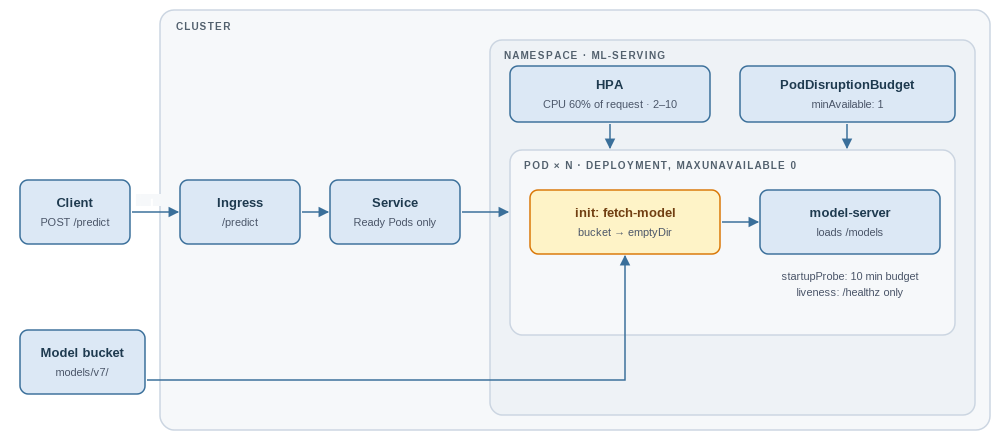
Figure S1-1: Model serving on Kubernetes. Amber marks the init container, which moves the slow download out of the serving container's lifecycle.
Kubernetes resources used
| Resource | Role here | Reference |
|---|---|---|
Deployment (maxUnavailable: 0) | Runs N identical model servers, releases without losing capacity | Deployments & Rollouts |
Init container + emptyDir | Downloads the model before the server starts | Pods & Multi-Container, Storage |
| Startup, readiness and liveness probes | Tolerate a slow boot, gate traffic, restart only real hangs | Probes & Observability |
| Requests and limits | Make scheduling predictable and give the HPA a baseline | Resources & Scaling |
| HorizontalPodAutoscaler | Adds replicas before the peak saturates the existing ones | Resources & Scaling |
| PodDisruptionBudget | Keeps at least one replica through node drains | Scheduling & Shutdown |
| Service + Ingress | Stable entry point that only includes Ready Pods | Services & Ingress |
Walkthrough
1. Move the download into an init container. The server container starts only after the model is on disk, so its probes measure loading, not downloading. The emptyDir needs a sizeLimit and an ephemeral-storage request so the scheduler picks a node with room.
2. Give boot its own probe. A startup probe with a 10-minute budget (60 × 10s) covers the worst-case load. Liveness and readiness don't run until it passes, so the restart loop disappears.
3. Split readiness from liveness. Readiness asks "is the model loaded and can I take a request?" Liveness asks only "is the process responsive?" A slow request must never restart the Pod.
4. Size requests from real usage. Memory request = limit (a loaded model is a fixed cost, and OOM mid-request is the worst failure). CPU request only, no CPU limit, to avoid throttling during inference bursts.
apiVersion: apps/v1
kind: Deployment
metadata:
  name: model-api
  labels: {app: model-api}
spec:
  selector:
    matchLabels: {app: model-api}
  strategy:
    type: RollingUpdate
    rollingUpdate: {maxSurge: 1, maxUnavailable: 0}
  minReadySeconds: 30
  template:
    metadata:
      labels: {app: model-api}
    spec:
      terminationGracePeriodSeconds: 60
      initContainers:
      - name: fetch-model
        image: ghcr.io/example/model-fetcher:1.0          # placeholder: any S3/GCS copy tool
        args: ["--src=s3://models/recsys/v7", "--dest=/models"]
        volumeMounts: [{name: models, mountPath: /models}]
      containers:
      - name: server
        image: ghcr.io/example/model-server:2.3.1         # placeholder
        env: [{name: MODEL_PATH, value: /models}]
        ports: [{name: http, containerPort: 8080}]
        resources:
          requests: {cpu: "2", memory: 10Gi, ephemeral-storage: 8Gi}
          limits: {memory: 10Gi, ephemeral-storage: 8Gi}
        startupProbe:
          httpGet: {path: /healthz, port: http}
          periodSeconds: 10
          failureThreshold: 60                            # 10 minutes to load
        readinessProbe:
          httpGet: {path: /ready, port: http}             # 200 only once the model is loaded
          periodSeconds: 5
          failureThreshold: 2
        livenessProbe:
          httpGet: {path: /healthz, port: http}           # process only
          periodSeconds: 10
          timeoutSeconds: 3
          failureThreshold: 3
        lifecycle:
          preStop:
            sleep: {seconds: 10}                          # let endpoints drain before SIGTERM (→ Figure 16-1)
        volumeMounts: [{name: models, mountPath: /models, readOnly: true}]
      volumes:
      - name: models
        emptyDir: {sizeLimit: 8Gi}
5. Scale early. A new replica needs minutes, so the HPA target is conservative (60% of the CPU request) and scale-up is immediate. Scale-down is slow, because a replica removed by mistake takes minutes to come back. replicas is left out of the Deployment so the HPA owns it.
apiVersion: autoscaling/v2
kind: HorizontalPodAutoscaler
metadata:
  name: model-api
spec:
  scaleTargetRef: {apiVersion: apps/v1, kind: Deployment, name: model-api}
  minReplicas: 2
  maxReplicas: 10
  metrics:
  - type: Resource
    resource:
      name: cpu
      target: {type: Utilization, averageUtilization: 60}
  behavior:
    scaleUp:
      stabilizationWindowSeconds: 0
      policies: [{type: Pods, value: 2, periodSeconds: 60}]
    scaleDown:
      stabilizationWindowSeconds: 600
      policies: [{type: Pods, value: 1, periodSeconds: 120}]
6. Protect against drains. On GPU nodes, add the pool's toleration and an nvidia.com/gpu limit (→ GPU workloads). A PodDisruptionBudget stops kubectl drain and cluster upgrades from evicting more than one replica at a time.
apiVersion: policy/v1
kind: PodDisruptionBudget
metadata:
  name: model-api
spec:
  minAvailable: 1
  selector:
    matchLabels: {app: model-api}
7. Release. maxSurge: 1, maxUnavailable: 0 adds one new Pod, waits for its readiness probe plus minReadySeconds, then removes one old Pod. A new model version is a new --src path in the init container's args, which changes the template and triggers the rollout. kubectl rollout undo brings the previous model back.
How I'd explain this in an interview
"The core problem is that a model server has three different kinds of 'healthy', and the original setup treated them as one. So I'd split them. An init container downloads the model, so the serving container's lifecycle starts with the model already on disk. A startup probe with a ten-minute budget covers loading, which removes the restart loop. Readiness says 'model loaded, send me traffic'. Liveness only says 'the process isn't hung', and it never checks dependencies. For the lunchtime peak, the key fact is that a replica takes minutes to become useful, so the HPA has to act early: a 60% CPU target, instant scale-up, slow scale-down, and a minimum of two replicas. Releases use maxUnavailable zero, so capacity never dips, plus a preStop sleep so Pods leave the endpoints before they stop. A PodDisruptionBudget covers node maintenance. The trade-off I'd call out is cost: surge capacity and a conservative HPA target mean paying for idle headroom, and that's the price of multi-minute cold starts."
Follow-up questions
★★ Why not bake the model into the container image?
Model answer
- Clarify: how often does the model change compared to the code?
- Observe: a 6 GB layer makes every pull slow and every image push expensive, and node disks fill with old versions.
- Hypothesise: baking in is simpler and makes the model version immutable with the image. It suits small models that change with the code.
- Fix: for large models that change on their own schedule, keep them out of the image. Download at start (this design), or pre-populate a read-only volume if start time matters more than simplicity.
- Prevent: version the model path either way, so a rollback is exact.
★★ Would you autoscale on CPU?
Model answer
- Clarify: is inference CPU-bound or GPU-bound? Is there a request queue?
- Observe: for GPU inference CPU stays low while the GPU saturates, and latency is what users feel.
- Hypothesise: CPU works as a proxy only for CPU-bound serving.
- Fix: scale on a metric closer to user pain: in-flight requests per Pod or queue depth, exposed to the HPA through a custom metrics adapter (Prometheus Adapter, KEDA).
- Prevent: load-test to find the per-Pod throughput limit and set the target below it.
★★★ The lunchtime spike still outruns scaling. What else can you do?
Model answer
- Clarify: is the spike predictable? How long does a node take to join if the cluster must grow?
- Observe: the worst case is a new node (minutes) plus image pull plus model load, all while demand is peaking.
- Hypothesise: reactive scaling can't beat a multi-minute cold start.
- Fix: schedule the scale-up: raise
minReplicasat 11:30 with a CronJob, or use KEDA's cron scaler. Keep spare node capacity with low-priority placeholder Pods that get preempted, and pre-pull images with a DaemonSet. - Prevent: the trade-off is paying for capacity before it's needed. For a predictable daily peak that's cheaper than timeouts.
★★★ How do you roll out a new model version safely, not just a new container?
Model answer
- Clarify: can a bad model be detected by errors, or only by prediction quality?
- Observe: a bad model often returns 200 OK with worse answers. Readiness probes won't catch that.
- Hypothesise: a rolling update proves the model loads; it doesn't prove it's good.
- Fix: canary: a second Deployment with the new model and 10% of traffic, then compare business metrics (click-through, error rates) before scaling it up. Shadow traffic is an option when real users must not see the new model at all.
- Prevent: gate promotion on an offline evaluation in the training pipeline. → See Nightly Retraining Pipeline and Zero-Downtime Release.
Next in path → Nightly Retraining Pipeline