Deployments & Rollouts
Drill until fluent: hands-on rounds test this directly. Phase 2 of the Learning Path.
Docs: Deployments · StatefulSets · DaemonSet · kubectl rollout
Overview
A Deployment runs a stateless app as N identical Pods and changes them safely. It doesn't manage Pods itself. It owns ReplicaSets, one per version of the Pod template, and each ReplicaSet owns its Pods. A change to the template creates a new ReplicaSet. The Deployment then scales the new one up and the old one down within the limits you set, and it keeps old ReplicaSets at zero replicas so a rollback is one scale operation away. Every CKAD deployment strategy (rolling, blue/green, canary) is built from these pieces plus Service label selectors.
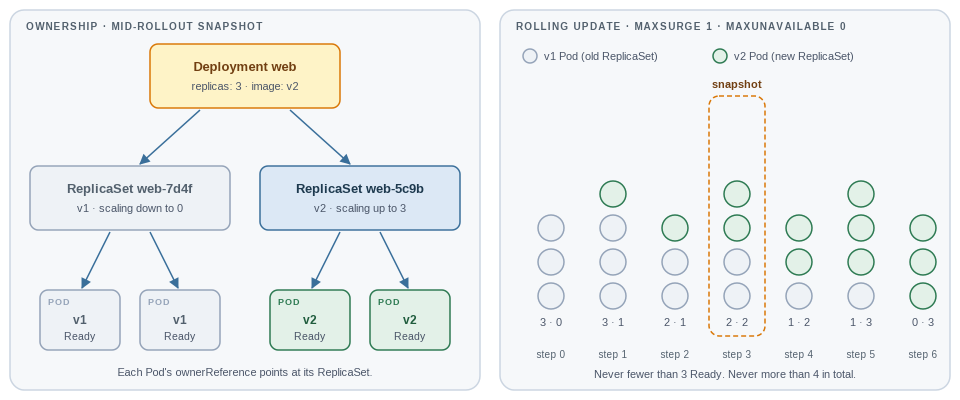
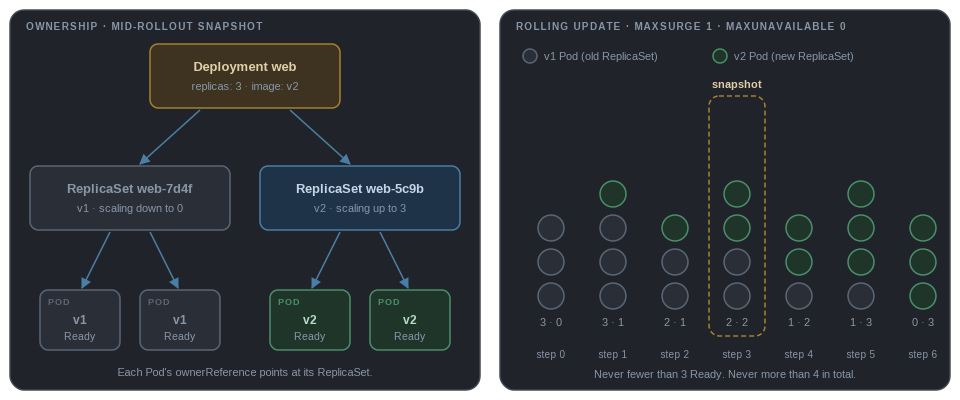
Figure 5-1: Ownership and a rolling update. Grey is the old version, green the new one. Amber marks the Deployment, the only object you edit, and the step shown on the left.
Key concepts
Choosing a workload resource
| Resource | Pods are | Identity and storage | Use for |
|---|---|---|---|
| Deployment | Interchangeable, random names | None. Shared or no storage. | Stateless web apps, APIs, workers |
| StatefulSet | Ordered, stable names (db-0, db-1) | Stable DNS per Pod, one PVC each | Databases, Kafka, anything with per-replica state |
| DaemonSet | One per node | Usually hostPath | Log collectors, node exporters, CNI agents |
| Job / CronJob | Run to completion | Varies | Batch work (→ Jobs & CronJobs) |
Rollout strategy
| Strategy | Behaviour | Downtime | Use when |
|---|---|---|---|
RollingUpdate (default) | Replace Pods gradually within maxSurge / maxUnavailable | None if readiness probes are right | Almost always |
Recreate | Delete all old Pods, then create new ones | Yes | Two versions can't run at once, or RWO volumes (→ Storage) |
| Setting | Default | Effect |
|---|---|---|
maxSurge | 25% | Extra Pods allowed above replicas during the rollout. Higher is faster and costs more. |
maxUnavailable | 25% | Pods allowed below replicas. 0 means capacity never drops. |
minReadySeconds | 0 | A new Pod must stay Ready this long before it counts |
progressDeadlineSeconds | 600 | After this, the rollout is marked failed. It is not rolled back automatically. |
revisionHistoryLimit | 10 | Old ReplicaSets kept for rollback |
Release strategies with core primitives
| Strategy | How | Rollback | Cost |
|---|---|---|---|
| Rolling | One Deployment, change the image | kubectl rollout undo | No extra capacity. Two versions serve at once. |
| Blue/green | Two Deployments (version: blue, version: green). The Service selector points at one. | Switch the selector back | Double capacity during the release |
| Canary | Two Deployments sharing the Service's label. Traffic splits by replica ratio (9 stable : 1 canary ≈ 10%). | Scale the canary to 0 | Coarse split. Precise percentages need an Ingress controller, Gateway API or a mesh. |
→ See Zero-Downtime Release for all three end to end.
kubectl essentials
Create and change:
kubectl create deployment web --image=nginx:1.27 --replicas=3 --port=80
kubectl set image deployment/web nginx=nginx:1.28        # container name = image name by default
kubectl scale deployment web --replicas=5
kubectl annotate deployment web kubernetes.io/change-cause="bump nginx to 1.28"
kubectl rollout restart deployment/web                   # new Pods, same spec (picks up new ConfigMap values)
Watch and undo:
kubectl rollout status deployment/web
kubectl rollout history deployment/web
kubectl rollout history deployment/web --revision=2      # what that revision contained
kubectl rollout undo deployment/web                      # back one revision
kubectl rollout undo deployment/web --to-revision=1
kubectl rollout pause deployment/web                     # batch several changes into one rollout
kubectl rollout resume deployment/web
kubectl get rs -l app=web                                # one ReplicaSet per revision
A Deployment that never drops capacity during a rollout:
apiVersion: apps/v1
kind: Deployment
metadata:
  name: web
  labels: {app: web}
spec:
  replicas: 3
  revisionHistoryLimit: 5
  selector:
    matchLabels: {app: web}           # immutable after creation
  strategy:
    type: RollingUpdate
    rollingUpdate:
      maxSurge: 1
      maxUnavailable: 0
  minReadySeconds: 5
  template:
    metadata:
      labels: {app: web}              # must match the selector
    spec:
      containers:
      - name: nginx
        image: nginx:1.27
        ports: [{containerPort: 80}]
        readinessProbe:
          httpGet: {path: /, port: 80}
          periodSeconds: 5
Blue/green is a Service whose selector names one version:
apiVersion: v1
kind: Service
metadata:
  name: web
spec:
  selector:
    app: web
    version: blue                     # switch to green to cut over
  ports:
  - port: 80
    targetPort: 80
🧪 Lab
Requires: Standard lab setup · readiness probes (the manifest uses one) · How the tiers work.
Roll forward, break it, roll back.
Goal
- In namespace
lab2-2, apply the Deployment above (3 replicas,maxSurge: 1,maxUnavailable: 0). - Update the image to
nginx:1.28with a change-cause. Watch the ReplicaSets during the rollout. - Update to
nginx:1.99-typo. Observe what happens to availability. - Roll back to the working version and confirm the revision history.
Verify
kubectl -n lab2-2 get deploy web -o jsonpath='{.spec.template.spec.containers[0].image}{"\n"}'   # nginx:1.28
kubectl -n lab2-2 get deploy web                     # 3/3 READY
kubectl -n lab2-2 rollout history deployment/web
🟡 Hints
- The generator can't set
strategy, so save the Deployment above asweb.yamland apply it. - "Ship a new image" in Command Patterns. The change-cause is an annotation:
kubectl annotate -h. Watch withkubectl get rs -w. - Count Ready Pods while the new one fails. What does
maxUnavailable: 0promise? kubectl rollout -hlistsstatus,historyandundo.
🟢 Guided
-
Create the lab namespace.
kubectl create namespace lab2-2 -
Create the Deployment from the manifest above, saved as
web.yaml.kubectl -n lab2-2 apply -f web.yaml -
Wait until all 3 Pods are Ready.
kubectl -n lab2-2 rollout status deployment/web -
Change the container image; this starts a rolling update.
kubectl -n lab2-2 set image deployment/web nginx=nginx:1.28 -
Record why, so rollout history shows it.
kubectl -n lab2-2 annotate deployment/web kubernetes.io/change-cause="nginx 1.28" -
Watch the ReplicaSets: new RS 0→1→2→3, old RS 3→2→1→0.
kubectl -n lab2-2 get rs -w -
Roll out an image tag that doesn't exist.
kubectl -n lab2-2 set image deployment/web nginx=nginx:1.99-typo -
Check the Pods: one new Pod in ImagePullBackOff, 3 old Pods still Ready.
kubectl -n lab2-2 get podsmaxUnavailable: 0 means no old Pod is removed until a new one is Ready. Users see no outage.
-
Wait briefly for the rollout: it times out because it's stuck.
kubectl -n lab2-2 rollout status deployment/web --timeout=30s -
Go back to the previous revision.
kubectl -n lab2-2 rollout undo deployment/web -
Wait until the rollback finishes.
kubectl -n lab2-2 rollout status deployment/web -
List revisions: the 1.28 revision moved to the newest number.
kubectl -n lab2-2 rollout history deployment/webThe broken revision also says "nginx 1.28": change-cause is copied from the Deployment's annotation, so it goes stale unless you update it with every change.
-
Run the ✅ Check below, then delete everything the lab created.
kubectl delete namespace lab2-2
✅ Check
t() { [ "$2" = "$3" ] && echo "PASS $1" || echo "FAIL $1: got '$2', want '$3'"; }
t "back on nginx:1.28"   "$(kubectl -n lab2-2 get deploy web -o jsonpath='{.spec.template.spec.containers[0].image}')" "nginx:1.28"
t "3 Pods Ready"         "$(kubectl -n lab2-2 get deploy web -o jsonpath='{.status.readyReplicas}')" "3"
t "3 revisions"          "$(kubectl -n lab2-2 rollout history deployment/web | grep -cE '^[0-9]+ ')" "3"
t "typo ReplicaSet at 0" "$(kubectl -n lab2-2 get rs -o jsonpath='{range .items[?(@.spec.template.spec.containers[0].image=="nginx:1.99-typo")]}{.spec.replicas}{end}')" "0"
Requires: Standard lab setup · Lab 2-2 · Release strategies · How the tiers work.
Blue/green with one patch, then a canary by replica ratio.
Goal
- In namespace
lab2-3, create Deploymentsweb-blue(nginx:1.27) andweb-green(nginx:1.28), 3 replicas each, labelledapp: webplusversion: blueorversion: green. Add a client Podc. - Create Service
webon port 80 that sends all traffic to blue. Prove which version answers. - Cut over to green with one command, prove it, and note how you would roll back.
- Turn it into a canary: the Service selects both versions, green runs 1 replica, blue 3. Sample 40 requests and count the versions.
Verify
kubectl -n lab2-3 exec c -- wget -S -qO /dev/null -T 3 http://web 2>&1 | grep -i server:   # nginx/1.27.5 or nginx/1.28.3
kubectl -n lab2-3 get svc web -o jsonpath='{.spec.selector}{"\n"}'                       # {"app":"web"} after step 4
🟡 Hints
- The generator can't set two labels, so write the blue Deployment as YAML and derive green from it. Give both a readiness probe.
kubectl create service clusterip -hsets the selector toapp=<name>;kubectl patchaddsversion. TheServerresponse header names the nginx version:wget -Sprints headers.- The switch is the Service's
spec.selector. Rollback is the same command with the old value. - Remove
versionfrom the selector (--type=jsonwith aremoveop) andkubectl scale. Loopwgetin the client Pod and count withsort | uniq -c.
🟢 Guided
-
Create the namespace and a client Pod.
kubectl create namespace lab2-3kubectl -n lab2-3 run c --image=busybox:1.36 --restart=Never -- sleep 3600 -
Write the blue Deployment, derive green from it, and apply both.
cat > blue.yaml <<'EOF'apiVersion: apps/v1kind: Deploymentmetadata:name: web-bluespec:replicas: 3selector:matchLabels: {app: web, version: blue}template:metadata:labels: {app: web, version: blue}spec:containers:- name: nginximage: nginx:1.27readinessProbe:httpGet: {path: /, port: 80}EOFsed 's/blue/green/g; s/1\.27/1.28/' blue.yaml > green.yamlkubectl -n lab2-3 apply -f blue.yaml -f green.yamlkubectl -n lab2-3 rollout status deployment/web-green -
Create the Service, pinned to blue.
kubectl -n lab2-3 create service clusterip web --tcp=80:80kubectl -n lab2-3 patch service web -p '{"spec":{"selector":{"app":"web","version":"blue"}}}'kubectl -n lab2-3 exec c -- wget -S -qO /dev/null -T 3 http://web 2>&1 | grep -i server:Server: nginx/1.27.5If the first call prints nothing, run it again: kube-proxy takes a second to program a brand-new Service.
-
Cut over. Green was already Ready, so no Pod starts; only the endpoints change.
kubectl -n lab2-3 patch service web -p '{"spec":{"selector":{"app":"web","version":"green"}}}'kubectl -n lab2-3 exec c -- wget -S -qO /dev/null -T 3 http://web 2>&1 | grep -i server:Server: nginx/1.28.3Rollback is the same patch with
blue: instant, because blue is still running at full size. -
Make it a canary: select both versions, and shrink green to 1 of 4 Pods.
kubectl -n lab2-3 scale deployment web-green --replicas=1sleep 5 # let the 2 extra green Pods terminatekubectl -n lab2-3 patch service web --type=json -p '[{"op":"remove","path":"/spec/selector/version"}]'kubectl -n lab2-3 exec c -- sh -c 'for i in $(seq 40); do wget -S -qO /dev/null -T 3 http://web 2>&1 | grep -i server:; done' | sort | uniq -c31 Server: nginx/1.27.59 Server: nginx/1.28.3About 1 in 4, as the replica ratio predicts. Each
wgetopens a new connection; clients that keep connections open skew the split (→ Zero-Downtime Release). -
Run the ✅ Check below, then delete everything the lab created.
kubectl delete namespace lab2-3
✅ Check
t() { [ "$2" = "$3" ] && echo "PASS $1" || echo "FAIL $1: got '$2', want '$3'"; }
t "selector is app=web only" "$(kubectl -n lab2-3 get svc web -o jsonpath='{.spec.selector}')" '{"app":"web"}'
t "3 blue, 1 green Ready"    "$(kubectl -n lab2-3 get deploy web-blue web-green -o jsonpath='{.items[*].status.readyReplicas}')" "3 1"
t "4 endpoints"              "$(kubectl -n lab2-3 get endpointslices -l kubernetes.io/service-name=web -o jsonpath='{range .items[*].endpoints[*]}x{end}')" "xxxx"
t "both versions answer"     "$(kubectl -n lab2-3 exec c -- sh -c 'for i in $(seq 40); do wget -S -qO /dev/null -T 3 http://web 2>&1 | grep -io "nginx/1\.2[78]"; done' | sort -u | tr '\n' ' ')" "nginx/1.27 nginx/1.28 "
Gotchas
- Only template changes trigger a rollout. Editing a ConfigMap the Pods read doesn't. Use
kubectl rollout restart, or a hashed ConfigMap name (→ Config & Secrets). - The selector is immutable. Changing
spec.selectormeans deleting and recreating the Deployment. - No readiness probe means instant Ready. The rollout counts a Pod as available the moment it starts, even if the app needs 30 s to warm up. → See Probes & Observability.
- A stuck rollout is not rolled back. After
progressDeadlineSecondsit is only markedProgressDeadlineExceeded. Rollback is your call, or your pipeline's. replicasin Git fights the HPA. If an HPA manages the Deployment, removereplicasfrom the manifest or every apply resets it. → See Resources & Scaling.rollout undocreates drift. The live object no longer matches Git. Revert in Git as well.
Scenario questions
Q1 ★ A rollout has been "in progress" for 15 minutes. What do you check?
Model answer
- Clarify: are users affected? What changed in this rollout?
- Observe:
kubectl rollout status, thenkubectl get rsto see how far the new ReplicaSet got, thenkubectl describe podon a new Pod. - Hypothesise: new Pods can't become Ready: image pull failure, crash, failing readiness probe, or not enough capacity to schedule the surge Pod.
- Fix: if users are unaffected (old Pods still serving thanks to
maxUnavailable: 0), take time to diagnose. Otherwisekubectl rollout undofirst, then diagnose. - Prevent: a pipeline step that waits on
rollout status --timeoutand undoes on failure.
Q2 ★★ Rollback with kubectl rollout undo or with a Git revert?
Model answer
- Clarify: how is production deployed: CI applying from Git, or a GitOps controller?
- Observe: under GitOps, a manual undo gets reverted by the controller within minutes.
- Hypothesise:
rollout undois fastest: it only rescales an old ReplicaSet. Git revert is slower but keeps the source of truth right. - Fix: in an incident, undo first to stop the bleeding, then revert in Git right away. Under GitOps, revert in Git, since that's the only lasting path.
- Prevent: make the Git path fast enough that nobody needs the manual one.
Q3 ★★ Blue/green or canary for a payment service?
Model answer
- Clarify: can two versions run at once (schema, message formats)? Is there budget for double capacity? How good is monitoring?
- Observe: canary limits the blast radius but needs metrics good enough to judge 10% of traffic. Blue/green gives an instant, all-or-nothing switch.
- Hypothesise: payments favour canary. A bug reaches 1–5% of users, not 100%.
- Fix: canary with precise traffic weights (Gateway API or a mesh, not replica ratios) and automated analysis on error rate and latency.
- Prevent: if versions can't coexist, blue/green is the only option. Say so up front; it's the deciding constraint.
Q4 ★★★ A release includes a database column rename. How do you roll it out without downtime?
Model answer
- Clarify: is a rename required, or can we add a column? How big is the table?
- Observe: during any rolling update, old and new Pods run together against one database. Rollback puts old code back on the new schema.
- Hypothesise: a rename in one step breaks whichever version isn't expecting it.
- Fix: expand/contract in three releases. (1) Add the new column; code writes both and reads old. (2) Backfill; code reads new. (3) Drop the old column once no rollback target needs it. Run migrations as a Job before the rollout (→ Jobs & CronJobs).
- Prevent: a rule that every schema change must work with the current and previous app versions.
Summary
- Deployment → ReplicaSet → Pods. One ReplicaSet per template version. Rollback is rescaling an old one.
maxSurgeandmaxUnavailableset speed vs capacity.maxUnavailable: 0keeps full capacity throughout.- Readiness probes make rollouts safe. Without them, "available" means "started".
- Blue/green and canary are label tricks. Two Deployments, one Service, move the selector or the ratio.
- Only the Pod template triggers a rollout. Config changes need a restart or a new name.
Next in path → Services & Ingress