Probes & Observability
Drill until fluent: hands-on rounds test this directly. Phase 3 of the Learning Path.
Docs: Liveness, readiness and startup probes · Configure probes · Logging · Deprecation guide
Overview
"Running" only means the process exists. Probes tell the kubelet whether it's actually working. A startup probe holds the other two off until a slow app has booted. A readiness probe decides whether the Pod receives traffic: failing removes it from Service endpoints but leaves it running. A liveness probe decides whether the container is stuck: failing makes the kubelet restart it. Picking the wrong one causes outages. A liveness probe that checks the database restarts every replica during a database blip. The rest of this page covers the built-in tools for watching an app (logs, events, kubectl top) and for spotting API versions that are about to disappear.
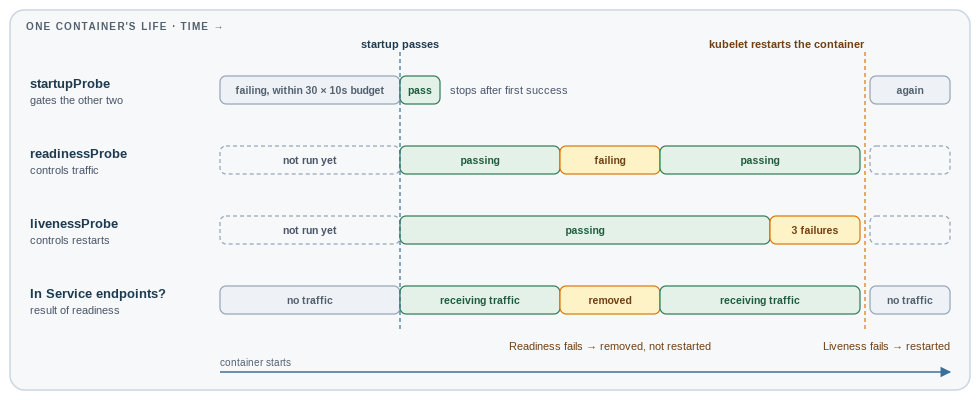
Figure 12-1: One container's probes over time. Green is passing or receiving traffic, amber is failing, grey is not running. Readiness failures cost traffic; liveness failures cost a restart.
Key concepts
The three probes
| Probe | Question | On failure | Use when |
|---|---|---|---|
| startupProbe | Has the app finished booting? | Keep waiting until failureThreshold × periodSeconds, then restart | Slow starts: JVMs, model loading, cache warm-up |
| readinessProbe | Can it serve a request right now? | Removed from Service endpoints. Not restarted. Runs for the Pod's whole life. | Every Pod behind a Service |
| livenessProbe | Is it stuck beyond self-repair? | Container restarted | Deadlock-prone apps. Only check the process itself. |
| Probe design | Result |
|---|---|
| Liveness checks the database | Database blip → every replica restarts at once → full outage |
| Liveness identical to readiness | Overload → readiness fails, then liveness restarts busy Pods → cascading failure |
Long initialDelaySeconds on liveness instead of a startup probe | Slow boot on a busy node → killed mid-boot. Fast boots wait needlessly. |
Startup probe for boot, cheap /healthz for liveness, dependency-aware /ready for readiness | Correct |
Mechanisms
| Type | Success when | Note |
|---|---|---|
httpGet | Status 200–399 | Most common. Use a dedicated path. |
tcpSocket | Port accepts a connection | For non-HTTP servers |
exec | Command exits 0 | Forks a process every period. Costly at scale. |
grpc | gRPC health check returns SERVING | For gRPC services |
Parameters
| Field | Default | Note |
|---|---|---|
initialDelaySeconds | 0 | Prefer a startup probe for slow boots |
periodSeconds | 10 | How often to check |
timeoutSeconds | 1 | Too tight for many real apps under load |
failureThreshold | 3 | Consecutive failures before acting |
successThreshold | 1 | Must be 1 for liveness and startup |
A startup probe's budget is failureThreshold × periodSeconds: 30 × 10 s allows five minutes to boot.
Built-in monitoring
| Tool | Shows | Lost when |
|---|---|---|
kubectl logs | Container stdout/stderr | The Pod is deleted. --previous shows one restart back. |
kubectl get events | Scheduling, pulls, probe failures, kills | About 1 hour (default event TTL) |
kubectl describe | Object state + its recent events | Same as events |
kubectl top | Current CPU and memory (metrics-server) | Not stored at all. No history. |
For anything historical you need a real stack: log aggregation and Prometheus. The built-ins answer "what is happening now?".
API deprecations
Deprecated API versions are removed after a published period. The objects stored in the cluster survive the upgrade; the manifests and Helm charts in Git break on the next kubectl apply. Three commands find them before that:
kubectl explain cronjob | head -3                                   # the version the server serves now
kubectl apply --dry-run=server -f manifests/                        # fails on removed versions, warns on deprecated ones
kubectl get --raw /metrics | grep apiserver_requested_deprecated_apis   # who still calls them
Deeper dive
| Signal | Where |
|---|---|
Warning: <kind> <version> is deprecated in v1.X+, unavailable in v1.Y+ | Printed by kubectl on every request to a deprecated API |
kubectl explain <kind> header | Shows the version the server prefers |
apiserver_requested_deprecated_apis metric | Which deprecated APIs clients still call |
kubectl convert plugin | Rewrites manifests to a newer version |
→ The versions you will use: API groups and versions.
kubectl essentials
Logs:
kubectl logs web-5c9b-x2k                        # one Pod
kubectl logs web-5c9b-x2k -c sidecar             # one container
kubectl logs web-5c9b-x2k --previous             # the container that crashed
kubectl logs deploy/web -f --since=10m           # follow, one Pod of the Deployment
kubectl logs -l app=web --all-containers --prefix --max-log-requests=10
Events and state:
kubectl get events --sort-by=.lastTimestamp
kubectl get events --field-selector type=Warning
kubectl get events --field-selector involvedObject.name=web-5c9b-x2k
kubectl get pods -w                              # READY and RESTARTS change live
kubectl describe pod web-5c9b-x2k | grep -A5 -E "Liveness|Readiness|Startup"
Resource usage and API versions:
kubectl top pods --sort-by=memory
kubectl top pods --containers
kubectl api-resources -o wide                    # version, verbs, short names
kubectl api-versions | grep autoscaling          # which group/versions this server serves
kubectl get --raw /metrics | grep apiserver_requested_deprecated_apis
A Deployment with all three probes, tuned for a slow-booting HTTP app:
apiVersion: apps/v1
kind: Deployment
metadata:
  name: api
spec:
  replicas: 2
  selector:
    matchLabels: {app: api}
  template:
    metadata:
      labels: {app: api}
    spec:
      containers:
      - name: api
        image: registry.k8s.io/e2e-test-images/agnhost:2.53
        args: ["netexec", "--http-port=8080"]
        ports: [{name: http, containerPort: 8080}]
        startupProbe:                  # up to 30 × 5s = 150s to boot
          httpGet: {path: /healthz, port: http}
          periodSeconds: 5
          failureThreshold: 30
        readinessProbe:                # may check dependencies
          httpGet: {path: /readyz, port: http}
          periodSeconds: 5
          failureThreshold: 2
        livenessProbe:                 # the process only, never dependencies
          httpGet: {path: /healthz, port: http}
          periodSeconds: 10
          timeoutSeconds: 2
          failureThreshold: 3
🧪 Lab
Requires: Standard lab setup · Services · How the tiers work.
Watch readiness remove a Pod and liveness restart one.
Goal
- In namespace
lab3-4, create a Podprobe(busybox:1.36) that creates/tmp/healthyand/tmp/ready, then sleeps. Give it an exec readiness probe on/tmp/readyand an exec liveness probe on/tmp/healthy, both every 5 s. - Expose it with a Service
probeon port 80 and check its endpoints. - Delete
/tmp/ready. Watch the READY column and the endpoints. - Delete
/tmp/healthy. Watch RESTARTS and the events.
Verify
kubectl -n lab3-4 get pod probe -w                                  # 1/1 → 0/1 → restart count increases
kubectl -n lab3-4 get endpointslices -l kubernetes.io/service-name=probe -o jsonpath='{.items[0].endpoints[*].conditions.ready}{"\n"}'
kubectl -n lab3-4 get events --field-selector involvedObject.name=probe | grep -E "Unhealthy|Killing"
🟡 Hints
- Probes need YAML: generate a Pod with
kubectl run ... --dry-run=client -o yaml, then addreadinessProbeandlivenessProbe(kubectl explain pod.spec.containers.livenessProbe.exec). kubectl expose podworks likeexpose deployment.kubectl exec probe -- rm <file>. How many failures, at what period, before the probe acts?- Watch
RESTARTS, and filter events to this Pod with--field-selector involvedObject.name=probe.
🟢 Guided
-
Create the lab namespace.
kubectl create namespace lab3-4 -
Create the Pod: two marker files, a readiness probe on one, a liveness probe on the other.
kubectl -n lab3-4 apply -f - <<'EOF'apiVersion: v1kind: Podmetadata:name: probelabels: {app: probe}spec:containers:- name: appimage: busybox:1.36command: ["sh", "-c", "touch /tmp/healthy /tmp/ready; sleep 3600"]readinessProbe:exec: {command: ["cat", "/tmp/ready"]}periodSeconds: 5livenessProbe:exec: {command: ["cat", "/tmp/healthy"]}periodSeconds: 5EOF -
Give it a Service so it has an endpoint to lose.
kubectl -n lab3-4 expose pod probe --port=80 -
Wait until both probes pass.
kubectl -n lab3-4 wait --for=condition=Ready pod/probe -
Make readiness fail.
kubectl -n lab3-4 exec probe -- rm /tmp/ready~15s later (3 failures × 5s): READY 0/1, RESTARTS 0. The endpoint is marked not ready: no traffic, no restart.
-
Make liveness fail.
kubectl -n lab3-4 exec probe -- rm /tmp/healthy~15s later: events show "Liveness probe failed" then "Killing". RESTARTS only ticks up ~30s after that: sh runs as PID 1 and ignores SIGTERM, so the kubelet waits out terminationGracePeriodSeconds (30s) before SIGKILL. Real apps must handle SIGTERM. The restarted container recreates both files and becomes Ready again.
-
Run the ✅ Check below, then delete everything the lab created.
kubectl delete namespace lab3-4
✅ Check
t() { [ "$2" = "$3" ] && echo "PASS $1" || echo "FAIL $1: got '$2', want '$3'"; }
t "liveness restarted it"   "$([ "$(kubectl -n lab3-4 get pod probe -o jsonpath='{.status.containerStatuses[0].restartCount}')" -ge 1 ] && echo yes)" "yes"
t "Ready again"             "$(kubectl -n lab3-4 get pod probe -o jsonpath='{.status.containerStatuses[0].ready}')" "true"
t "readiness probe failed"  "$(kubectl -n lab3-4 get events --field-selector reason=Unhealthy -o jsonpath='{.items[*].message}' | grep -c 'Readiness probe failed')" "1"
t "liveness probe failed"   "$(kubectl -n lab3-4 get events --field-selector reason=Unhealthy -o jsonpath='{.items[*].message}' | grep -c 'Liveness probe failed')" "1"
Gotchas
- Liveness must not depend on anything outside the process. A shared dependency failing restarts every replica.
timeoutSeconds: 1under load. A GC pause or a busy thread pool fails the probe while the app is fine. Give it 2–5 s.- Readiness runs forever, not just at startup. It's how an overloaded Pod sheds traffic.
- No readiness probe = Ready immediately. Traffic arrives before the app listens. Rollouts count unready Pods as available.
- PID 1 that ignores SIGTERM makes every restart and rollout wait the full grace period. Use
execin entrypoint scripts or an init liketini. - Named ports in probes (
port: http) survive port changes. Numbers drift. kubectl logsshows only the current container. After a crash,--previousis where the error is.- Events expire. Debug a Pod that failed overnight from your log system, not
kubectl get events.
Scenario questions
Q1 ★ A Pod restarts every few minutes, but its logs show no errors. What do you look at?
Model answer
- Clarify: is it the same container each time? Did anything change: image, probe config, load?
- Observe:
kubectl describe pod→Last State: Terminated, reason and exit code, plus events.Liveness probe failed: ... context deadline exceededfollowed byKillingis the tell. - Hypothesise: the liveness probe times out (1 s default) under load, or checks something that is flaky. Exit code 137 with reason
OOMKilledpoints at memory instead. - Fix: give the probe a realistic
timeoutSecondsandfailureThreshold, and point it at a cheap endpoint that only checks the process. - Prevent: alert on restart rate. A restart without an error log is almost always the kubelet acting on a probe or OOM.
Q2 ★★ A service loading a large model gets stuck in CrashLoopBackOff after a model upgrade doubled the load time. Fix it properly.
Model answer
- Clarify: how long does boot take now, worst case? Is there a liveness probe with
initialDelaySeconds? - Observe: events show liveness failures and kills before the app finishes loading. Each restart starts the load again.
- Hypothesise: liveness starts checking before the model is loaded. Every boot is killed mid-way, forever.
- Fix: add a startup probe with a budget above the worst-case load time (for example
failureThreshold: 60,periodSeconds: 10= 10 min). Liveness and readiness wait until it passes, then run with tight settings. - Prevent: measure boot time in CI and alert when it approaches the startup budget. → See ML Model Serving.
Q3 ★★ During a traffic spike, all Pods go 0/1 Ready at once and the service goes fully down. Why?
Model answer
- Clarify: what does the readiness endpoint check? Did the spike also slow a dependency?
- Observe: readiness failures with timeouts on every Pod. The endpoint checks the database, which was also saturated.
- Hypothesise: a shared dependency in readiness makes every Pod fail together. Removing them all turns "slow" into "down".
- Fix: readiness should reflect the Pod's own ability to serve (its thread pool, its warm cache). Handle a slow dependency in the request path with timeouts and fallbacks.
- Prevent: the trade-off: checking dependencies in readiness is right when one Pod's connection is broken, wrong when the dependency itself is down for everyone. Design for the second case.
Q4 ★★★ The cluster will be upgraded next month. How do you find workloads using APIs that the new version removes?
Model answer
- Clarify: target version? Who deploys: Helm charts, raw manifests, GitOps?
- Observe: the removal list in the Kubernetes deprecation guide for the target version. Live usage from the
apiserver_requested_deprecated_apismetric and audit logs. Static usage by scanning Git and rendered Helm output with a tool such as Pluto or kubent. - Hypothesise: the live cluster alone isn't enough. Objects are stored in the newest version, so they look fine; it's the manifests in Git and CI that break on the next apply.
- Fix: update manifests and chart versions, then run
kubectl apply --dry-run=serveragainst a test cluster on the target version. - Prevent: a CI check that fails on deprecated APIs, so the list never builds up between upgrades.
Summary
- Startup gates, readiness routes, liveness restarts. Each answers a different question.
- Liveness checks the process only. Dependencies in liveness turn blips into outages.
- Readiness failure is quiet and safe. The Pod stops receiving traffic but keeps its state.
- Logs, events and
topshow now, not history.--previousfor crashes. Events vanish after about an hour. - Watch for deprecation warnings. Git manifests break on upgrade, not the stored objects.
Next in path → Troubleshooting (Phase 4)