Pods & Multi-Container
Be able to explain it and pass its lab once. Phase 2 of the Learning Path.
Docs: Pods · Init containers · Sidecar containers · Pod lifecycle
Overview
A Pod is the smallest thing Kubernetes schedules: one or more containers that share a network namespace (they reach each other on localhost), share volumes, and always land on the same node. You rarely create Pods directly. A controller creates them from a template (→ Deployments & Rollouts, Jobs & CronJobs). Put two containers in one Pod only when they must share a lifecycle, a filesystem or localhost. Everything else belongs in separate Pods that scale independently.
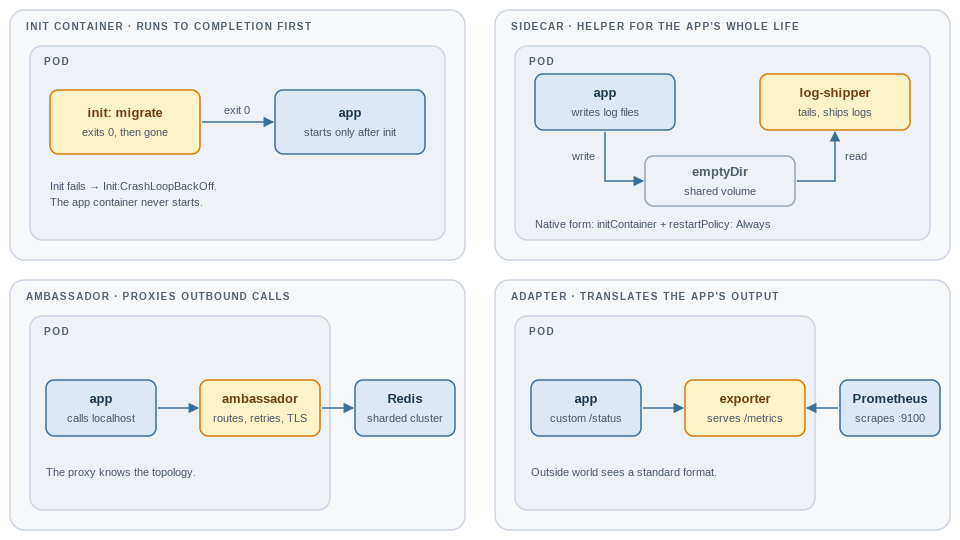
Figure 2-1: The four multi-container patterns. Blue is the main application container, amber is the helper container that defines the pattern.
Key concepts
Multi-container patterns
| Pattern | What the helper does | Example | Declared as |
|---|---|---|---|
| Init container | Runs to completion before any app container starts. Init containers run one at a time, in order. | Wait for a database, run a schema migration, download a model | initContainers |
| Sidecar | Runs alongside the app for its whole life, extending it. | Log shipper, service-mesh proxy, config reloader | initContainers with restartPolicy: Always (native sidecar) |
| Ambassador | Proxies the app's outbound connections. | Local proxy to a sharded Redis or a cloud SQL instance | Sidecar that listens on localhost |
| Adapter | Normalises the app's output for the outside world. | Exporter that turns a custom status page into Prometheus metrics | Sidecar that exposes a port |
Ambassador and adapter are sidecars with a specific job. Interviewers use the names; the YAML is the same.
Native sidecars vs plain extra containers
| Declared as | Start order | Blocks Job completion? | Result |
|---|---|---|---|
Second entry in containers | Parallel with the app | Yes. The Job waits for the helper to exit. | Log shipper keeps a Job running forever. |
initContainers with restartPolicy: Always | Before the app, stays running | No. Killed after the app exits. | Correct sidecar. Stable since v1.33. |
Pod phase
| Phase | Meaning |
|---|---|
Pending | Accepted, but not all containers are running. Unscheduled, pulling images, or running init containers. |
Running | Bound to a node, at least one container running. Says nothing about Ready. |
Succeeded | All containers exited 0 and won't restart. Jobs end here. |
Failed | All containers stopped, at least one with a non-zero exit. |
Unknown | The node stopped reporting. |
STATUS in kubectl get pods shows a more specific reason (CrashLoopBackOff, Init:0/1). → See Troubleshooting.
restartPolicy
| Value | Container restarted when | Used by |
|---|---|---|
Always (default) | It exits for any reason | Deployments, StatefulSets, DaemonSets. The only value they accept. |
OnFailure | It exits non-zero | Jobs that retry in place |
Never | Never | Jobs where each failure should leave a Pod to inspect |
Same Pod or separate Pods?
| Pair | Same Pod? | Why |
|---|---|---|
| App + log shipper reading its files | Yes | Shares a volume and lives exactly as long as the app |
| App + service-mesh proxy | Yes | Must intercept the app's localhost traffic |
| Web frontend + API backend | No | Scale differently. One Pod means scaling both together. |
| App + its database | No | Database needs its own lifecycle and storage (→ Storage) |
kubectl essentials
Generate a Pod manifest, then add containers by hand:
kubectl run web --image=nginx:1.27 --port=80 --dry-run=client -o yaml > pod.yaml
kubectl explain pod.spec.initContainers.restartPolicy
Work inside a multi-container Pod. Always name the container with -c:
kubectl get pod web -o jsonpath='{.spec.containers[*].name}'     # container names
kubectl logs web -c log-shipper                                 # one container's logs
kubectl logs web --all-containers --prefix
kubectl exec -it web -c app -- sh
kubectl get pod web -o jsonpath='{.status.initContainerStatuses[*].state}'
Throwaway debugging Pod, deleted on exit:
kubectl run tmp --rm -it --image=busybox:1.36 --restart=Never -- sh
A Pod with an init container, a native sidecar and an app sharing one volume:
apiVersion: v1
kind: Pod
metadata:
  name: web
  labels: {app: web}
spec:
  volumes:
  - name: html
    emptyDir: {}
  initContainers:
  - name: init-page                   # runs first, must exit 0
    image: busybox:1.36
    command: ["sh", "-c", "echo '<h1>hello</h1>' > /html/index.html"]
    volumeMounts: [{name: html, mountPath: /html}]
  - name: clock                       # native sidecar: starts before app, keeps running
    image: busybox:1.36
    restartPolicy: Always
    command: ["sh", "-c", "while true; do date > /html/time.txt; sleep 5; done"]
    volumeMounts: [{name: html, mountPath: /html}]
  containers:
  - name: app
    image: nginx:1.27
    ports: [{containerPort: 80}]
    volumeMounts: [{name: html, mountPath: /usr/share/nginx/html}]
🧪 Lab
Requires: Standard lab setup · How the tiers work.
Build a three-container Pod.
Goal
- In namespace
lab2-1, create the Podwebabove: an init container writesindex.html, a native sidecar writes the time totime.txtevery 5 seconds, and nginx serves both. - Confirm the init container finished and the sidecar is still running.
- Fetch
time.txttwice from another Pod and confirm it changes. - Change the init container's command to
exit 1, recreate the Pod, and read its status.
Verify
kubectl -n lab2-1 get pod web                        # READY 2/2: sidecar + app
kubectl -n lab2-1 get pod web -o jsonpath='{.status.initContainerStatuses[0].state.terminated.reason}'   # Completed
kubectl -n lab2-1 run tmp --rm -it --image=busybox:1.36 --restart=Never -- \
  wget -qO- "http://$(kubectl -n lab2-1 get pod web -o jsonpath='{.status.podIP}')/time.txt"
🟡 Hints
- There's no generator for init containers or sidecars. Copy the manifest above into
pod.yamland apply it.kubectl explain pod.spec.initContainers.restartPolicyexplains the sidecar field. READYcounts app containers and native sidecars, not init containers. Init container state is under.status.initContainerStatuses.- A Pod IP works without a Service:
-o jsonpath='{.status.podIP}'. - Most Pod fields are immutable, so edit the file and use
kubectl replace --force -f. Read an init container's output withkubectl logs <pod> -c <init-container>.
🟢 Guided
-
Create the lab namespace.
kubectl create namespace lab2-1 -
Create the Pod from the manifest above, saved as
pod.yaml.kubectl -n lab2-1 apply -f pod.yaml -
Wait until the init container finished and both long-running containers are Ready.
kubectl -n lab2-1 wait --for=condition=Ready pod/web --timeout=60s -
Check the Pod: READY 2/2. The sidecar counts, the init container doesn't.
kubectl -n lab2-1 get pod web -
Fetch
time.txtthrough the Pod IP; run it again 5+ seconds later and the time changes.kubectl -n lab2-1 run tmp --rm -it --image=busybox:1.36 --restart=Never -- \wget -qO- "http://$(kubectl -n lab2-1 get pod web -o jsonpath='{.status.podIP}')/time.txt" -
Break the init container: replace its echo command with exit 1.
sed -i.bak 's#echo .*index.html#exit 1#' pod.yaml -
Pod specs are mostly immutable, so delete and recreate the Pod.
kubectl -n lab2-1 replace --force -f pod.yamlIt takes about 30 seconds. The
clocksidecar's shell ignores SIGTERM, so the kubelet waits out the grace period before SIGKILL (→ termination sequence). -
Watch the status: Init:Error → Init:CrashLoopBackOff. nginx never starts.
kubectl -n lab2-1 get pod web -w -
Read the failing init container's output.
kubectl -n lab2-1 logs web -c init-page -
Run the ✅ Check below, then delete everything the lab created.
kubectl delete namespace lab2-1
✅ Check
t() { [ "$2" = "$3" ] && echo "PASS $1" || echo "FAIL $1: got '$2', want '$3'"; }
t "clock is a native sidecar" "$(kubectl -n lab2-1 get pod web -o jsonpath='{.spec.initContainers[1].restartPolicy}')" "Always"
t "init-page exits 1"         "$(kubectl -n lab2-1 get pod web -o jsonpath='{.status.initContainerStatuses[0].lastState.terminated.exitCode}')" "1"
t "nginx never started"       "$(kubectl -n lab2-1 get pod web -o jsonpath='{.status.containerStatuses[0].state.waiting.reason}')" "PodInitializing"
Gotchas
- Init containers block everything. A hanging init container leaves the Pod at
Init:0/2forever. Give waits a timeout. - Forgetting
-c.kubectl logsandexecon a multi-container Pod pick the default container, which may not be the one you want. - Shared network means shared ports. Two containers in one Pod cannot both listen on port 80.
- Pod specs are mostly immutable. Only a few fields (such as
image) can change on a live Pod. Usekubectl replace --force -for edit the owning controller. - Sidecar as a regular container stalls Jobs. Declare it as a native sidecar so the Job can complete.
Runningis not Ready. A Pod can run and still receive no traffic. → See Probes & Observability.
Scenario questions
Q1 ★ A Pod has shown Init:0/1 for ten minutes. What do you do?
Model answer
- Clarify: is this new, or did it start after a change? What should the init container wait for?
- Observe:
kubectl describe podfor events, thenkubectl logs <pod> -c <init-container>. - Hypothesise: it is waiting on something that never arrives (a Service name that doesn't resolve, a database that is down), or it is failing and retrying.
- Fix: fix the dependency or the init command. If it waits on DNS, check the Service exists in the right namespace.
- Prevent: put a timeout on every wait loop so it fails loudly, and alert on Pods stuck in
Initlonger than a few minutes.
Q2 ★★ A batch Job with a log-shipping sidecar never completes, though the main container exited 0. Why?
Model answer
- Clarify: is the sidecar in
containersor ininitContainers? - Observe:
kubectl get podshows1/2Running. The app container isCompleted, the shipper is still running. - Hypothesise: a Job completes only when all regular containers exit. The shipper never does.
- Fix: move the shipper to
initContainerswithrestartPolicy: Always. The kubelet stops native sidecars after the main containers finish. - Prevent: a team rule that helpers are always native sidecars. The older workaround (a shared file that tells the shipper to exit) is fragile.
Q3 ★★ Should the app and its Redis cache run in the same Pod?
Model answer
- Clarify: is the cache per-instance (local, disposable) or shared across replicas?
- Observe: shared caches need one consistent copy. Per-instance caches only need low latency.
- Hypothesise: same Pod couples scaling and restarts. Every app replica gets its own cache, and a cache crash restarts nothing but also can't be scaled alone.
- Fix: shared cache: separate Deployment or StatefulSet behind a Service. Per-instance, throwaway cache: a sidecar is acceptable.
- Prevent: the test I apply: would I ever want to scale or restart them separately? If yes, separate Pods.
Q4 ★★★ After adding a service mesh, requests fail for the first few seconds of each Pod's life. Why, and how do you fix it?
Model answer
- Clarify: do failures happen only at startup? On shutdown too?
- Observe: app logs show connection refused on outbound calls in the first seconds. The proxy's logs show it was still starting.
- Hypothesise: the proxy runs as a regular container, so it starts in parallel with the app. The app makes calls before the proxy is ready. On shutdown the proxy can exit first, too.
- Fix: run the proxy as a native sidecar. Native sidecars start and pass their startup probe before the app starts, and stop after it.
- Prevent: prefer native sidecars for anything the app depends on. The old workaround (an app-side retry loop or a
postStarthook) hides the ordering problem.
Summary
- A Pod is a co-scheduled group. Shared network, shared volumes, same node, same fate.
- Init containers gate startup. They run in order, must exit 0, and block the app until they do.
- Sidecars are init containers with
restartPolicy: Always. They start first, stop last, and don't block Job completion. - Ambassador and adapter are sidecar jobs. One proxies out, one translates out.
- Separate Pods unless they must share a lifecycle. Scaling together is the cost of sharing a Pod.
Next in path → Deployments & Rollouts