Mental Model: How Kubernetes Thinks
Docs: Kubernetes objects · Controllers · Labels and selectors
Phase 1 starts here. Every other page in this section is a detail of one idea explained here: the big idea, the object map, five concepts, the six-step chain behind every kubectl apply, and how to tell which step broke. Then set up a cluster with Local Setup and learn the commands in Command Patterns.
The big idea
You never tell Kubernetes what to do. You tell it what should exist, and it works out the steps. A manifest is a statement of desired state ("3 replicas of nginx:1.27"). It's stored, and controllers compare it with actual state forever, acting whenever the two differ. There's no "run" command that finishes. There's only a gap that keeps being closed.
That's why a deleted Pod comes back, why a failed node's Pods reappear elsewhere, and why an edit to a live object disappears on the next apply. None of these are special features. They're all the same loop.
→ See Figure 1-2: the reconciliation loop in Architecture.
The object map
Most commands act on one of a handful of objects. They connect in only two ways: one object owns another, or one object finds another by label or name.
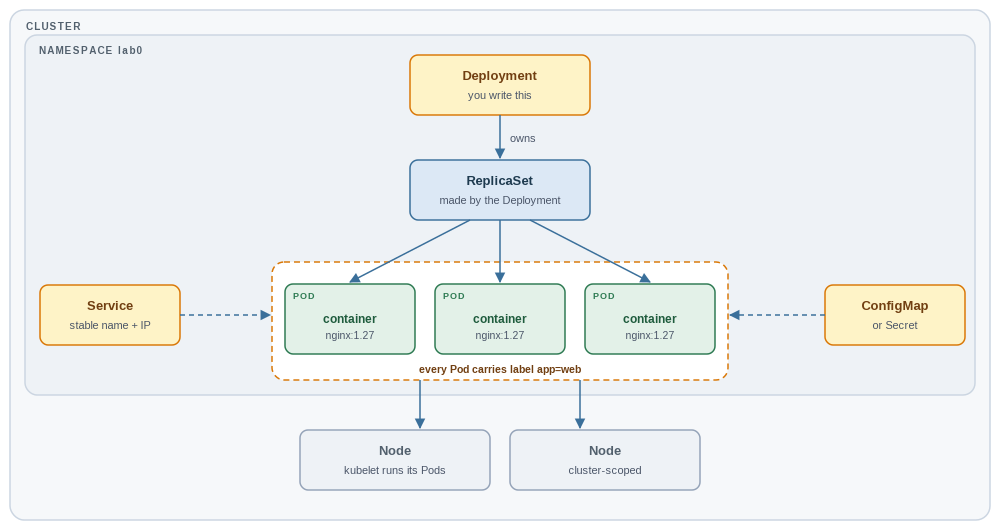
Figure 0-1: The objects behind a typical app. Amber is what you write, blue is what a controller writes for you, green is what runs, grey is the machines. Solid arrows are ownership, dashed arrows are lookups.
| Link | Example | Delete the one on the left | If it breaks |
|---|---|---|---|
| Owns (solid) | Deployment → ReplicaSet → Pod | Everything it owns goes too | Rare. The controller recreates what's missing. |
| Finds by label (dashed) | Service → Pods | The Pods are untouched | Silent. The Service just has no endpoints. |
| Finds by name (dashed) | Pod → ConfigMap, Secret | The Pod keeps running, but a new one fails to start | Loud. The new Pod shows CreateContainerConfigError (env) or stays ContainerCreating (volume). |
What this means at the command line:
| Object | You create it with | Edit it directly? | See it with |
|---|---|---|---|
| Deployment | kubectl create deployment / apply | Yes. This is the object you change. | kubectl get deploy |
| ReplicaSet | The Deployment controller | No. The Deployment overwrites your edit. | kubectl get rs |
| Pod | The ReplicaSet controller | No. Delete it and a new one replaces it. | kubectl get pods -o wide (shows the node) |
| Service | kubectl expose / apply | Yes | kubectl get svc, kubectl get endpointslices |
| ConfigMap / Secret | kubectl create configmap / secret | Yes. Running Pods don't see env changes until restarted. | kubectl get cm,secret |
| Node | The cluster | No | kubectl get nodes (no -n: cluster-scoped) |
Pod names encode the hierarchy. web-69c6f74b8b-x2k9p is Deployment web, ReplicaSet hash 69c6f74b8b, Pod suffix x2k9p. kubectl get all -n <ns> lists Deployments, ReplicaSets, Pods and Services together, but not ConfigMaps or Secrets.
→ Config wiring in detail: Config & Secrets.
Five core concepts
| Concept | One sentence | What it explains | Detail |
|---|---|---|---|
| The API server is the hub | Every component reads and writes through it; only it touches etcd. | No component calls another. If the API server is down, nothing new happens, but running apps keep running. | Components |
| spec vs status | You write spec (desired), controllers write status (actual). | Debugging is comparing the two and asking which controller should have closed the gap. | Where a change lives |
| Pods are disposable | The smallest unit, replaced rather than repaired, with a new IP each time. | Why you never edit a Pod, and why nothing should address a Pod IP. | Pods & Multi-Container |
| Controllers are one pattern | Each keeps one invariant true, using the same watch-diff-act loop. | Deployments, Jobs and DaemonSets differ in the promise, not the mechanism. | Table below |
| Labels are the only glue | Objects find each other by label selector, never by name or ownership. | A typo in a label silently disconnects things. | Services & Ingress |
Controllers: same loop, different promises
| Controller | The invariant it keeps true |
|---|---|
| Deployment → ReplicaSet | "N identical, interchangeable Pods of the current template exist." |
| StatefulSet | "N Pods exist, each with a stable name and its own storage." |
| DaemonSet | "Exactly one Pod runs on every matching node." |
| Job / CronJob | "This many Pods have succeeded." / "A Job is created on this schedule." |
→ To choose between them, see Choosing a workload resource.
Where labels do the linking
| Selector on | Picks | If the labels don't match |
|---|---|---|
| ReplicaSet (from its Deployment) | The Pods it owns and counts | Rejected at apply: selector does not match template labels. Stray Pods that do match get adopted and counted. |
| Service | The Pods that receive traffic | Empty EndpointSlice, "connection refused" |
| NetworkPolicy | The Pods a rule protects or allows | The rule silently applies to nothing |
Life of a kubectl apply
One kubectl apply of a 3-replica Deployment sets off six steps. Each is a different component reacting to a change it watched on the API server, then writing its result back. No step calls the next one directly.
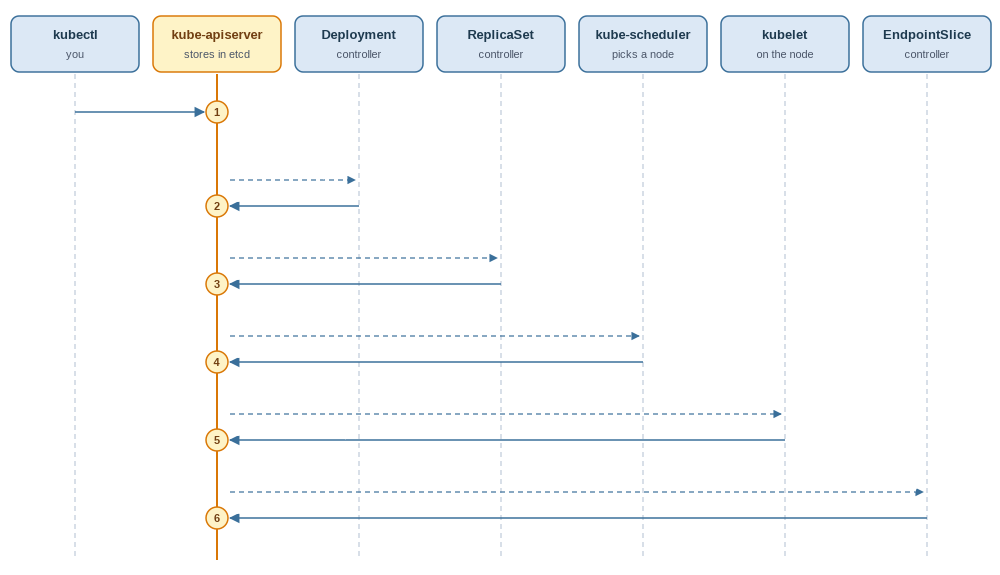
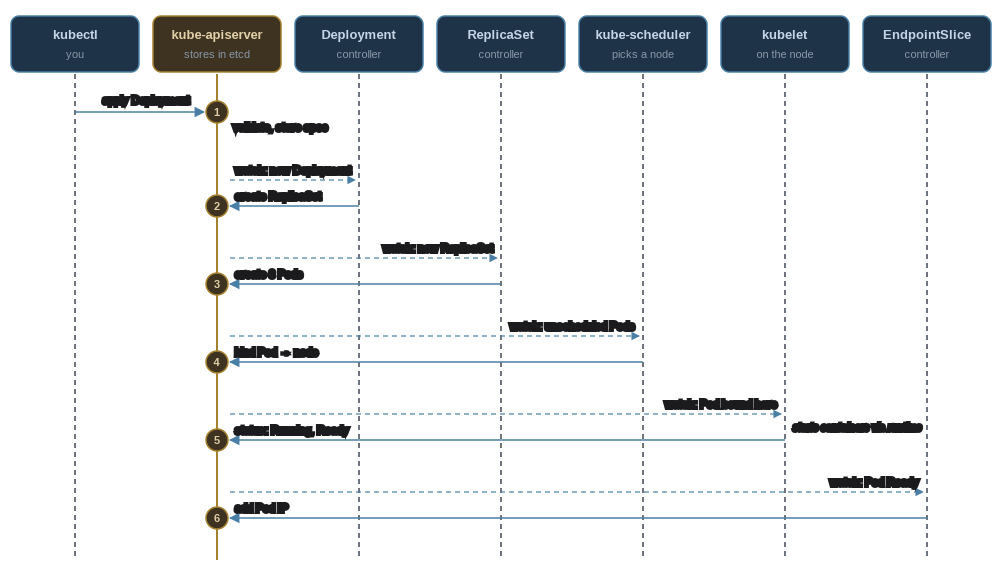
Figure 0-2: The chain behind one kubectl apply. Amber is the API server, the only lifeline every arrow touches. Dashed arrows are watch events, solid arrows are writes. The numbers are the steps below.
| # | Component | Watches | Writes | Stage |
|---|---|---|---|---|
| 1 | kube-apiserver | Your request | Validated Deployment into etcd | Admission |
| 2 | Deployment controller | New Deployment | A ReplicaSet for this Pod template | Reconcile |
| 3 | ReplicaSet controller | New ReplicaSet | 3 Pod objects (admission checks quota and Pod Security here) | Reconcile |
| 4 | kube-scheduler | Pods with no node | A binding: Pod → node | Scheduling |
| 5 | kubelet on that node | Pods bound to its node | Pulls the image, starts containers, reports Running, then Ready | Running |
| 6 | EndpointSlice controller | Pods turning Ready that match a Service | The Pod's IP into the Service's EndpointSlice | Routing |
Which step broke?
The chain turns every symptom into a question: which step didn't happen? Find the step, then use Troubleshooting for the command and the usual causes.
| Symptom | Step that broke | Component to question | Next |
|---|---|---|---|
Deployment 0/3, no Pods at all | 3: Pods rejected at admission | ReplicaSet controller's events | Troubleshooting |
Pending | 4: no node fits | kube-scheduler | Troubleshooting |
ImagePullBackOff | 5: image can't be pulled | kubelet + container runtime | Troubleshooting |
CrashLoopBackOff | 5: container starts, then exits | Your application | Troubleshooting |
Running, but the Service returns nothing | 6: Pod not Ready, or labels don't match | EndpointSlice controller (via readiness and selectors) | Troubleshooting |
→ Figure S5-1 maps each step to a hands-on drill.
🧪 Lab
Requires: Standard lab setup · Command Patterns (skim; the first pass only pastes commands) · How the tiers work.
See the chain and the glue for yourself.
First pass: open 🟢 Guided and paste the commands. This lab is a demo of the ideas above, not a test. The commands are taught in Command Patterns. Come back to the Goal tier once you've read it.
Goal
- In namespace
lab1-1, create a Deploymentwebwithnginx:1.27and 3 replicas. - Delete one Pod and watch a replacement appear. Which controller created it?
- Trace ownership from a Pod up to the Deployment using
kubectl describe. - Expose the Deployment as a Service on port 80 and list its endpoints.
- Change the Service's selector to
app: wrong. What happens to the endpoints, and what does a client see?
Verify
kubectl -n lab1-1 get pods                                         # 3 Running, one younger than the others
kubectl -n lab1-1 describe pod <pod> | grep "Controlled By"        # ReplicaSet/web-<hash>
kubectl -n lab1-1 describe rs | grep "Controlled By"               # Deployment/web
kubectl -n lab1-1 get endpointslices -l kubernetes.io/service-name=web   # 3 IPs, then <unset> after step 5
🟡 Hints
- "Run N copies that heal themselves" in Command Patterns. Check the flags with
kubectl create deployment -h. kubectl delete pod <name>in one terminal,kubectl get pods -win another. The new Pod shares the old one's name prefix.describeprints aControlled By:line. Follow it from the Pod to its ReplicaSet, then from the ReplicaSet up.- "Give Pods one stable name" in Command Patterns. Endpoints live in
endpointslices, labelledkubernetes.io/service-name=<svc>. kubectl patch servicewith a newspec.selector. Test from a throwaway busybox Pod withwget -qO- -T 3 http://web.
🟢 Guided
-
Create the lab namespace.
kubectl create namespace lab1-1 -
Create a Deployment with 3 replicas of nginx.
kubectl -n lab1-1 create deployment web --image=nginx:1.27 --replicas=3 -
Wait until all 3 Pods are Ready.
kubectl -n lab1-1 rollout status deployment/web -
Stream Pod changes in the background so you see the replacement appear.
kubectl -n lab1-1 get pods -w & -
Delete the first Pod; the ReplicaSet controller sees 2 of 3 and creates one (step 3 of the chain).
kubectl -n lab1-1 delete "$(kubectl -n lab1-1 get pods -o name | head -n 1)" -
Stop the background watch.
kill %1 -
Show which object owns a Pod.
kubectl -n lab1-1 describe "$(kubectl -n lab1-1 get pods -o name | head -n 1)" | grep "Controlled By"Controlled By: ReplicaSet/web-69c6f74b8b -
Show which object owns the ReplicaSet.
kubectl -n lab1-1 describe rs | grep "Controlled By"Controlled By: Deployment/web -
Create a Service that selects the Deployment's Pods by label (step 6).
kubectl -n lab1-1 expose deployment web --port=80 -
List the Pod IPs the Service found.
kubectl -n lab1-1 get endpointslices -l kubernetes.io/service-name=webweb-pz927 IPv4 80 10.244.0.8,10.244.0.5,10.244.0.6 -
Point the Service at a label no Pod carries.
kubectl -n lab1-1 patch service web -p '{"spec":{"selector":{"app":"wrong"}}}' -
Confirm the selector changed and the endpoints emptied.
kubectl -n lab1-1 describe svc web | grep -E "Selector|Endpoints"Selector: app=wrongEndpoints: <- empty: no Pod carries app=wrong -
Call the Service from a throwaway Pod.
kubectl -n lab1-1 run tmp --rm -it --image=busybox:1.36 --restart=Never -- wget -qO- -T 3 http://webwget: can't connect to remote host (...): Connection refusedThe Pods are fine and the Service exists. Only the label link is gone.
-
Run the ✅ Check below, then delete everything the lab created.
kubectl delete namespace lab1-1
✅ Check
t() { [ "$2" = "$3" ] && echo "PASS $1" || echo "FAIL $1: got '$2', want '$3'"; }
t "3 Pods Ready"             "$(kubectl -n lab1-1 get deploy web -o jsonpath='{.status.readyReplicas}')" "3"
t "Pod owned by ReplicaSet"  "$(kubectl -n lab1-1 get pods -l app=web -o jsonpath='{.items[0].metadata.ownerReferences[0].kind}')" "ReplicaSet"
t "RS owned by Deployment"   "$(kubectl -n lab1-1 get rs -l app=web -o jsonpath='{.items[0].metadata.ownerReferences[0].kind}')" "Deployment"
t "selector now app=wrong"   "$(kubectl -n lab1-1 get svc web -o jsonpath='{.spec.selector.app}')" "wrong"
t "Service has no endpoints" "$(kubectl -n lab1-1 get endpointslices -l kubernetes.io/service-name=web -o jsonpath='{range .items[*].endpoints[*]}x{end}')" ""
Next: Lab 1-2 names the components behind each step, and Lab 2-4 adds targetPort and Ingress failures.
The 60-second interview answer
"Kubernetes is declarative. I tell the API server what should exist, it stores that in etcd, and controllers spend their lives closing the gap between that and reality. So when I apply a Deployment, six things happen, and each one is a different component reacting to a change it watched on the API server. The API server validates and stores the Deployment. The Deployment controller creates a ReplicaSet for that Pod template. The ReplicaSet controller creates the Pods. The scheduler binds each Pod to a node. The kubelet on that node pulls the image, starts the containers and reports Ready. Finally, the EndpointSlice controller adds the Pod's IP to any Service whose selector matches its labels. Nothing calls anything directly: everything goes through the API server, and objects find each other only by labels. That's also how I debug. Pending means step four, ImagePullBackOff and CrashLoopBackOff mean step five, and a Service that returns nothing means step six: readiness or labels."
Next in path → Local Setup