Scenario: Troubleshooting Drills
Drill until fluent: hands-on rounds test this directly. Phase 4 of the Learning Path.
Builds on: Troubleshooting · Probes & Observability · Services & Ingress · Resources & Scaling
Situation
Hands-on interviews often go: "here's a namespace, something's broken, talk me through it." The broken thing is almost always one of eight failures, each at a different stage of a Pod's life. These drills reproduce all eight on a local kind cluster. Every symptom and error message below was captured from a real run on Kubernetes v1.37.
Requirements
For each drill, before you open the answer:
| Step | What to say out loud |
|---|---|
| Read the status | "STATUS is X, so the failure is at stage Y." |
| Run one command | The command that explains that stage (Figure S5-1) |
| Name the root cause | Quote the line of output that proves it |
| Fix it at the owner | Deployment, not Pod, wherever there is one |
| Confirm with the same command | The status you expected, not "it seems fine" |
Requires: Standard lab setup (plain kind). Use one namespace per drill and make it the default, because the commands below omit -n: kubectl create ns drill1 && kubectl config set-context --current --namespace=drill1. Each drill ends with a ✅ Check that passes once your fix works.
Architecture
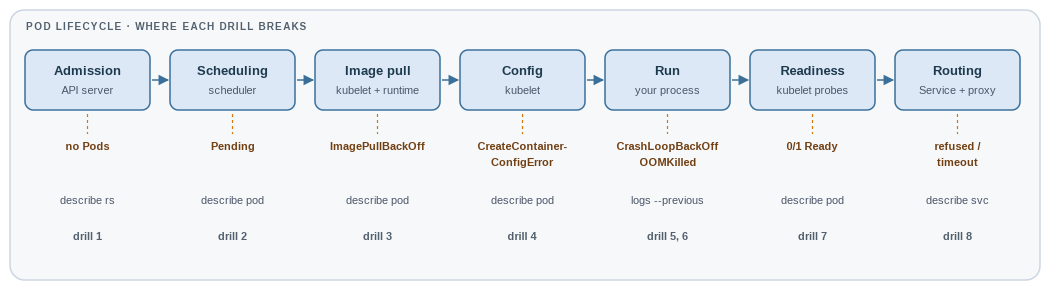
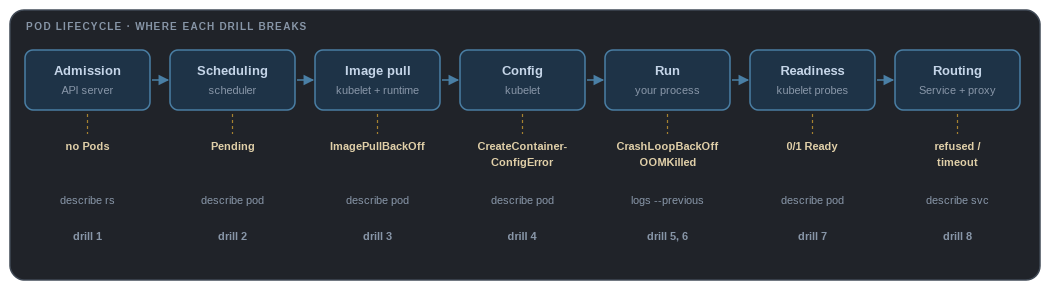
Figure S5-1: Where each drill breaks. Amber is the status you see; below it is the first command to run and the drill that exercises that stage.
Kubernetes resources used
| Drill | Stage | Resources involved | Reference |
|---|---|---|---|
| 1 | Admission | ResourceQuota, Deployment, ReplicaSet | Resources & Scaling |
| 2 | Scheduling | Requests, node capacity, taints | Resources & Scaling |
| 3 | Image pull | Image reference | Troubleshooting |
| 4 | Config | Secret, secretKeyRef | Config & Secrets |
| 5 | Run | Container command, env | Troubleshooting |
| 6 | Run | Memory limits | Resources & Scaling |
| 7 | Readiness | Readiness probe, EndpointSlice | Probes & Observability |
| 8 | Routing | Service targetPort | Services & Ingress |
Walkthrough
Drill 1 ★★: The Deployment with no Pods
apiVersion: v1
kind: ResourceQuota
metadata:
  name: compute
spec:
  hard: {requests.cpu: "2", requests.memory: 4Gi}
---
apiVersion: apps/v1
kind: Deployment
metadata:
  name: app1
spec:
  replicas: 2
  selector:
    matchLabels: {app: app1}
  template:
    metadata:
      labels: {app: app1}
    spec:
      containers:
      - name: nginx
        image: nginx:1.27
Symptom
$ kubectl get deploy,pods
NAME                   READY   UP-TO-DATE   AVAILABLE
deployment.apps/app1   0/2     0            0
Investigate
kubectl get pods                      # No resources found
kubectl describe deploy app1          # Conditions: ReplicaFailure True FailedCreate
kubectl describe rs -l app=app1       # the real error is on the ReplicaSet
Root cause and fix
Error creating: pods "app1-b6b6bc85d-w66k7" is forbidden: failed quota: compute:
must specify requests.cpu for: nginx; requests.memory for: nginx
A quota on requests.cpu makes requests mandatory. Admission rejects every Pod, so there's no Pod to describe; the error lives one level up, on the ReplicaSet.
kubectl set resources deployment app1 --requests=cpu=100m,memory=128Mi
Longer term, add a LimitRange with default requests to the namespace.
✅ Check
t() { [ "$2" = "$3" ] && echo "PASS $1" || echo "FAIL $1: got '$2', want '$3'"; }
t "app1 2/2 Ready" "$(kubectl get deploy app1 -o jsonpath='{.status.readyReplicas}')" "2"
Reproduce in one line: kubectl create quota compute --hard=requests.cpu=2,requests.memory=4Gi && kubectl create deployment app1 --image=nginx:1.27 --replicas=2
Drill 2 ★: Pending forever
apiVersion: apps/v1
kind: Deployment
metadata:
  name: app2
spec:
  replicas: 1
  selector:
    matchLabels: {app: app2}
  template:
    metadata:
      labels: {app: app2}
    spec:
      containers:
      - name: nginx
        image: nginx:1.27
        resources:
          requests: {cpu: "64", memory: 128Mi}
Symptom
$ kubectl get pods
app2-6b5969796-wpd6m   0/1   Pending   0   51s
Investigate
kubectl describe pod -l app=app2 | grep -A2 Events
kubectl describe node | grep -A6 "Allocated resources"
Root cause and fix
0/1 nodes are available: 1 Insufficient cpu. preemption: 0/1 nodes are available: 1 Preemption is not helpful for scheduling.
The scheduler checks every node and gives one reason per node. The only node lacks 64 free CPUs, counted by requests, not usage. On a cluster with a separate control plane the same Pod reads 0/2 nodes are available: 1 Insufficient cpu, 1 node(s) had untolerated taint(s): the control-plane node is tainted against workloads (→ Taints and tolerations).
kubectl set resources deployment app2 --requests=cpu=100m
✅ Check
t() { [ "$2" = "$3" ] && echo "PASS $1" || echo "FAIL $1: got '$2', want '$3'"; }
t "app2 Ready"     "$(kubectl get deploy app2 -o jsonpath='{.status.readyReplicas}')" "1"
Reproduce in one line: kubectl create deployment app2 --image=nginx:1.27 && kubectl set resources deployment app2 --requests=cpu=64
Drill 3 ★: ImagePullBackOff
apiVersion: v1
kind: Pod
metadata:
  name: app3
spec:
  containers:
  - name: nginx
    image: nginx:1.72
Symptom
$ kubectl get pods
app3   0/1   ImagePullBackOff   0   51s
Investigate
kubectl describe pod app3 | grep -E "Failed|Pulling"
Root cause and fix
Failed to pull image "nginx:1.72": rpc error: code = NotFound desc = failed to pull and unpack
image "docker.io/library/nginx:1.72": failed to resolve reference ...
NotFound means the tag doesn't exist (1.72 instead of 1.27). unauthorized or denied would mean a private registry without imagePullSecrets, and toomanyrequests a registry rate limit.
kubectl set image pod/app3 nginx=nginx:1.27 # image is one of the few mutable Pod fields
✅ Check
t() { [ "$2" = "$3" ] && echo "PASS $1" || echo "FAIL $1: got '$2', want '$3'"; }
t "app3 Ready"     "$(kubectl get pod app3 -o jsonpath='{.status.containerStatuses[0].ready}')" "true"
Reproduce in one line: kubectl run app3 --image=nginx:1.72
Drill 4 ★★: CreateContainerConfigError
apiVersion: v1
kind: Secret
metadata:
  name: db
stringData:
  password: s3cr3t
---
apiVersion: v1
kind: Pod
metadata:
  name: app4
spec:
  containers:
  - name: app
    image: busybox:1.36
    command: ["sh", "-c", "sleep 3600"]
    env:
    - name: DB_PASSWORD
      valueFrom:
        secretKeyRef: {name: db, key: passwd}
Symptom
$ kubectl get pods
app4   0/1   CreateContainerConfigError   0   51s
Investigate
kubectl describe pod app4 | grep Error
kubectl get secret db -o jsonpath='{.data}'      # which keys actually exist
Root cause and fix
Error: couldn't find key passwd in Secret drill4/db
The Secret has password; the Pod asks for passwd. env can't be changed on a live Pod, so replace it:
kubectl get pod app4 -o yaml | sed 's/key: passwd/key: password/' | kubectl replace --force -f -
✅ Check
t() { [ "$2" = "$3" ] && echo "PASS $1" || echo "FAIL $1: got '$2', want '$3'"; }
t "app4 Ready"     "$(kubectl get pod app4 -o jsonpath='{.status.containerStatuses[0].ready}')" "true"
Reproduce in one line: kubectl create secret generic db --from-literal=password=s3cr3t, then apply the Pod above.
Drill 5 ★★: CrashLoopBackOff
apiVersion: v1
kind: Pod
metadata:
  name: app5
spec:
  containers:
  - name: app
    image: busybox:1.36
    command: ["sh", "-c", "test -n \"$DB_URL\" || { echo 'fatal: DB_URL is not set' >&2; exit 1; }; sleep 3600"]
Symptom
$ kubectl get pods
app5   0/1   CrashLoopBackOff   3 (39s ago)   50s      # alternates with "Error"
Investigate
kubectl logs app5                                # during back-off: the last crash's output
kubectl logs app5 --previous                     # once a new attempt is running: the one before
kubectl describe pod app5 | grep -A3 "Last State"
Root cause and fix
fatal: DB_URL is not set
Last State: Terminated   Reason: Error   Exit Code: 1
Exit code 1 plus the log line: the app refuses to start without configuration. It's not a Kubernetes problem, but the fix is in the Pod spec.
kubectl delete pod app5
kubectl run app5 --image=busybox:1.36 --env=DB_URL=postgres://db:5432/app --command -- \
  sh -c 'test -n "$DB_URL" || { echo "fatal: DB_URL is not set" >&2; exit 1; }; sleep 3600'
In a real app the env var would come from a ConfigMap (→ Config & Secrets).
✅ Check
t() { [ "$2" = "$3" ] && echo "PASS $1" || echo "FAIL $1: got '$2', want '$3'"; }
t "app5 Ready, no new restarts" "$(kubectl get pod app5 -o jsonpath='{.status.containerStatuses[0].ready} {.status.containerStatuses[0].restartCount}')" "true 0"
Reproduce in one line: kubectl run app5 --image=busybox:1.36 --command -- sh -c 'echo "fatal: DB_URL is not set" >&2; exit 1'
Drill 6 ★★: OOMKilled
apiVersion: v1
kind: Pod
metadata:
  name: app6
spec:
  containers:
  - name: app
    image: busybox:1.36
    command: ["sh", "-c", "echo loading; head -c 150m /dev/zero | tail > /dev/null; echo ready; sleep 3600"]
    resources:
      requests: {memory: 64Mi}
      limits: {memory: 64Mi}
Symptom
$ kubectl get pods
app6   0/1   OOMKilled   2 (26s ago)   27s       # alternates with CrashLoopBackOff
Investigate
kubectl describe pod app6 | grep -A3 "Last State"
kubectl logs app6                                # "loading", never "ready"
kubectl top pod app6                             # if it survives long enough to measure
Root cause and fix
Last State: Terminated Reason: OOMKilled Exit Code: 137
The container needs about 150 Mi while loading and is limited to 64 Mi. The kernel kills it the moment it crosses the limit; 137 = 128 + SIGKILL.
kubectl get pod app6 -o yaml | sed 's/64Mi/256Mi/g' | kubectl replace --force -f -
kubectl logs app6                                # loading, ready
In a real incident, check whether memory plateaus (limit too low) or keeps growing (leak) before raising the limit.
✅ Check
t() { [ "$2" = "$3" ] && echo "PASS $1" || echo "FAIL $1: got '$2', want '$3'"; }
t "app6 finished loading" "$(kubectl logs app6 | tail -n 1)" "ready"
Reproduce in one line: apply the Pod above. kubectl run can't set limits without --overrides.
Drill 7 ★★: Running, but 0/1 Ready
apiVersion: apps/v1
kind: Deployment
metadata:
  name: app7
spec:
  replicas: 2
  selector:
    matchLabels: {app: app7}
  template:
    metadata:
      labels: {app: app7}
    spec:
      containers:
      - name: nginx
        image: nginx:1.27
        ports: [{containerPort: 80}]
        readinessProbe:
          httpGet: {path: /healthz, port: 80}
          periodSeconds: 5
---
apiVersion: v1
kind: Service
metadata:
  name: app7
spec:
  selector: {app: app7}
  ports: [{port: 80, targetPort: 80}]
Symptom
$ kubectl get pods
app7-688568985d-cjwrl   0/1   Running   0   50s
app7-688568985d-zwk6s   0/1   Running   0   50s
$ kubectl exec c -- wget -qO- -T 3 http://app7
wget: can't connect to remote host (10.96.52.165): Connection refused
Investigate
kubectl describe pod -l app=app7 | grep "Readiness probe failed"
kubectl describe svc app7 | grep Endpoints       # empty: no Ready endpoints
kubectl get endpointslices -l kubernetes.io/service-name=app7 -o yaml | grep -A2 conditions
Root cause and fix
Readiness probe failed: HTTP probe failed with statuscode: 404
The first few failures say connection refused while nginx boots; the steady-state message is the 404. nginx has no /healthz. The Pods run but never become Ready, so the Service has no endpoints and kube-proxy refuses connections.
kubectl patch deployment app7 --type=json \
  -p '[{"op":"replace","path":"/spec/template/spec/containers/0/readinessProbe/httpGet/path","value":"/"}]'
✅ Check
t() { [ "$2" = "$3" ] && echo "PASS $1" || echo "FAIL $1: got '$2', want '$3'"; }
t "2 Ready endpoints" "$(kubectl get endpointslices -l kubernetes.io/service-name=app7 -o jsonpath='{range .items[*].endpoints[*]}{.conditions.ready} {end}')" "true true "
t "app7 answers"      "$(kubectl exec c -- wget -qO- -T 3 http://app7 | grep -o '<title>.*</title>')" "<title>Welcome to nginx!</title>"
Reproduce in one line: apply the manifest above. There is no imperative flag for probes.
Drill 8 ★★★: Endpoints exist, connection refused
apiVersion: apps/v1
kind: Deployment
metadata:
  name: app8
spec:
  replicas: 2
  selector:
    matchLabels: {app: app8}
  template:
    metadata:
      labels: {app: app8}
    spec:
      containers:
      - name: nginx
        image: nginx:1.27
        ports: [{containerPort: 80}]
---
apiVersion: v1
kind: Service
metadata:
  name: app8
spec:
  selector: {app: app8}
  ports: [{port: 80, targetPort: 8080}]
Symptom
$ kubectl get pods
app8-6c7b8d87c8-82wxw   1/1   Running   0   50s
app8-6c7b8d87c8-zfh2l   1/1   Running   0   50s
$ kubectl exec c -- wget -qO- -T 3 http://app8
wget: can't connect to remote host (10.96.209.158): Connection refused
Investigate
kubectl describe svc app8 | grep -E "TargetPort|Endpoints"
kubectl get pod -l app=app8 -o jsonpath='{.items[0].spec.containers[0].ports}'
Root cause and fix
TargetPort:  8080/TCP
Endpoints:   10.244.1.88:8080,10.244.1.87:8080
Everything looks healthy: Pods Ready, endpoints listed. But the endpoints point at port 8080 and nginx listens on 80, so each Pod refuses the connection. Compare with drill 7: the same "Connection refused", but there the endpoint list was empty.
kubectl patch svc app8 --type=json -p '[{"op":"replace","path":"/spec/ports/0/targetPort","value":80}]'
Variation: if the request times out instead, suspect a NetworkPolicy (→ Network Policy).
✅ Check
t() { [ "$2" = "$3" ] && echo "PASS $1" || echo "FAIL $1: got '$2', want '$3'"; }
t "app8 answers"      "$(kubectl exec c -- wget -qO- -T 3 http://app8 | grep -o '<title>.*</title>')" "<title>Welcome to nginx!</title>"
Reproduce in one line: kubectl create deployment app8 --image=nginx:1.27 --replicas=2 && kubectl expose deployment app8 --port=80 --target-port=8080
The client Pod c used in drills 7 and 8: kubectl run c --image=busybox:1.36 --restart=Never -- sleep 3600.
How I'd explain this in an interview
"I walk the Pod's lifecycle in order and let the status tell me where to start. If there are no Pods at all, it's admission, so I describe the ReplicaSet: quota or Pod Security. Pending is scheduling: describe the Pod and read the scheduler's message, which lists why every node was rejected. ImagePullBackOff and CreateContainerConfigError are the kubelet preparing the container, and describe names the exact tag or missing key. CrashLoopBackOff and OOMKilled mean the process ran, so logs and the last state's exit code tell me whether it's the app or the memory limit. Running but not Ready is a probe: describe shows the probe's response. And if everything is green but traffic fails, I describe the Service: empty endpoints means a selector or readiness problem, listed endpoints with 'connection refused' means the wrong targetPort, and a timeout suggests a NetworkPolicy. One command per stage, and I quote the line that proves it before I change anything."
Follow-up questions
★★ Drills 7 and 8 both give "connection refused". How do you tell them apart in one command?
Model answer
- Clarify: is anything else in the path, such as an Ingress or a NetworkPolicy?
- Observe:
kubectl describe svc: drill 7 showsEndpoints:empty, drill 8 lists IPs. - Hypothesise: empty means kube-proxy is rejecting (no Ready Pods match). Listed means the Pods themselves refuse on that port.
- Fix: empty → check selector and readiness. Listed → check
targetPortagainst the container's port. - Prevent: named ports (
targetPort: http) remove the drill 8 class of bug entirely.
★★ You fixed the Deployment but kubectl get pods still shows the old failing Pods. What's going on?
Model answer
- Clarify: did the fix change the Pod template?
- Observe:
kubectl get rsshows a new ReplicaSet scaling up.kubectl rollout statusshows progress. - Hypothesise: a rolling update replaces Pods gradually, and old Pods in CrashLoopBackOff can sit in a long back-off. If the fix was to a ConfigMap or Secret instead, the template didn't change at all, so nothing rolls out.
- Fix: wait for the rollout. For config fixes,
kubectl rollout restart. For a standalone Pod, delete it to skip the back-off. - Prevent: always confirm with
rollout status, not by eyeballingget pods.
★★★ You're given a broken namespace with no hints. What's your first minute?
Model answer
- Clarify: what should be working? Which Service or URL is the success criterion?
- Observe:
kubectl get all,events --sort-by=.lastTimestampfor an overview, thenkubectl get events --field-selector type=Warning. Warnings usually point straight at the broken stage. - Hypothesise: group the failures by stage. Several can be broken at once, as in Lab 4-1.
- Fix: fix in lifecycle order, admission first, because later stages can't be diagnosed until earlier ones pass.
- Prevent: narrate each step. In an interview the method counts as much as the fix.
Next in path → Capstone, attempt 1 (untimed)