Capstone: Deploy an App End to End
Drill until fluent: hands-on rounds test this directly. Phases 4 and 8 of the Learning Path.
Builds on: Container Images · Config & Secrets · Probes & Observability · Resources & Scaling · Services & Ingress · Deployments & Rollouts
Requires: Cluster add-ons (port mappings, metrics-server, ingress-nginx), Docker, and the four app files from Container Images in one directory.
Situation
The interviewer shares a screen with an empty kind cluster and a directory holding a small Python service. "Get this running like you would in production, then ship two new versions. You have 40 minutes, and talk me through it." This page is that task, cut into seven time-boxed steps. Each step ends in a ✅ Check that proves it worked before you move on. Do it untimed first with the solutions open, then again against the clock with them closed.
Requirements
| Requirement | Failure it prevents |
|---|---|
| Image built, pinned tag, loaded into the node | ImagePullBackOff on a tag the node has never seen |
| Config and credentials outside the image | Rebuilding to change a greeting; a key baked into a layer |
| Requests, memory limit, readiness and liveness probes | Unschedulable surprises, OOM on a neighbour, traffic to a Pod that can't serve |
| Non-root, read-only root filesystem, no capabilities | A compromised process owning the node |
| Reachable from the laptop through an Ingress | "It works with port-forward" is not a deployment |
| Scales out under load | Timeouts at peak while replicas sit at 2 |
| A bad release can't take the service down | The v0.3 rollout replacing every healthy Pod with a broken one |
Architecture
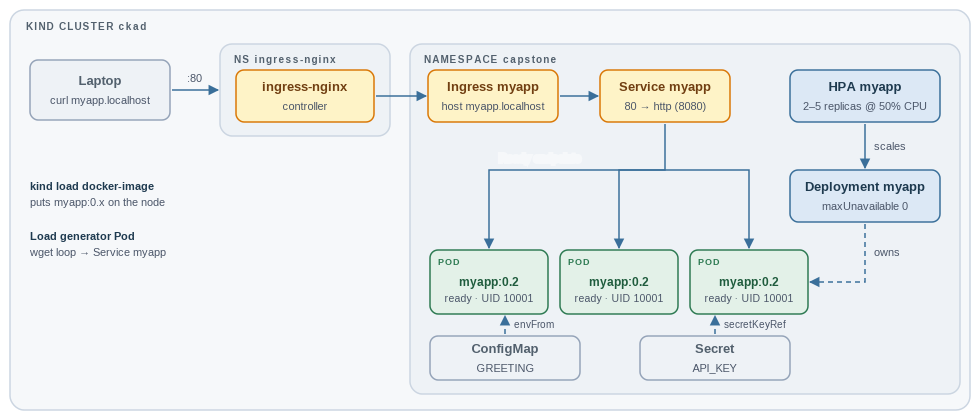
Figure S6-1: What you build. Amber is the request path that step 4's curl tests end to end. Green are the Pods, blue the controllers that manage them, grey the config they read.
Kubernetes resources used
| Resource | Role here | Reference |
|---|---|---|
Image myapp:0.x | The app, versioned by tag, loaded with kind load | Container Images |
| ConfigMap + Secret | GREETING and API_KEY, injected as env vars | Config & Secrets |
| Deployment | 2+ replicas, probes, resources, securityContext, maxUnavailable: 0 | Deployments & Rollouts |
| Service + Ingress | Stable name, then HTTP routing by host from the laptop | Services & Ingress |
| HorizontalPodAutoscaler | 2–5 replicas at 50% of the CPU request | Resources & Scaling |
Walkthrough
Start the clock. Every command uses -n capstone; set it as your default context namespace if you prefer.
1. Containerize the app and load it into kind (5 min)
Build myapp:0.1 with APP_VERSION=0.1 and make the node able to run it.
✅ Check
docker exec ckad-control-plane crictl images | grep myapp # docker.io/library/myapp 0.1
Solution
docker build -t myapp:0.1 --build-arg APP_VERSION=0.1 .
kind load docker-image myapp:0.1 --name ckad
Say: "Pinned tag, so the pull policy defaults to IfNotPresent and the node uses the loaded copy. With :latest it would default to Always and fail on kind."
2. Namespace, ConfigMap and Secret (5 min)
Namespace capstone. ConfigMap myapp-config with GREETING=hello-from-configmap. Secret myapp-secret with API_KEY=s3cr3t.
✅ Check
kubectl -n capstone get configmap myapp-config -o jsonpath='{.data.GREETING}{"\n"}'              # hello-from-configmap
kubectl -n capstone get secret myapp-secret -o jsonpath='{.data.API_KEY}' | base64 -d; echo      # s3cr3t
Solution
kubectl create namespace capstone
kubectl -n capstone create configmap myapp-config --from-literal=GREETING=hello-from-configmap
kubectl -n capstone create secret generic myapp-secret --from-literal=API_KEY=s3cr3t
Say: "The Secret is only base64 in etcd. In production it would come from a secret manager through External Secrets, and RBAC would limit who can read it."
3. The Deployment (10 min)
Deployment myapp, 2 replicas of myapp:0.1:
- Requests
cpu: 50m, memory: 64Mi, memory limit128Mi, no CPU limit. - Readiness on
/readyz, liveness on/healthz, both on the named porthttp(8080). - Every ConfigMap key as env vars;
API_KEYfrom the Secret. - Runs as non-root with a read-only root filesystem, no privilege escalation, all capabilities dropped,
RuntimeDefaultseccomp. - Rolling updates never drop below 2 Ready Pods.
✅ Check
kubectl -n capstone rollout status deployment/myapp            # successfully rolled out
kubectl -n capstone exec deploy/myapp -- id -u                 # 10001
kubectl -n capstone exec deploy/myapp -- env | grep -E 'GREETING|API_KEY'
Solution
Generate the skeleton with kubectl create deployment myapp --image=myapp:0.1 --replicas=2 --port=8080 -n capstone --dry-run=client -o yaml, then add what the generator can't set. The finished manifest:
apiVersion: apps/v1
kind: Deployment
metadata:
  name: myapp
  namespace: capstone
  labels: {app: myapp}
spec:
  replicas: 2
  selector:
    matchLabels: {app: myapp}
  strategy:
    type: RollingUpdate
    rollingUpdate: {maxSurge: 1, maxUnavailable: 0}
  template:
    metadata:
      labels: {app: myapp}
    spec:
      securityContext:
        runAsNonRoot: true
        seccompProfile: {type: RuntimeDefault}
      containers:
      - name: myapp
        image: myapp:0.1
        ports: [{name: http, containerPort: 8080}]
        envFrom:
        - configMapRef: {name: myapp-config}
        env:
        - name: API_KEY
          valueFrom:
            secretKeyRef: {name: myapp-secret, key: API_KEY}
        resources:
          requests: {cpu: 50m, memory: 64Mi}
          limits: {memory: 128Mi}
        readinessProbe:
          httpGet: {path: /readyz, port: http}
          periodSeconds: 5
        livenessProbe:
          httpGet: {path: /healthz, port: http}
          periodSeconds: 10
          failureThreshold: 3
        securityContext:
          allowPrivilegeEscalation: false
          readOnlyRootFilesystem: true
          capabilities: {drop: ["ALL"]}
kubectl apply -f myapp.yaml
kubectl -n capstone rollout status deployment/myapp
Say: "No CPU limit, because throttling hurts latency more than a noisy neighbour hurts us; the request still guarantees our share. Memory gets a limit, because running out of memory has no graceful version. Liveness only checks the process; readiness is what gates traffic."
4. Service and Ingress, then curl through the Ingress (5 min)
Service myapp on port 80 to the named port http. Ingress myapp for host myapp.localhost, class nginx.
✅ Check
curl -s http://myapp.localhost/
{"version":"0.1","greeting":"hello-from-configmap","api_key_set":true,"pod":"myapp-bfd5987dd-td966"}
Solution
kubectl -n capstone expose deployment myapp --port=80 --target-port=http
kubectl -n capstone create ingress myapp --class=nginx --rule="myapp.localhost/*=myapp:80"
If curl fails, walk the path in Figure S6-1 from the right: get endpointslices -l kubernetes.io/service-name=myapp (Pods Ready?), describe ingress myapp (backend resolved?), then -n ingress-nginx get pods (controller running?).
Say: "targetPort: http follows the container's named port, so the Service survives the app changing port numbers."
5. Autoscale under load (5 min)
HPA myapp: 2–5 replicas at 50% CPU. Then start a load Pod and watch it scale.
✅ Check
kubectl -n capstone get hpa myapp -w # REPLICAS climbs to 5 within about a minute
NAME    REFERENCE          TARGETS          MINPODS   MAXPODS   REPLICAS   AGE
myapp   Deployment/myapp   cpu: 57%/50%     2         5         2          15s
myapp   Deployment/myapp   cpu: 401%/50%    2         5         3          30s
myapp   Deployment/myapp   cpu: 193%/50%    2         5         5          45s
Solution
kubectl -n capstone autoscale deployment myapp --min=2 --max=5 --cpu-percent=50
kubectl -n capstone run load --image=busybox:1.36 --restart=Never -- \
  sh -c 'while true; do wget -q -O- http://myapp >/dev/null; done'
kubectl -n capstone get hpa myapp -w                  # Ctrl-C once REPLICAS reaches 5
kubectl -n capstone delete pod load
TARGETS of <unknown> means no metrics-server or no CPU request. 401% means usage is four times the 50m request, which is the point: HPA works on usage ÷ request.
Say: "The HPA now owns replicas. If CI re-applies a manifest with replicas: 2, it fights the HPA, so I'd remove the field from Git."
6. Ship v0.2, then a broken v0.3, then roll back (5 min)
Build and ship myapp:0.2. Then build myapp:0.3 with a bug: in app.py, rename the /readyz route to /ready (and change it back after the build). Ship it, watch the rollout stall, and recover.
✅ Check
kubectl -n capstone get pods -l app=myapp                         # one 0/1 Running, the rest 1/1
kubectl -n capstone rollout undo deployment/myapp
curl -s http://myapp.localhost/ | grep -o '"version":"[^"]*"'     # "version":"0.2"
Solution
docker build -t myapp:0.2 --build-arg APP_VERSION=0.2 .
kind load docker-image myapp:0.2 --name ckad
kubectl -n capstone set image deployment/myapp myapp=myapp:0.2
kubectl -n capstone rollout status deployment/myapp
sed -i.bak 's#"/readyz"#"/ready"#' app.py
docker build -t myapp:0.3 --build-arg APP_VERSION=0.3 .
mv app.py.bak app.py                                              # undo the bug in the source
kind load docker-image myapp:0.3 --name ckad
kubectl -n capstone set image deployment/myapp myapp=myapp:0.3
kubectl -n capstone rollout status deployment/myapp --timeout=60s
Waiting for deployment "myapp" rollout to finish: 1 out of 5 new replicas have been updated...
error: timed out waiting for the condition
Read before you change anything:
kubectl -n capstone get pods -l app=myapp
kubectl -n capstone get events --field-selector reason=Unhealthy \
  -o custom-columns=MSG:.message --no-headers | grep -m1 statuscode
NAME                     READY   STATUS    RESTARTS   AGE
myapp-68589594f4-52687   0/1     Running   0          60s
myapp-7c698d9cff-hmcxk   1/1     Running   0          63s
...four more 0.2 Pods, all 1/1...
Readiness probe failed: HTTP probe failed with statuscode: 404
One surge Pod runs v0.3 and never becomes Ready. The first few probe failures say connection refused while uvicorn starts; after that it's a steady 404 from the renamed route. maxUnavailable: 0 means no v0.2 Pod is removed until a v0.3 Pod is Ready, so users only ever hit v0.2. Roll back:
kubectl -n capstone rollout undo deployment/myapp
kubectl -n capstone rollout status deployment/myapp
Say: "The readiness probe caught this, not a human. Liveness passed the whole time, because the process was fine. I undo first and diagnose second, then revert in Git so the next deploy doesn't bring v0.3 back."
7. Explain the architecture out loud (5 min)
Talk through Figure S6-1 without looking at it: what each object does, why each setting is there, and one trade-off you made. The next section is a model answer.
How I'd explain this in an interview
"I built the image with a multi-stage Dockerfile on a slim base, running as UID 10001, and tagged it with a version, never latest, so every Pod runs a known build and the node's loaded copy is used. Config and the API key live outside the image in a ConfigMap and a Secret. The Deployment runs two replicas with a CPU request and a memory limit. I skipped the CPU limit because throttling hurts latency, while the request still guarantees our share. Readiness gates traffic and liveness only checks that the process answers, so a slow dependency can't cause a restart storm. The container runs non-root with a read-only filesystem and no capabilities. A Service gives it a stable name on a named port, and the Ingress routes the host from outside. The HPA scales on CPU as a percentage of the request, which is why the request has to be realistic. For releases, maxUnavailable zero plus readiness means a broken version can't replace a healthy one. When v0.3 failed its probe, the rollout just stalled with v0.2 still serving, and I rolled back. The trade-off I'd flag is that a stalled rollout is silent. In production I'd have the pipeline wait on rollout status with a timeout and roll back automatically."
Success checklist
Run this at the end. Every line should print PASS.
t() { [ "$2" = "$3" ] && echo "PASS $1" || echo "FAIL $1: got '$2', want '$3'"; }
n="kubectl -n capstone"
t "1 image on node"        "$(docker exec ckad-control-plane crictl images | grep -c 'myapp *0.2 ')" "1"
t "2 config wired"         "$(curl -s http://myapp.localhost/ | grep -o '"greeting":"hello-from-configmap","api_key_set":true')" '"greeting":"hello-from-configmap","api_key_set":true'
t "3 probes set"           "$($n get deploy myapp -o jsonpath='{.spec.template.spec.containers[0].readinessProbe.httpGet.path} {.spec.template.spec.containers[0].livenessProbe.httpGet.path}')" "/readyz /healthz"
t "3 memory limit"         "$($n get deploy myapp -o jsonpath='{.spec.template.spec.containers[0].resources.limits.memory}')" "128Mi"
t "3 non-root"             "$($n exec deploy/myapp -- id -u)" "10001"
t "4 curl via Ingress"     "$(curl -s -o /dev/null -w '%{http_code}' http://myapp.localhost/)" "200"
t "5 HPA scaled out"       "$($n get events --field-selector reason=SuccessfulRescale -o name | head -n 1 | grep -c .)" "1"
t "6 rolled back to 0.2"   "$($n get deploy myapp -o jsonpath='{.spec.template.spec.containers[0].image}')" "myapp:0.2"
t "6 all Pods Ready"       "$($n get deploy myapp -o jsonpath='{.status.readyReplicas}')" "$($n get deploy myapp -o jsonpath='{.spec.replicas}')"
Clean up with kubectl delete namespace capstone.
What interviewers look for
| Signal | Looks like | Red flag |
|---|---|---|
| Verifies each step | Runs the ✅ Check before moving on, and says what the output proves | Types five commands, then discovers step 2 never worked |
| Reads errors before changing anything | Quotes the describe or events line that names the cause | Deletes Pods, restarts things, or edits YAML to "see if it helps" |
| Narrates trade-offs | "No CPU limit because…", "maxUnavailable 0 costs one extra Pod during rollouts" | Settings with no reason, or copied without knowing what they do |
| Fixes at the owner | set image and rollout undo on the Deployment | kubectl edit pod |
| Knows what production adds | Registry and digests, a secret manager, pipeline-driven rollback | Treats the kind setup as finished |
Follow-up questions
★★ The HPA shows <unknown>/50% after step 5. What do you check?
Model answer
- Clarify: does
kubectl top pods -n capstonework? - Observe:
kubectl describe hpa myappnames the cause:missing request for cpuorunable to get metrics. - Hypothesise: metrics-server isn't installed or can't reach the kubelets (on kind, the missing
--kubelet-insecure-tls), or the Pod template has no CPU request. - Fix: install or patch metrics-server, or add the CPU request. The HPA recovers on its next sync.
- Prevent: a policy that rejects HPAs on workloads without requests. → See Resources & Scaling.
★★ Step 3 fails with CreateContainerConfigError. Name two causes this manifest can hit.
Model answer
- Clarify: did steps 1 and 2 pass their checks?
- Observe:
kubectl describe pod→couldn't find key API_KEY in Secret capstone/myapp-secret, orcontainer has runAsNonRoot and image has non-numeric user. - Hypothesise: a missing or misspelled Secret key, or an image whose
USERis a name rather than a number. - Fix: create the key, or rebuild with
USER 10001. The Pod starts on its own once a missing key appears. - Prevent: ship config and workload together (one Kustomize or Helm release) and lint Dockerfiles for numeric users.
★★★ The interviewer says: "Now make v0.3's failure roll back automatically." What do you change?
Model answer
- Clarify: what deploys today: a person, CI, or a GitOps controller?
- Observe: Kubernetes itself never rolls back. After
progressDeadlineSecondsthe Deployment is only markedProgressDeadlineExceeded. - Hypothesise: rollback has to live in whatever drives the rollout.
- Fix: in CI,
kubectl rollout status --timeout=120s || kubectl rollout undo, then fail the build. With Helm,helm upgrade --rollback-on-failure. With progressive delivery, Argo Rollouts or Flagger abort on readiness or metric analysis. - Prevent: the trade-off is speed against certainty: a short timeout rolls back slow-but-healthy releases, a long one leaves a broken release half-deployed for longer. Set it from the app's measured startup time. → See Zero-Downtime Release.
Next in path → Jobs & CronJobs after attempt 1 (Phase 5) · Mock Interview after attempt 2 (Phase 8)