Container Images
Drill until fluent: hands-on rounds test this directly. Phase 2 of the Learning Path.
Docs: Images · Pull an image from a private registry · Define a command and arguments · kind: loading an image · Dockerfile reference
Overview
An image is a stack of read-only filesystem layers plus run config: the user, the working directory, ENTRYPOINT and CMD. Kubernetes never builds images. It names one in the Pod spec, and the kubelet asks the container runtime (containerd) to pull it from a registry, unless imagePullPolicy says the node's copy will do. On kind the node has no access to your laptop's Docker images, so a freshly built image either goes through a registry or is copied in with kind load. Skip that step and you get the most common first-day failure: ImagePullBackOff for an image that "definitely exists".
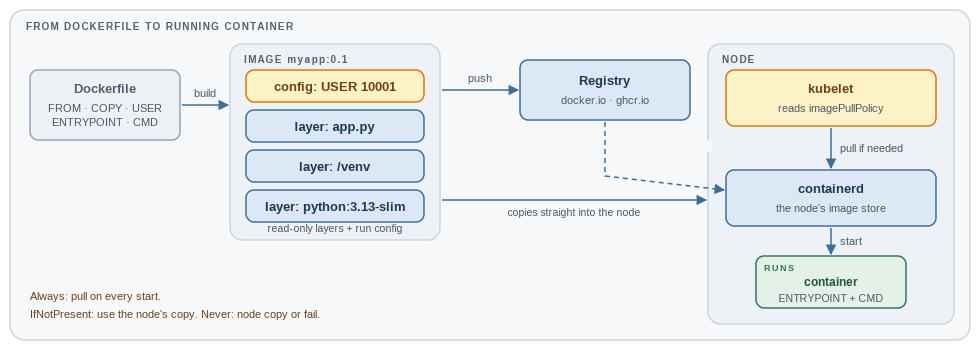
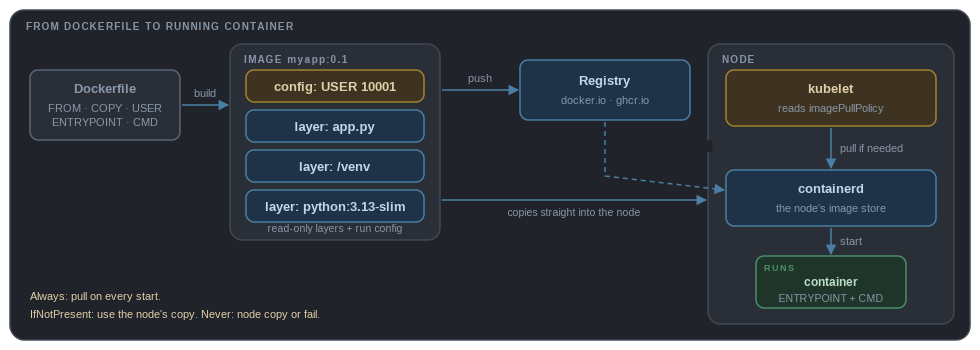
Figure 15-1: Two ways an image reaches a node. Amber is what Kubernetes reads: the image's run config and the kubelet's pull decision. Green is the running container.
Key concepts
imagePullPolicy
| Policy | The kubelet pulls when | Use when |
|---|---|---|
Always | Every container start. It checks the registry digest and reuses cached layers. | Mutable tags you want refreshed on each restart |
IfNotPresent | The node has no image with that name | Pinned tags and digests. The normal case. |
Never | Never. Fails with ErrImageNeverPull if the node lacks it. | Images you pre-load on purpose |
Leave the field out and the API server fills it in once, at creation:
| Image reference | Default | On kind after kind load |
|---|---|---|
myapp (no tag) or myapp:latest | Always | ImagePullBackOff. The kubelet ignores the loaded copy and asks Docker Hub for docker.io/library/myapp:latest. |
myapp:0.1 | IfNotPresent | Runs from the loaded copy |
myapp@sha256:… | IfNotPresent | Runs from the loaded copy |
The default is not recomputed when you later change the tag. A Deployment created with :latest keeps Always after set image myapp=myapp:0.2.
Tags vs digests
| Reference | Mutable? | Result |
|---|---|---|
nginx:latest | Yes, moves on every release | Two Pods of one ReplicaSet can run different code |
nginx:1.27 | Yes, re-pushed for patch releases | Usually fine. Nodes that pulled earlier keep the older build under IfNotPresent. |
nginx@sha256:… | No | Every node runs identical bytes. Rollback is exact. |
Pin a tag in every manifest you write. Pin a digest where "exactly what we tested" matters: production, regulated workloads, supply-chain policies.
ENTRYPOINT and CMD vs command and args
| Dockerfile | Kubernetes field | Set only the Kubernetes field and |
|---|---|---|
ENTRYPOINT | command | The entrypoint is replaced and the image's CMD is dropped too |
CMD | args | CMD is replaced; the entrypoint still runs with your args |
The image on this page uses ENTRYPOINT ["uvicorn", "app:app", "--host", "0.0.0.0"] and CMD ["--port", "8080"], so args: ["--port", "9090"] moves the port without a rebuild. → See What -- does for which kubectl generator sets which field.
What goes in the Dockerfile
| Practice | Failure it prevents |
|---|---|
| Multi-stage build | Compilers and caches shipped to production. The runtime stage copies only what runs. |
Slim base (python:3.13-slim, distroless) | Slow pulls and a larger CVE surface |
COPY requirements.txt before the code | Every code edit reinstalling all dependencies. Layers are cached in order. |
.dockerignore | .git, local virtualenvs and secrets baked into a layer |
Numeric non-root USER | runAsNonRoot: true can only verify a numeric UID. A name such as USER app fails with CreateContainerConfigError. |
No HEALTHCHECK | Nothing. Kubernetes ignores it. Health belongs in probes. |
kubectl essentials
The app: one file, three endpoints. /healthz is for the liveness probe and /readyz for readiness.
# app.py
import os
import socket

from fastapi import FastAPI

app = FastAPI()


@app.get("/")
def root():
    return {
        "version": os.environ.get("APP_VERSION", "dev"),
        "greeting": os.environ.get("GREETING", "hello"),
        "api_key_set": "API_KEY" in os.environ,
        "pod": socket.gethostname(),
    }


@app.get("/healthz")  # liveness: the process answers
def healthz():
    return {"ok": True}


@app.get("/readyz")  # readiness: ready for traffic
def readyz():
    return {"ready": True}
# requirements.txt
fastapi==0.141.1
uvicorn==0.54.0
# Dockerfile
# Stage 1: install dependencies into a virtualenv. Build tools, if you need any, stay here.
FROM python:3.13-slim AS build
RUN python -m venv /venv
COPY requirements.txt .
RUN /venv/bin/pip install --no-cache-dir -r requirements.txt

# Stage 2: the runtime image gets only the virtualenv and the code.
FROM python:3.13-slim
ARG APP_VERSION=dev
ENV APP_VERSION=$APP_VERSION PATH=/venv/bin:$PATH PYTHONUNBUFFERED=1
COPY --from=build /venv /venv
WORKDIR /app
COPY app.py .
USER 10001
EXPOSE 8080
ENTRYPOINT ["uvicorn", "app:app", "--host", "0.0.0.0"]
CMD ["--port", "8080"]
# .dockerignore
.git
.venv
__pycache__
*.pyc
Dockerfile
.dockerignore
Build, load, run, expose, call. APP_VERSION is baked in at build time so every response says which image served it:
docker build -t myapp:0.1 --build-arg APP_VERSION=0.1 .
kind load docker-image myapp:0.1 --name ckad              # copy into the kind node
kubectl create deployment myapp --image=myapp:0.1 --port=8080
kubectl expose deployment myapp --port=80 --target-port=8080
kubectl exec c -- wget -qO- -T 3 http://myapp             # c is the client Pod from the image kit
Inspect what the node has and what the Pod asked for:
docker exec ckad-control-plane crictl images | grep myapp  # the kind node's image store
docker image inspect myapp:0.1 --format '{{.Config.Entrypoint}} {{.Config.Cmd}} {{.Config.User}}'
kubectl get deploy myapp -o jsonpath='{.spec.template.spec.containers[0].imagePullPolicy}{"\n"}'
kubectl describe pod -l app=myapp | grep -E "Pulling|Pulled|Failed"
Private registries: a docker-registry Secret, referenced by the Pod or attached to its ServiceAccount:
kubectl create secret docker-registry regcred --docker-server=ghcr.io \
  --docker-username=bot --docker-password="$TOKEN"
kubectl patch serviceaccount default -p '{"imagePullSecrets":[{"name":"regcred"}]}'
apiVersion: v1
kind: Pod
metadata:
  name: private
spec:
  imagePullSecrets:
  - name: regcred                    # same namespace as the Pod
  containers:
  - name: app
    image: ghcr.io/example/private-app:1.4.2
    imagePullPolicy: IfNotPresent
    args: ["--port", "9090"]         # replaces CMD, keeps ENTRYPOINT
🧪 Lab
Requires: Standard lab setup (plain kind) and Docker on your laptop · How the tiers work.
Build an image, get it into kind, and break the pull on purpose.
Goal
- Save the four files above in a directory. Build
myapp:0.1withAPP_VERSION=0.1and load it into theckadcluster. - In namespace
lab2-6, create Deploymentmyappfrom it, expose it on port 80 → 8080, and call it from a client Podc. - Build
myapp:0.2and rollmyappto it without loading it first. Read the error, then fix it without touching the Deployment. - Tag the same image as
myapp:latest, load it, and create Deploymentlatestfrom it. Explain why it fails, then make it run without changing the tag.
Verify
kubectl -n lab2-6 exec c -- wget -qO- -T 3 http://myapp      # "version":"0.2"
kubectl -n lab2-6 get deploy latest                          # 1/1
kubectl -n lab2-6 exec deploy/myapp -- id -u                 # 10001
🟡 Hints
docker build -hfor-tand--build-arg.kind load -hlistsdocker-image; pass--name ckad.- "Run N copies" and "Give Pods one stable name" in Command Patterns. The container listens on 8080.
- "Ship a new image" in Command Patterns. The kubelet retries the pull with back-off, so fixing what's on the node is enough.
- Compare
imagePullPolicyon the two Deployments. The defaults table says why they differ.kubectl patchcan set the field.
🟢 Guided
-
Create the lab namespace and a client Pod to test from.
kubectl create namespace lab2-6kubectl -n lab2-6 run c --image=busybox:1.36 --restart=Never -- sleep 3600 -
In the directory with the four files, build the image with its version baked in.
docker build -t myapp:0.1 --build-arg APP_VERSION=0.1 . -
Copy the image into the kind node.
kind load docker-image myapp:0.1 --name ckadImage: "myapp:0.1" with ID "sha256:ef7ca82e..." not yet present on node "ckad-control-plane", loading... -
Create the Deployment and wait for it. The pinned tag defaults to
IfNotPresent, so the loaded copy is used.kubectl -n lab2-6 create deployment myapp --image=myapp:0.1 --port=8080kubectl -n lab2-6 rollout status deployment/myapp -
Expose it and call it.
kubectl -n lab2-6 expose deployment myapp --port=80 --target-port=8080kubectl -n lab2-6 exec c -- wget -qO- -T 3 http://myapp{"version":"0.1","greeting":"hello","api_key_set":false,"pod":"myapp-5b455bd5d5-4mbxt"} -
Build 0.2 and roll to it, forgetting the load.
docker build -t myapp:0.2 --build-arg APP_VERSION=0.2 .kubectl -n lab2-6 set image deployment/myapp myapp=myapp:0.2kubectl -n lab2-6 get pods -l app=myappkubectl -n lab2-6 describe pod -l app=myapp | grep "Failed to pull"NAME READY STATUS RESTARTS AGEmyapp-5b455bd5d5-4mbxt 1/1 Running 0 22smyapp-698bc75bc6-qrxg4 0/1 ImagePullBackOff 0 20sFailed to pull image "myapp:0.2": failed to pull and unpack image "docker.io/library/myapp:0.2":failed to resolve reference "docker.io/library/myapp:0.2": pull access denied, repository does notexist or may require authorizationA bare name means Docker Hub. The old Pod is still serving 0.1, because the rollout never removes a Pod until its replacement is Ready.
-
Load the image. The kubelet's next retry finds it on the node; the Deployment is untouched.
kind load docker-image myapp:0.2 --name ckadkubectl -n lab2-6 rollout status deployment/myapp -
Tag the same image as
latest, load it, and deploy it.docker tag myapp:0.2 myapp:latestkind load docker-image myapp:latest --name ckadkubectl -n lab2-6 create deployment latest --image=myapp:latest --port=8080kubectl -n lab2-6 get deploy latest -o jsonpath='{.spec.template.spec.containers[0].imagePullPolicy}{"\n"}'Always:latestdefaulted toAlways. The image is on the node, but the kubelet still asks Docker Hub first and getspull access denied:ImagePullBackOff. -
Tell the kubelet to use the node's copy.
kubectl -n lab2-6 patch deployment latest --type=json \-p '[{"op":"add","path":"/spec/template/spec/containers/0/imagePullPolicy","value":"IfNotPresent"}]'kubectl -n lab2-6 rollout status deployment/latest -
Confirm the Dockerfile's
USERis what runs.kubectl -n lab2-6 exec deploy/myapp -- id -u10001 -
Run the ✅ Check below, then delete everything the lab created.
kubectl delete namespace lab2-6
✅ Check
t() { [ "$2" = "$3" ] && echo "PASS $1" || echo "FAIL $1: got '$2', want '$3'"; }
t "myapp serves 0.2"        "$(kubectl -n lab2-6 exec c -- wget -qO- -T 3 http://myapp | grep -o '"version":"[^"]*"')" '"version":"0.2"'
t "latest uses IfNotPresent" "$(kubectl -n lab2-6 get deploy latest -o jsonpath='{.spec.template.spec.containers[0].imagePullPolicy}')" "IfNotPresent"
t "latest is Ready"          "$(kubectl -n lab2-6 get deploy latest -o jsonpath='{.status.readyReplicas}')" "1"
t "runs as UID 10001"        "$(kubectl -n lab2-6 exec deploy/myapp -- id -u)" "10001"
Gotchas
- Forgetting
kind load. Every rebuild needs a new load; the node's copy is a snapshot. Rebuilding the same tag and reloading doesn't restart running Pods either:kubectl rollout restartpicks it up. :latestmeansAlways. On kind, and on any node without registry access, that'sImagePullBackOff. Pin a tag, or setimagePullPolicy: IfNotPresentexplicitly.- "pull access denied" is ambiguous. Docker Hub returns the same
pull access denied, repository does not exist or may require authorizationfor a typo, a private repo and an image that was never pushed. Check the name first, then credentials. imagePullSecretsare namespaced. A Secret indefaultdoes nothing for a Pod inprod. Attach it to the ServiceAccount so every Pod gets it.commanddropsCMD. Setting onlycommandloses the image's default arguments. To change flags, setargsand keep the entrypoint.- Architecture mismatch. An
amd64image on anarm64node (Apple Silicon kind, Graviton) exits withexec format error. Build withdocker buildx build --platform linux/amd64,linux/arm64. USERby name.runAsNonRoot: truerefuses an image whose user isn't numeric:container has runAsNonRoot and image has non-numeric user (app), cannot verify user is non-root. UseUSER 10001.
Scenario questions
Q1 ★ You built an image on your laptop, deployed it to kind, and the Pod shows ImagePullBackOff. The image is right there in docker images. Why?
Model answer
- Clarify: which tag, and did you run
kind load? - Observe:
kubectl describe podshowsFailed to pull image "myapp:latest" ... docker.io/library/myapp:latest: pull access denied.docker exec ckad-control-plane crictl imagesshows whether the node has it.kubectl get deploy -o jsonpathshowsimagePullPolicy. - Hypothesise: the node is a separate container with its own image store, so the laptop's Docker cache is invisible to it. Either the image was never loaded, or it was loaded but the
:latesttag defaulted toAlways, so the kubelet ignores the local copy and asks Docker Hub. - Fix:
kind load docker-image myapp:0.1 --name ckadand deploy a pinned tag. For:latest, setimagePullPolicy: IfNotPresent. - Prevent: never deploy
:latest. A CI step that tags images with the Git SHA makes every tag unique and every rollout traceable.
Q2 ★★ A Deployment pulling from your company's private registry fails with ImagePullBackOff, but the same image pulls fine on your laptop. Walk me through it.
Model answer
- Clarify: which registry, and how does the cluster authenticate: a pull Secret, or node or workload identity (GKE, EKS)?
- Observe:
kubectl describe podshowsunauthorized,deniedorpull access denied.kubectl get pod -o jsonpath='{.spec.imagePullSecrets}'is empty, or names a Secret thatkubectl get secretcan't find in this namespace. - Hypothesise: your laptop is logged in and the node isn't. No
imagePullSecrets, a Secret in the wrong namespace, an expired token, or the node's cloud identity lacks read access to the registry. - Fix:
kubectl create secret docker-registryin the Pod's namespace and reference it, or attach it to the ServiceAccount. On a managed cloud, grant the node or workload identity reader access instead. - Prevent: prefer identity-based pulls to static tokens, which expire silently. If you must use tokens, deploy the pull Secret with the namespace so no workload can arrive without it.
Q3 ★★ Staging and production both run api:2.4, but production behaves like the old build. How is that possible?
Model answer
- Clarify: was
2.4ever re-pushed? WhatimagePullPolicydoes production use? - Observe:
kubectl get pod -o jsonpath='{.status.containerStatuses[0].imageID}'shows the digest each Pod actually runs. Compare it across clusters and nodes. - Hypothesise: tags are mutable.
2.4was re-pushed after a fix. Production nodes had the old2.4cached andIfNotPresentreused it; staging nodes pulled fresh. - Fix: redeploy by digest (
api@sha256:…) so every node runs the same bytes. - Prevent: immutable tags in the registry (most registries support this setting), and deploy by digest from CI. The trade-off: digests are unreadable in manifests, so keep the tag as a comment or label.
Q4 ★★★ The model-serving image is 4 GB and a scale-out takes six minutes, mostly pulling. What do you do?
Model answer
- Clarify: what's in the 4 GB: base OS, CUDA libraries, Python packages, the model weights? How often does each part change?
- Observe:
docker history <image>shows each layer's size.kubectl describe podshowsPulled ... in 5m12s. - Hypothesise: a full base image, build tools left in, and model weights baked into a layer that changes with every model version, so no node ever has it cached.
- Fix: multi-stage build onto a slim runtime base, order layers from least to most frequently changed so code changes reuse cached layers, and move the weights out of the image into a volume or init-container download. Pre-pull the base on GPU nodes with a DaemonSet.
- Prevent: track image size in CI and fail the build over a budget. → See ML Model Serving for the model-download pattern.
Summary
- An image is layers plus run config.
ENTRYPOINTmaps tocommand,CMDtoargs. - kind nodes have their own image store.
kind load docker-imageafter every build, or push to a registry. :latestdefaults toAlways. Pin tags; pin digests where exactness matters.- Private registries need credentials in the Pod's namespace.
imagePullSecretson the Pod or its ServiceAccount. - Build small, run non-root, probe in Kubernetes. Multi-stage, slim base, numeric
USER, noHEALTHCHECK.
Next in path → Config & Secrets (Phase 3)