Services & Ingress
Drill until fluent: hands-on rounds test this directly. Phase 2 of the Learning Path.
Docs: Service · EndpointSlices · DNS for Services and Pods · Ingress · Gateway API
Overview
Pods are replaced all the time and every replacement gets a new IP, so nothing should talk to a Pod IP directly. A Service gives a set of Pods one stable virtual IP and DNS name. It finds its Pods by label selector and nothing else. The EndpointSlice controller keeps the list of Ready, matching Pod IPs current, and kube-proxy on each node routes the virtual IP to them. An Ingress adds HTTP routing on top: one external entry point that sends shop.example.com/api to one Service and / to another. An Ingress does nothing unless an Ingress controller is installed. Almost every "can't reach my app" question is answered by walking this path hop by hop.
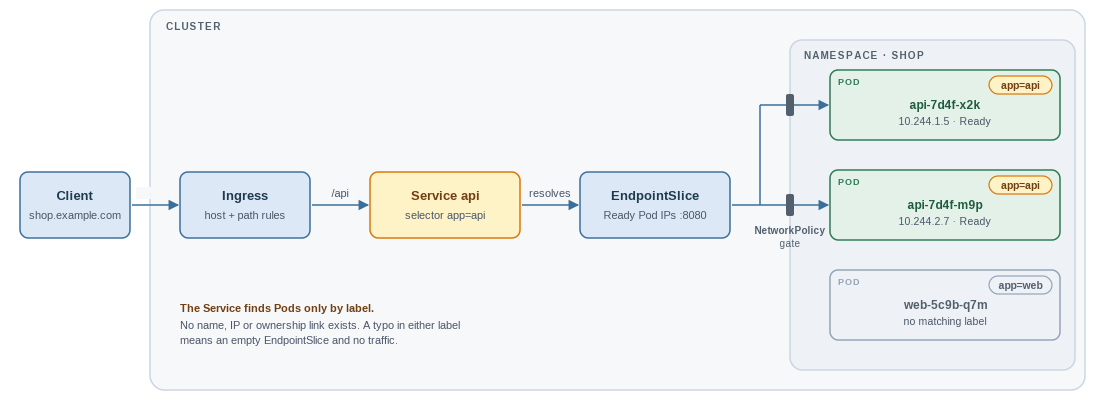
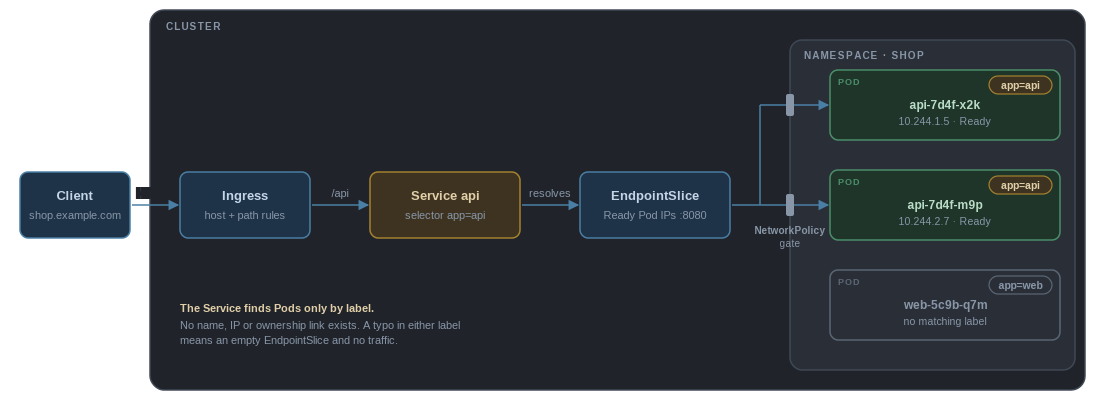
Figure 10-1: The request path. Amber marks labels and the selector that matches them, the only link between a Service and its Pods. Grey is a Pod the selector doesn't match. The dark bars are NetworkPolicy checks (→ Network Policy).
Key concepts
Service types
| Type | Reachable from | How | Use when |
|---|---|---|---|
| ClusterIP (default) | Inside the cluster | Virtual IP + DNS name | Service-to-service traffic |
| NodePort | Outside, via <any-node-ip>:30000–32767 | Opens the port on every node | Quick tests, or behind your own load balancer |
| LoadBalancer | Outside, via a cloud load balancer | NodePort + a provisioned external LB | One externally exposed TCP/UDP service |
| ExternalName | Inside | DNS CNAME to an outside name | Alias an external database |
Headless (clusterIP: None) | Inside | DNS returns Pod IPs directly, no virtual IP | StatefulSets, client-side load balancing |
The four ports
| Field | Where | Meaning |
|---|---|---|
containerPort | Pod spec | What the app listens on. Informational only. |
targetPort | Service | Where the Service sends traffic on the Pod. Must match what the app listens on. |
port | Service | What clients connect to on the Service IP |
nodePort | Service (NodePort/LB) | Port opened on every node |
Service port → targetPort | App listens on | Result |
|---|---|---|
| 80 → 8080 | 8080 | Works |
| 80 → 80 | 8080 | Endpoints exist, but connections are refused |
80 → http (named) | Port named http in the Pod spec | Works, and survives the app changing port numbers |
DNS names
| Name | Resolves from |
|---|---|
api | Same namespace |
api.shop | Any namespace |
api.shop.svc.cluster.local | Anywhere in the cluster (fully qualified) |
db-0.db.shop.svc.cluster.local | A single StatefulSet Pod behind a headless Service |
Ingress vs Gateway API
Gateway API exists because Ingress only standardised host and path routing. Everything else (traffic weights, header matching, timeouts, TLS details) became controller-specific annotations, so an Ingress written for one controller didn't work on another.
| Ingress | Gateway API | |
|---|---|---|
| API | networking.k8s.io/v1, stable, in the CKAD curriculum | gateway.networking.k8s.io/v1, the successor |
| Model | One object: host + path rules | Split roles: GatewayClass (infra), Gateway (platform), HTTPRoute (app team) |
| Traffic splitting, header matching | Controller-specific annotations | Built in (weights, headers) |
| Needs a controller | Yes | Yes |
→ Why the labs still use ingress-nginx: the retirement note.
kubectl essentials
Expose and inspect:
kubectl expose deployment api --port=80 --target-port=8080               # ClusterIP
kubectl expose deployment api --port=80 --target-port=8080 --type=NodePort --name=api-np
kubectl create service clusterip api --tcp=80:8080 --dry-run=client -o yaml   # selector is app=api
kubectl get svc,endpointslices -l app=api
kubectl get endpointslices -l kubernetes.io/service-name=api -o wide     # the actual Pod IPs
kubectl describe svc api                                                  # Selector, TargetPort, Endpoints
kubectl get pods -l app=api --show-labels                                 # does the selector match anything?
Test from inside the cluster:
kubectl run tmp --rm -it --image=busybox:1.36 --restart=Never -- wget -qO- -T 3 http://api
kubectl run tmp --rm -it --image=busybox:1.36 --restart=Never -- nslookup api.shop
kubectl port-forward svc/api 8080:80                                      # then curl localhost:8080
Ingress:
kubectl create ingress shop --class=nginx \
  --rule="shop.example.com/api*=api:80" --rule="shop.example.com/*=web:80"
kubectl get ingressclass
kubectl describe ingress shop                                             # rules and resolved backends
A Service with a named target port:
apiVersion: v1
kind: Service
metadata:
  name: api
spec:
  type: ClusterIP
  selector:
    app: api                     # must match the Pod template labels exactly
  ports:
  - name: http
    port: 80
    targetPort: http             # the containerPort named "http"
An Ingress routing by path:
apiVersion: networking.k8s.io/v1
kind: Ingress
metadata:
  name: shop
spec:
  ingressClassName: nginx
  tls:
  - hosts: [shop.example.com]
    secretName: shop-tls         # a kubernetes.io/tls Secret
  rules:
  - host: shop.example.com
    http:
      paths:
      - path: /api
        pathType: Prefix
        backend:
          service:
            name: api
            port: {number: 80}
      - path: /
        pathType: Prefix
        backend:
          service:
            name: web
            port: {number: 80}
🧪 Lab
Requires: Standard lab setup · Lab 1-1 · How the tiers work.
Break the link between a Service and its Pods, then find it. Lab 1-1 does the basic selector break; this lab adds targetPort and Ingress.
Goal
- In namespace
lab2-4, create Deploymentapi(registry.k8s.io/e2e-test-images/agnhost:2.53, argsnetexec --http-port=8080, 2 replicas). - Expose it as Service
apion port 80 → 8080. Call it from a temporary Pod. - Patch the Service selector to
app: apii. Call it again and find the cause using onlykubectl get/describe. - Fix the selector, then change
targetPortto 9090 and describe how the symptom differs. - Create an Ingress
shoprouting/apitoapi:80and check its backends withkubectl describe.
Verify
kubectl -n lab2-4 get endpointslices -l kubernetes.io/service-name=api   # 2 endpoints after the fix
kubectl -n lab2-4 run tmp --rm -it --image=busybox:1.36 --restart=Never -- wget -qO- -T 3 http://api/hostname
🟡 Hints
- agnhost is in the image kit. Note how
--behaves undercreate deployment. kubectl expose -h: look at--portand--target-port.kubectl describe svcshowsSelectorandEndpoints. Compare withkubectl get pods --show-labels.kubectl patch --type=jsoncan replace/spec/ports/0/targetPort. Is the error the same? What doesdescribe svcshow this time?- "Route HTTP by host and path" in Command Patterns.
🟢 Guided
-
Create the lab namespace.
kubectl create namespace lab2-4 -
Run 2 agnhost Pods serving HTTP on 8080 (create deployment: the words after -- replace the entrypoint).
kubectl -n lab2-4 create deployment api --image=registry.k8s.io/e2e-test-images/agnhost:2.53 \--replicas=2 --port=8080 -- /agnhost netexec --http-port=8080 -
Create a Service: port 80 on the Service, 8080 on the Pods.
kubectl -n lab2-4 expose deployment api --port=80 --target-port=8080 -
Call it from a throwaway Pod: prints the serving Pod's name.
kubectl -n lab2-4 run tmp --rm -it --image=busybox:1.36 --restart=Never -- wget -qO- -T 3 http://api/hostname -
Break the selector with a typo.
kubectl -n lab2-4 patch svc api -p '{"spec":{"selector":{"app":"apii"}}}' -
Call it again: Connection refused, although DNS still resolves.
kubectl -n lab2-4 run tmp --rm -it --image=busybox:1.36 --restart=Never -- wget -qO- -T 3 http://api/hostname -
See why: Endpoints:
<none>.kubectl -n lab2-4 describe svc api -
The Pods are
app=api; the selector saysapp=apii.kubectl -n lab2-4 get pods --show-labels -
Fix the selector.
kubectl -n lab2-4 patch svc api -p '{"spec":{"selector":{"app":"api"}}}' -
Send traffic to a port nothing listens on.
kubectl -n lab2-4 patch svc api --type=json -p '[{"op":"replace","path":"/spec/ports/0/targetPort","value":9090}]' -
Call it: also "Connection refused", but now describe svc lists endpoints; the Pod itself refuses.
kubectl -n lab2-4 run tmp --rm -it --image=busybox:1.36 --restart=Never -- wget -qO- -T 3 http://api/hostname -
Put targetPort back.
kubectl -n lab2-4 patch svc api --type=json -p '[{"op":"replace","path":"/spec/ports/0/targetPort","value":8080}]' -
Route shop.example.com/api to the Service.
kubectl -n lab2-4 create ingress shop --rule="shop.example.com/api*=api:80" -
Check the backends: api:80 (10.244.x.x:8080,...).
kubectl -n lab2-4 describe ingress shopADDRESSstays empty and nothing routes until an Ingress controller runs. Lab 2-5 installs one and sends real traffic. -
Run the ✅ Check below, then delete everything the lab created.
kubectl delete namespace lab2-4
✅ Check
t() { [ "$2" = "$3" ] && echo "PASS $1" || echo "FAIL $1: got '$2', want '$3'"; }
kubectl -n lab2-4 run chk --image=busybox:1.36 --restart=Never -- sleep 600 2>/dev/null; kubectl -n lab2-4 wait --for=condition=Ready pod/chk >/dev/null
t "selector fixed"      "$(kubectl -n lab2-4 get svc api -o jsonpath='{.spec.selector.app}')" "api"
t "targetPort 8080"     "$(kubectl -n lab2-4 get svc api -o jsonpath='{.spec.ports[0].targetPort}')" "8080"
t "2 endpoints"         "$(kubectl -n lab2-4 get endpointslices -l kubernetes.io/service-name=api -o jsonpath='{range .items[*].endpoints[*]}x{end}')" "xx"
t "Service answers"     "$(kubectl -n lab2-4 exec chk -- wget -qO- -T 3 http://api/hostname | cut -c1-4)" "api-"
t "Ingress routes /api" "$(kubectl -n lab2-4 get ingress shop -o jsonpath='{.spec.rules[0].http.paths[0].backend.service.name}')" "api"
Requires: Cluster add-ons (port mappings + ingress-nginx) · Lab 2-4 · How the tiers work.
Route two Services through one Ingress, from your laptop.
Goal
- In namespace
lab2-5, create Deploymentapi(agnhostnetexecon 8080, 2 replicas) with Serviceapion 80 → 8080, and Deploymentweb(nginx:1.27) with Servicewebon 80. - Create one Ingress
shop, classnginx, hostshop.localhost:/apigoes toapi, everything else toweb. - From your laptop, curl
/,/apiand/apiv1. Which backend answered each, and how can you tell? - Curl a host the Ingress doesn't know. Who answers now?
Verify
curl -s http://shop.localhost/ | grep -o '<title>.*</title>'      # <title>Welcome to nginx!</title>
curl -s http://shop.localhost/api                                # NOW: 2026-... (agnhost)
curl -s -o /dev/null -w '%{http_code}\n' http://other.localhost/  # 404
🟡 Hints
- Same commands as Lab 2-4 steps 2–3, twice.
- "Route HTTP by host and path" in Command Patterns.
--rulecan repeat;--classpicks the controller. - agnhost answers unknown paths with
NOW: <time>. nginx answers with HTML.pathType: Prefixmatches whole path segments. - A 404 has a footer. Compare it with the one from
/apiv1, and readkubectl logs deploy/web.
🟢 Guided
-
Create the namespace and both backends.
kubectl create namespace lab2-5kubectl -n lab2-5 create deployment api --image=registry.k8s.io/e2e-test-images/agnhost:2.53 \--replicas=2 --port=8080 -- /agnhost netexec --http-port=8080kubectl -n lab2-5 expose deployment api --port=80 --target-port=8080kubectl -n lab2-5 create deployment web --image=nginx:1.27kubectl -n lab2-5 expose deployment web --port=80 -
Create the Ingress. The more specific path wins, whatever the rule order.
kubectl -n lab2-5 create ingress shop --class=nginx \--rule="shop.localhost/api*=api:80" --rule="shop.localhost/*=web:80"kubectl -n lab2-5 describe ingress shop | sed -n '/Rules/,/Annotations/p'Rules:Host Path Backends---- ---- --------shop.localhost/api api:80 (10.244.0.172:8080,10.244.0.171:8080)/ web:80 (10.244.0.173:80)The generator's
api*becomespath: /apiwithpathType: Prefix. -
Curl each path from your laptop.
curl -s http://shop.localhost/ | grep -o '<title>.*</title>'curl -s http://shop.localhost/apicurl -s http://shop.localhost/apiv1 | tail -3<title>Welcome to nginx!</title>NOW: 2026-09-27 09:56:00.194899043 +0000 UTC m=+5.235875961<hr><center>nginx/1.27.5</center></body></html>/apireached agnhost./apiv1is not under the/apiprefix, because Prefix matches whole segments, so it went toweb, whose nginx has no such file. The versioned footer andkubectl -n lab2-5 logs deploy/webboth show thewebPod served that 404. -
Curl a host with no rule.
curl -s http://other.localhost/ | tail -3<hr><center>nginx</center></body></html>A different 404: no version in the footer. The controller answered itself, because no rule matched the host. No Pod was involved.
-
Run the ✅ Check below, then delete everything the lab created.
kubectl delete namespace lab2-5
✅ Check
t() { [ "$2" = "$3" ] && echo "PASS $1" || echo "FAIL $1: got '$2', want '$3'"; }
t "/ reaches web"          "$(curl -s http://shop.localhost/ | grep -o '<title>.*</title>')" "<title>Welcome to nginx!</title>"
t "/api reaches api"       "$(curl -s http://shop.localhost/api | cut -c1-4)" "NOW:"
t "/apiv1 goes to web"     "$(curl -s http://shop.localhost/apiv1 | grep -o 'nginx/1.27')" "nginx/1.27"
t "unknown host is a 404"  "$(curl -s -o /dev/null -w '%{http_code}' http://other.localhost/)" "404"
t "Ingress has 2 backends" "$(kubectl -n lab2-5 get ingress shop -o jsonpath='{.spec.rules[0].http.paths[*].backend.service.name}')" "api web"
Gotchas
- Selector typos fail silently. The Service is created and DNS resolves; it just has no endpoints.
- "Connection refused" has two causes. kube-proxy rejects connections to a Service with no endpoints, and a wrong
targetPortis refused by the Pod.describe svctells them apart: empty vs listed Endpoints. A NetworkPolicy drop times out instead. - Not Ready means not an endpoint. A failing readiness probe removes the Pod from the EndpointSlice. → See Probes & Observability.
- Short names only work in the same namespace. Across namespaces use
api.shop. - An Ingress with no controller does nothing.
ADDRESSstays empty. Checkkubectl get ingressclass. pathTypeis required.Prefixmatches path segments (/apimatches/api/v1, not/apiv1).Exactmatches one path.kubectl get endpointsis deprecated. The Endpoints API is deprecated in favour of EndpointSlices. Usekubectl get endpointslices.
Scenario questions
Q1 ★ A Service exists and DNS resolves, but every request gets "connection refused". What do you check?
Model answer
- Clarify: did it ever work? What changed?
- Observe:
kubectl describe svc→Endpoints: <none>. CompareSelectorwithkubectl get pods --show-labels. - Hypothesise: the selector doesn't match the Pod labels, or matching Pods exist but none are Ready. With no endpoints, kube-proxy rejects the connection, which is why it's refused rather than timing out.
- Fix: correct the selector or labels, or fix whatever keeps the Pods from becoming Ready.
- Prevent: generate Service and Deployment from the same template (Helm/Kustomize) so labels can't drift apart. Alert on Services with zero endpoints.
Q2 ★★ Port-forwarding to a Pod works, but going through the Service fails with "connection refused". Why?
Model answer
- Clarify: which port does the app listen on, and what does the Service say?
- Observe:
kubectl describe svcshowsTargetPort: 80/TCP; the port-forward used 8080. Endpoints are listed. - Hypothesise:
targetPortpoints at a port where nothing listens. Endpoints exist, so this refusal comes from the Pod itself, not from kube-proxy. - Fix: set
targetPort: 8080, or better, name the container port and usetargetPort: http. - Prevent: named ports keep the Service correct when the app's port changes.
Q3 ★★ You need to expose five HTTP services externally. LoadBalancer per Service, or Ingress?
Model answer
- Clarify: all HTTP? Same domain? TLS required? Any non-HTTP protocols?
- Observe: each LoadBalancer Service provisions a separate cloud load balancer and IP, with its own cost and certificate handling.
- Hypothesise: HTTP services sharing a domain belong behind one entry point that routes by host and path and terminates TLS once.
- Fix: one Ingress (or Gateway API HTTPRoutes) in front of five ClusterIP Services. Keep LoadBalancer for non-HTTP protocols such as a TCP game server or MQTT.
- Prevent: the trade-off: a shared entry point is a shared failure domain and needs capacity planning. For a new platform, I'd pick Gateway API: standard weights and header matching, and clean role separation.
Q4 ★★★ Users see a burst of 502s during every rolling deploy, although readiness probes pass. Why?
Model answer
- Clarify: 502s at startup or at shutdown of Pods? Through the Ingress, or also Service-to-Service?
- Observe: errors line up with old Pods terminating. The proxy logs show connections reset by upstream.
- Hypothesise: on deletion, the kubelet sends SIGTERM while endpoint removal is still propagating to kube-proxy and the Ingress controller. For a moment, traffic still arrives at a Pod that has stopped accepting it.
- Fix: a
preStophook that sleeps 5–10 s, so the Pod keeps serving until everyone has removed it, plus graceful shutdown in the app and aterminationGracePeriodSecondslonger than both (→ termination sequence). - Prevent: add connection draining to the release checklist and test it with load running during a deploy. → See Zero-Downtime Release.
Summary
- Services find Pods by label only. Check
describe svc→ Endpoints before anything else. portis the Service's,targetPortis the app's. Name ports to avoid mismatches.- Only Ready Pods receive traffic. Readiness probes control Service membership.
- Use DNS names, not IPs.
svc.namespaceworks across namespaces. - Ingress routes HTTP and needs a controller. Gateway API is its successor; both are worth knowing.
Next in path → Container Images