Scheduling & Graceful Shutdown
Drill until fluent: hands-on rounds test this directly. Phase 3 of the Learning Path.
Docs: Assigning Pods to nodes · Taints and tolerations · Schedule GPUs · Pod termination · Disruptions
Overview
This page covers both ends of a Pod's time on a node. At the start, the scheduler filters out every node the Pod can't use, then scores the rest. Requests decide whether it fits (→ Resources & Scaling). Labels, affinity and taints decide whether it's allowed there. That's how GPU nodes stay reserved for GPU work. At the end, deletion is a sequence, not an instant: the Pod leaves the Service endpoints while the kubelet runs preStop, sends SIGTERM, and finally SIGKILL. Get the sequence wrong and every rollout drops requests. A PodDisruptionBudget stops node drains from taking too many replicas at once.
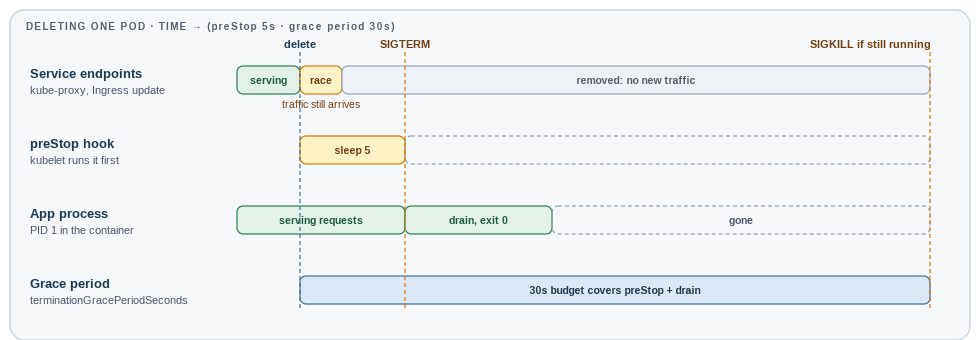
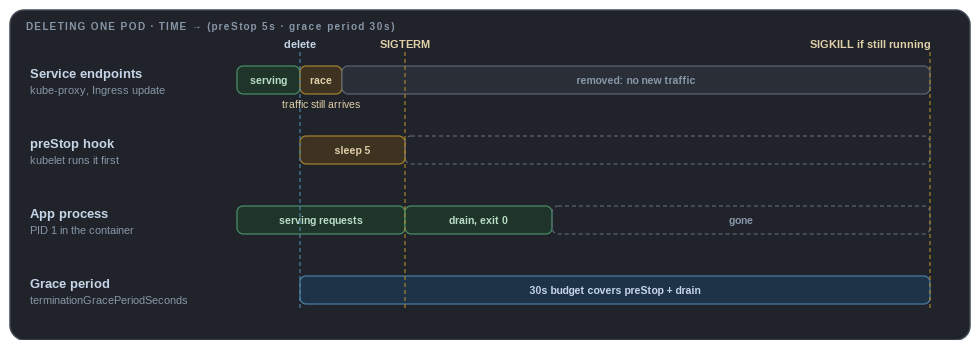
Figure 16-1: The termination sequence. Amber is the danger zone: the race while proxies still send traffic, and the signals that end the process. Green is the app doing useful work. The grace period's clock starts at deletion, not at SIGTERM.
Key concepts
Placing Pods
| Mechanism | Set on | Says | Use when |
|---|---|---|---|
nodeSelector | Pod | "Only nodes with these labels" | One hard requirement: disktype: ssd, a GPU model |
Node affinity, required… | Pod | Same, with In, NotIn, Exists and OR across terms | Several acceptable values, or exclusions |
Node affinity, preferred… | Pod | "Rather these nodes", with a weight | Soft preference that must not block scheduling |
| Taint | Node | "Keep out unless you tolerate me" | Reserve nodes: GPUs, a team's pool, a node being fixed |
| Toleration | Pod | "I may run on that taint" | Workloads that belong on tainted nodes |
Pod anti-affinity / topologySpreadConstraints | Pod | "Spread me across nodes or zones" | Replicas that must not share a failure domain |
Taints and tolerations
| Effect | New Pods without a toleration | Running Pods without one |
|---|---|---|
NoSchedule | Not scheduled | Stay |
PreferNoSchedule | Avoided if possible | Stay |
NoExecute | Not scheduled | Evicted (after tolerationSeconds, if set) |
A toleration permits; it doesn't attract. Dedicated nodes need both halves:
| Node has | Pod has | Result |
|---|---|---|
Taint dedicated=gpu:NoSchedule | Nothing | Pending: 1 node(s) had untolerated taint(s) |
| Taint | Toleration only | May land on the GPU node or any other node. The GPU pool is not reserved for it. |
| Nothing | nodeSelector only | Lands on the labelled node, but so can everyone else |
| Taint + label | Toleration + nodeSelector | Correct. Only this workload runs there, and it runs only there. |
→ Drill 2 reads the scheduler's message when no node qualifies.
GPU workloads
| Piece | What it does | Failure without it |
|---|---|---|
| Device plugin (NVIDIA GPU Operator, or built into GKE/EKS GPU pools) | Advertises nvidia.com/gpu as allocatable on GPU nodes | Insufficient nvidia.com/gpu on every node |
limits: {nvidia.com/gpu: 1} | Reserves whole GPUs. Integers only; requests default to the limit. | Pod lands on a CPU node, or several Pods share a GPU unmanaged |
| Toleration for the pool's taint | Lets the Pod onto tainted GPU nodes. GKE taints GPU pools nvidia.com/gpu=present:NoSchedule. | untolerated taint |
nodeSelector on the GPU type | Picks the model: cloud.google.com/gke-accelerator: nvidia-l4 | Gets whatever GPU is free |
GPUs can't be overcommitted and are the most expensive thing in the cluster. A Pending GPU Pod usually means the pool is full, so the cluster autoscaler has to add a node: minutes, not seconds.
The termination sequence
| # | What happens | Knob | Failure it prevents |
|---|---|---|---|
| 1 | Pod marked Terminating. At the same time, its endpoint is removed and the kubelet starts shutdown. | none | n/a |
| 2 | kube-proxy and Ingress controllers update, over 0–3 s. Traffic still arrives meanwhile. | none | This race is the cause of 502s during rollouts |
| 3 | kubelet runs the preStop hook | lifecycle.preStop.sleep.seconds | Keeps serving until everyone has stopped sending traffic |
| 4 | kubelet sends SIGTERM to PID 1 | The image's STOPSIGNAL | App stops accepting, finishes in-flight requests, exits |
| 5 | SIGKILL if still running | terminationGracePeriodSeconds (default 30), counted from step 1 | A hung shutdown blocking a rollout forever |
The API rejects a preStop sleep that doesn't fit: preStop.sleep: Invalid value: 5: must be non-negative and less than terminationGracePeriodSeconds (2). Budget grace period > preStop + the app's drain time.
PodDisruptionBudget
| Disruption | Respects the PDB? |
|---|---|
kubectl drain, node upgrades, cluster-autoscaler scale-down (all use the Eviction API) | Yes. Eviction waits until the budget allows it. |
| Deployment rolling update | No. maxUnavailable governs that. |
kubectl delete pod, node crash, OOM kill | No |
| Setting | Result with 3 replicas |
|---|---|
minAvailable: 2 | One Pod may be evicted at a time |
maxUnavailable: 1 | Same, and keeps working when the HPA scales to 10 |
minAvailable: 3 (all replicas) | Drains block forever. Node upgrades stall. |
kubectl essentials
Label and taint nodes. A trailing - removes:
kubectl get nodes --show-labels
kubectl label node <node> disktype=ssd
kubectl label node <node> disktype-                         # remove the label
kubectl taint nodes <node> dedicated=gpu:NoSchedule
kubectl taint nodes <node> dedicated=gpu:NoSchedule-        # remove the taint
kubectl describe node <node> | grep -A2 Taints
kubectl explain pod.spec.affinity.nodeAffinity
Maintenance and budgets:
kubectl cordon <node>                                       # no new Pods; running ones stay
kubectl drain <node> --ignore-daemonsets --delete-emptydir-data
kubectl drain <node> --pod-selector=app=web --timeout=60s   # evict only matching Pods
kubectl uncordon <node>
kubectl create pdb web --selector=app=web --min-available=2
kubectl get pdb                                             # ALLOWED DISRUPTIONS is what drains may take
A Deployment pinned to dedicated nodes, with a clean shutdown:
apiVersion: apps/v1
kind: Deployment
metadata:
  name: web
spec:
  replicas: 3
  selector:
    matchLabels: {app: web}
  template:
    metadata:
      labels: {app: web}
    spec:
      nodeSelector: {disktype: ssd}              # only here…
      tolerations:                               # …and allowed past the taint
      - {key: dedicated, operator: Equal, value: web, effect: NoSchedule}
      terminationGracePeriodSeconds: 30          # > preStop + drain time
      containers:
      - name: nginx
        image: nginx:1.27
        lifecycle:
          preStop:
            sleep: {seconds: 5}                  # stay in rotation while endpoints update
---
apiVersion: policy/v1
kind: PodDisruptionBudget
metadata:
  name: web
spec:
  maxUnavailable: 1
  selector:
    matchLabels: {app: web}
A GPU inference Pod. Not runnable on kind: there's no GPU device plugin, so it stays Pending with Insufficient nvidia.com/gpu. It passes --dry-run=server.
apiVersion: v1
kind: Pod
metadata:
  name: llm-inference
spec:
  nodeSelector:
    cloud.google.com/gke-accelerator: nvidia-l4       # GKE label; EKS and AKS use their own
  tolerations:
  - {key: nvidia.com/gpu, operator: Exists, effect: NoSchedule}
  containers:
  - name: server
    image: vllm/vllm-openai:v0.11.0
    args: ["--model", "Qwen/Qwen2.5-1.5B-Instruct"]
    resources:
      limits:
        nvidia.com/gpu: 1                          # whole GPUs only
        memory: 24Gi
      requests:
        cpu: "4"
        memory: 24Gi
🧪 Lab
Requires: Standard lab setup (plain kind, one node) · How the tiers work. The lab taints and labels your only node; the last step removes both.
Reserve a node, get a workload onto it, then try to drain it.
Goal
- Taint your node
dedicated=gpu:NoSchedule. In namespacelab3-3, create Deploymentweb(nginx:1.27, 2 replicas) and read why its Pods don't start. - Let
webonto the tainted node without removing the taint. - Require nodes labelled
disktype=ssd. Watch what happens to the rollout, then make it succeed. - Protect
webwith a PodDisruptionBudget ofminAvailable: 2, then try to drain onlyweb's Pods from the node. Uncordon afterwards. - Add a 5-second
preStopsleep and time how long deleting one Pod takes.
Verify
kubectl -n lab3-3 get pods -o wide                        # 2 Running
kubectl -n lab3-3 get pdb web                             # ALLOWED DISRUPTIONS 0
kubectl get nodes                                        # Ready, not SchedulingDisabled
🟡 Hints
kubectl taint -h. The node name is inkubectl get nodes.describe pod→ Events names the reason.tolerationsis a list under the Pod template'sspec.kubectl explain pod.spec.tolerations, thenkubectl patch --type=json.nodeSelectoris a map in the same place. A rolling update keeps old Pods until new ones are Ready.kubectl label node -h.kubectl create pdb -h.kubectl drain -h: look at--pod-selectorand--timeout. Drain cordons the node first.kubectl explain pod.spec.containers.lifecycle.preStop.sleep. Wrapkubectl deleteintime.
🟢 Guided
-
Create the namespace and keep the node name in a variable.
kubectl create namespace lab3-3NODE=$(kubectl get nodes -o jsonpath='{.items[0].metadata.name}') -
Taint the node, then create the Deployment.
kubectl taint nodes "$NODE" dedicated=gpu:NoSchedulekubectl -n lab3-3 create deployment web --image=nginx:1.27 --replicas=2kubectl -n lab3-3 describe pod -l app=web | grep FailedScheduling | head -1Warning FailedScheduling 5s default-scheduler 0/1 nodes are available: 1 node(s) had untolerated taint(s).preemption: 0/1 nodes are available: 1 Preemption is not helpful for scheduling. -
Add a toleration that matches the taint's key, value and effect.
kubectl -n lab3-3 patch deployment web --type=json -p '[{"op":"add","path":"/spec/template/spec/tolerations","value":[{"key":"dedicated","operator":"Equal","value":"gpu","effect":"NoSchedule"}]}]'kubectl -n lab3-3 rollout status deployment/web -
Require an
ssdnode. No node has that label yet.kubectl -n lab3-3 patch deployment web -p '{"spec":{"template":{"spec":{"nodeSelector":{"disktype":"ssd"}}}}}'kubectl -n lab3-3 get podsNAME READY STATUS RESTARTS AGEweb-776f7c6b64-p6x59 0/1 Pending 0 5sweb-7f58cb459d-kmqvv 1/1 Running 0 5sweb-7f58cb459d-t24l2 1/1 Running 0 6sThe new Pod is
Pendingwithdidn't match Pod's node affinity/selector. The old Pods keep serving: the rollout is stuck, not down. -
Label the node. The Pending Pod schedules and the rollout completes.
kubectl label node "$NODE" disktype=ssdkubectl -n lab3-3 rollout status deployment/web -
Create the budget and try to drain
weboff the node.kubectl -n lab3-3 create pdb web --selector=app=web --min-available=2kubectl drain "$NODE" --pod-selector=app=web --timeout=15s 2>&1 | grep -m1 "disruption budget"error when evicting pods/"web-776f7c6b64-fv2mk" -n "lab3-3" (will retry after 5s): Cannot evict pod as it would violate the pod's disruption budget.With 2 replicas and
minAvailable: 2,ALLOWED DISRUPTIONSis 0. On a real cluster the drain waits until the Deployment has a spare replica elsewhere. -
Drain cordoned the node before it gave up. Uncordon it.
kubectl uncordon "$NODE" -
Add a 5-second
preStopsleep, then time a delete.kubectl -n lab3-3 patch deployment web -p '{"spec":{"template":{"spec":{"containers":[{"name":"nginx","lifecycle":{"preStop":{"sleep":{"seconds":5}}}}]}}}}'kubectl -n lab3-3 rollout status deployment/webtime kubectl -n lab3-3 delete "$(kubectl -n lab3-3 get pods -l app=web -o name | head -n 1)"pod "web-5cf474b777-hcqmb" deleted from lab3-3 namespacetimereports about 6 seconds: five ofpreStop, then SIGTERM, which nginx handles quickly. Without the hook the same delete takes about 2 seconds. -
Run the ✅ Check below, then remove the taint and label and delete the namespace.
kubectl taint nodes "$NODE" dedicated=gpu:NoSchedule-kubectl label node "$NODE" disktype-kubectl delete namespace lab3-3
✅ Check
t() { [ "$2" = "$3" ] && echo "PASS $1" || echo "FAIL $1: got '$2', want '$3'"; }
NODE=$(kubectl get nodes -o jsonpath='{.items[0].metadata.name}')
t "2 Pods Ready"          "$(kubectl -n lab3-3 get deploy web -o jsonpath='{.status.readyReplicas}')" "2"
t "toleration set"        "$(kubectl -n lab3-3 get deploy web -o jsonpath='{.spec.template.spec.tolerations[0].value}')" "gpu"
t "nodeSelector set"      "$(kubectl -n lab3-3 get deploy web -o jsonpath='{.spec.template.spec.nodeSelector.disktype}')" "ssd"
t "PDB allows 0"          "$(kubectl -n lab3-3 get pdb web -o jsonpath='{.status.disruptionsAllowed}')" "0"
t "node schedulable"      "$(kubectl get node "$NODE" -o jsonpath='{.spec.unschedulable}')" ""
t "preStop is 5s"         "$(kubectl -n lab3-3 get deploy web -o jsonpath='{.spec.template.spec.containers[0].lifecycle.preStop.sleep.seconds}')" "5"
Gotchas
- A toleration is not a reservation. Without a
nodeSelectoror affinity, a tolerating Pod lands anywhere, and the GPU node sits idle. - Labels are yours to drift. A
nodeSelectoron a label that a node-pool upgrade dropped leaves new PodsPendingwhile old ones keep running. Prefer labels the provider sets (cloud.google.com/gke-accelerator,topology.kubernetes.io/zone). NoExecuteevicts running Pods. Tainting a nodeNoExecuteto "reserve" it empties it immediately.- The grace period includes
preStop. A 30 s preStop with the default 30 s grace period is rejected. A 25 s preStop leaves the app 5 s to drain. - PID 1 that ignores SIGTERM. An entrypoint script that starts the app without
execleavesshas PID 1, and it doesn't forward the signal. Every delete then waits out the whole grace period. Use exec-formENTRYPOINTandexecin scripts. - A PDB covering every replica blocks drains.
minAvailableequal toreplicas, or a PDB on a single-replica app, stalls node upgrades until someone deletes it. - Drain skips DaemonSets and refuses
emptyDir. Pass--ignore-daemonsetsand--delete-emptydir-data, knowing the second deletes that scratch data.
Scenario questions
Q1 ★ A new Pod is Pending: 0/5 nodes are available: 2 node(s) had untolerated taint {nvidia.com/gpu: present}, 3 node(s) didn't match Pod's node affinity/selector. Explain.
Model answer
- Clarify: is this Pod meant for GPU nodes? What does its
nodeSelectorask for? - Observe:
kubectl get pod -o jsonpath='{.spec.nodeSelector}'andkubectl get nodes -L <that label>.kubectl describe node <gpu-node> | grep Taints. - Hypothesise: the selector matches only the 2 GPU nodes, and the Pod lacks the toleration for their taint. The other 3 are excluded by the selector. Nowhere is legal.
- Fix: if it needs a GPU, add the toleration and a
nvidia.com/gpulimit. If not, remove the selector that points it at GPU nodes. - Prevent: a Helm value or Kustomize component that adds selector, toleration and GPU limit together, so nobody sets one half.
Q2 ★★ Every rollout causes a short burst of 502s from the Ingress, although readiness probes pass. What's happening and how do you fix it?
Model answer
- Clarify: do the errors line up with old Pods terminating or new ones starting?
- Observe: the timestamps match Pods entering
Terminating. Ingress controller logs showupstream prematurely closed connectionorconnection refusedto Pod IPs that just began shutting down. - Hypothesise: the endpoint removal race. SIGTERM arrives while the Ingress controller still routes to the Pod, and the app stops accepting immediately.
- Fix: a
preStopsleep of 5–10 s so the Pod keeps serving until the proxies catch up, SIGTERM handling that drains in-flight requests, andterminationGracePeriodSecondsabove both. - Prevent: run a load test during a rollout in CI and fail on any 5xx. The trade-off: each Pod takes 10 s longer to leave, so rollouts slow down a little.
Q3 ★★ A node upgrade has been stuck for an hour on kubectl drain. Why, and what do you do?
Model answer
- Clarify: which Pods are still on the node? Is anything in the drain output about a disruption budget?
- Observe: drain logs
Cannot evict pod as it would violate the pod's disruption budget.kubectl get pdb -Ashows one withALLOWED DISRUPTIONS 0. - Hypothesise: a PDB that can never be satisfied:
minAvailableequal to the replica count, a single-replica app, or replicas that are unhealthy so the budget is already spent. - Fix: scale the workload up so one replica is spare, or change the PDB to
maxUnavailable: 1. Deleting the PDB works too, but it accepts the outage. - Prevent: a policy check that rejects PDBs whose
minAvailableequalsreplicas. PrefermaxUnavailable, which scales with the HPA.
Q4 ★★★ Design GPU scheduling for a cluster that runs both expensive inference services and cheap batch jobs on the same GPU pool.
Model answer
- Clarify: which one wins when the pool is full? Can batch be interrupted? Are there several GPU types?
- Observe: GPUs can't be overcommitted, and a
PendingGPU Pod waits for a new node, which takes minutes. - Hypothesise: taint the pool so only GPU workloads enter, select GPU type by the provider's label, and use PriorityClasses so inference preempts batch.
- Fix: pool taint + toleration on both workloads; a high PriorityClass for inference and a low one for batch with retries (Jobs with
backoffLimit); a PDB on inference; cluster autoscaler on the pool with a small warm buffer for inference. - Prevent: the trade-off is utilisation against latency. Preemption keeps GPUs busy with batch work but kills batch Pods whenever inference scales up, so batch must checkpoint. → See ML Model Serving.
Summary
- Requests decide fit; labels and taints decide permission. A Pod needs both to schedule.
- Dedicated nodes need a taint and a selector. The toleration lets the Pod in; the selector keeps it there.
- GPUs are extended resources. Whole-number
nvidia.com/gpulimits, a pool taint to tolerate, a type label to select. - Deletion is a sequence. Endpoint removal and
preStoprun together, then SIGTERM, then SIGKILL at the grace period. - PDBs guard drains, not rollouts. Use
maxUnavailable: 1, and never budget every replica.
Next in path → Probes & Observability