Security
Be able to explain it and pass its lab once. Phase 6 of the Learning Path.
Docs: Controlling access to the API · RBAC · Service accounts · Security context · Pod Security Standards · Custom resources
Overview
Every request to the API server passes three gates in order. Authentication decides who you are (certificate, OIDC token, ServiceAccount token). Authorization decides whether that identity may do this verb on this resource, almost always through RBAC. Admission control can then change or reject the object itself: inject defaults, enforce quotas, block privileged Pods. Inside the Pod, a SecurityContext limits what the container process may do on the node. The same API machinery is also how Kubernetes is extended: a CustomResourceDefinition adds a new kind, and an Operator is a controller that reconciles it (→ Architecture).
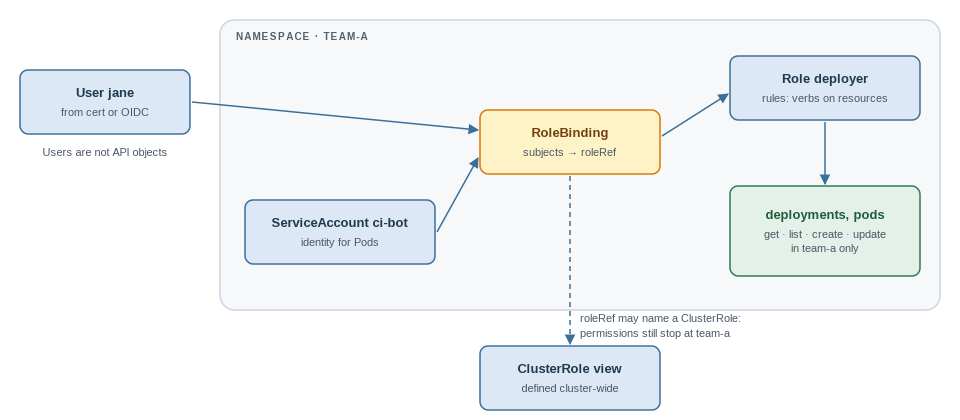
Figure 9-1: RBAC. Amber marks the binding, the only object that connects an identity to permissions. Green is what those permissions reach: verbs on resources, inside one namespace.
Key concepts
The request pipeline
| Stage | Question | Mechanisms | Failure you'll see |
|---|---|---|---|
| Authentication | Who are you? | Client certs, OIDC tokens, ServiceAccount tokens | 401 Unauthorized |
| Authorization | May you do this? | RBAC (also Node, Webhook) | 403 Forbidden: ... cannot create resource "deployments" |
| Mutating admission | Should the object change? | LimitRanger defaults, ServiceAccount injection, webhooks | Object differs from what you applied |
| Validating admission | Is the object allowed? | ResourceQuota, Pod Security Admission, ValidatingAdmissionPolicy, webhooks | forbidden: exceeded quota, violates PodSecurity "restricted" |
RBAC objects
| Object | Scope | Contains |
|---|---|---|
| Role | Namespace | Rules: apiGroups + resources + verbs |
| ClusterRole | Cluster | Same rules, plus cluster-scoped resources (nodes, PVs) |
| RoleBinding | Namespace | subjects → one roleRef |
| ClusterRoleBinding | Cluster | subjects → one ClusterRole, in every namespace |
| Role | Bound with | Result |
|---|---|---|
| Role | RoleBinding | Permissions in that namespace. The normal case. |
| ClusterRole | RoleBinding | Permissions in the binding's namespace only. Reuse one definition across namespaces. |
| ClusterRole | ClusterRoleBinding | Permissions in every namespace and on cluster-scoped resources |
| Role | ClusterRoleBinding | Invalid. A ClusterRoleBinding can only reference a ClusterRole. |
RBAC is additive. There are no deny rules; access is denied unless some binding allows it.
ServiceAccounts
| Fact | Consequence |
|---|---|
Every namespace has a default ServiceAccount | Pods without serviceAccountName use it. Give workloads their own. |
| Tokens are short-lived and projected into the Pod | Mounted at /var/run/secrets/kubernetes.io/serviceaccount/ |
automountServiceAccountToken: false | No token in the Pod. Set it for apps that never call the API. |
| Subject name format | system:serviceaccount:<namespace>:<name> in kubectl auth can-i --as |
SecurityContext
| Field | Level | Effect |
|---|---|---|
runAsNonRoot: true | Pod or container | Kubelet refuses to start a container that would run as UID 0 |
runAsUser / runAsGroup | Pod or container | UID / GID of the process |
fsGroup | Pod | Group ownership of mounted volumes, so a non-root user can write |
allowPrivilegeEscalation: false | Container | Blocks setuid binaries gaining privileges |
readOnlyRootFilesystem: true | Container | Writes only to mounted volumes |
capabilities.drop: ["ALL"] | Container | Removes Linux capabilities such as binding ports below 1024 |
privileged: true | Container | Full host access. Almost never. |
seccompProfile.type: RuntimeDefault | Pod or container | Filters dangerous syscalls |
Container-level settings override Pod-level ones.
Pod Security Admission
Label a namespace to enforce one of three Pod Security Standards:
| Level | Blocks | Use for |
|---|---|---|
privileged | Nothing | System namespaces (CNI, storage drivers) |
baseline | Host namespaces, privileged containers, hostPath | Default for most namespaces |
restricted | Also root users, privilege escalation, capabilities beyond NET_BIND_SERVICE | Application namespaces |
One label turns it on: kubectl label namespace team-a pod-security.kubernetes.io/enforce=restricted.
Deeper dive
Each level can be applied in three modes, one label per mode: enforce rejects the Pod, warn returns a warning to the client, audit records it in the audit log. Roll out with warn and audit first to find violations, then switch to enforce. Pin the standard's version with pod-security.kubernetes.io/enforce-version, or latest moves with each upgrade.
CRDs and Operators
| Piece | What it is | Example |
|---|---|---|
| CustomResourceDefinition | Adds a new kind to the API, with a schema | kind: Backup in group ops.example.com |
| Custom resource | An instance of that kind | Backup nightly-db |
| Operator | A controller that watches the kind and reconciles it | Creates CronJobs and PVCs for each Backup |
A CRD without a controller only stores data. The Operator is what makes it do something. The minimal CRD in kubectl essentials adds kind: Backup; a custom resource is then ordinary YAML:
# fragment: needs the Backup CRD installed
apiVersion: ops.example.com/v1
kind: Backup
metadata:
  name: nightly-db
spec:
  schedule: "0 2 * * *"
  retainDays: 7
kubectl essentials
RBAC, imperatively:
kubectl create serviceaccount ci-bot
kubectl create role deployer --verb=get,list,watch,create,update,patch --resource=deployments,pods
kubectl create rolebinding ci-bot-deployer --role=deployer --serviceaccount=team-a:ci-bot -n team-a
kubectl create rolebinding jane-view --clusterrole=view --user=jane -n team-a
kubectl create clusterrole node-reader --verb=get,list --resource=nodes
Check what an identity can do:
kubectl auth can-i create deployments -n team-a --as=system:serviceaccount:team-a:ci-bot
kubectl auth can-i --list -n team-a --as=jane
kubectl auth whoami
kubectl create token ci-bot -n team-a --duration=10m     # short-lived token for testing
Security context and admission:
kubectl explain pod.spec.securityContext
kubectl explain pod.spec.containers.securityContext
kubectl label namespace team-a pod-security.kubernetes.io/enforce=restricted
kubectl exec <pod> -- id                                  # which UID/GID the process has
Deeper dive
Inspect extensions:
kubectl get crd
kubectl api-resources --api-group=ops.example.com
kubectl explain backup.spec                               # works for CRDs with a schema
A Role and its binding:
apiVersion: rbac.authorization.k8s.io/v1
kind: Role
metadata:
  name: deployer
rules:
- apiGroups: ["apps"]                  # "" is the core group (pods, services, secrets)
  resources: ["deployments"]
  verbs: ["get", "list", "watch", "create", "update", "patch"]
- apiGroups: [""]
  resources: ["pods", "pods/log"]      # subresources are listed separately
  verbs: ["get", "list"]
---
apiVersion: rbac.authorization.k8s.io/v1
kind: RoleBinding
metadata:
  name: ci-bot-deployer
subjects:
- kind: ServiceAccount
  name: ci-bot
  namespace: team-a                    # required for ServiceAccount subjects
roleRef:
  apiGroup: rbac.authorization.k8s.io
  kind: Role
  name: deployer
A Pod that passes the restricted standard:
apiVersion: v1
kind: Pod
metadata:
  name: hardened
spec:
  automountServiceAccountToken: false
  securityContext:
    runAsNonRoot: true
    runAsUser: 1000
    runAsGroup: 3000
    fsGroup: 2000
    seccompProfile: {type: RuntimeDefault}
  containers:
  - name: app
    image: busybox:1.36
    command: ["sh", "-c", "id; touch /data/ok && echo wrote; sleep 3600"]
    securityContext:
      allowPrivilegeEscalation: false
      readOnlyRootFilesystem: true
      capabilities: {drop: ["ALL"]}
    volumeMounts: [{name: data, mountPath: /data}]
  volumes:
  - name: data
    emptyDir: {}
A minimal CRD:
apiVersion: apiextensions.k8s.io/v1
kind: CustomResourceDefinition
metadata:
  name: backups.ops.example.com        # <plural>.<group>
spec:
  group: ops.example.com
  scope: Namespaced
  names: {plural: backups, singular: backup, kind: Backup, shortNames: [bk]}
  versions:
  - name: v1
    served: true
    storage: true
    schema:
      openAPIV3Schema:
        type: object
        properties:
          spec:
            type: object
            required: [schedule]
            properties:
              schedule: {type: string}
              retainDays: {type: integer, minimum: 1}
🧪 Lab
Requires: Standard lab setup · How the tiers work.
Least privilege, then a hardened Pod.
Goal
- In namespace
lab6-2, create ServiceAccountci-botand a Role that allows managing Deployments and reading Pods and their logs. Bind it. - Prove
ci-botcan create Deployments but can't delete them, and can't read Secrets. - Label
lab6-2to enforcerestricted. Trykubectl run bad --image=nginx:1.27and read the error. - Run the
hardenedPod above and confirm its UID and that the root filesystem is read-only. - Install the
BackupCRD, create aBackupobject, and list it with its short name.
Verify
kubectl -n lab6-2 auth can-i create deployments --as=system:serviceaccount:lab6-2:ci-bot   # yes
kubectl -n lab6-2 auth can-i delete deployments --as=system:serviceaccount:lab6-2:ci-bot   # no
kubectl -n lab6-2 auth can-i get secrets --as=system:serviceaccount:lab6-2:ci-bot          # no
kubectl -n lab6-2 logs hardened                        # uid=1000 gid=3000 groups=2000,3000, then: wrote
kubectl -n lab6-2 get bk
🟡 Hints
kubectl create serviceaccount,kubectl create role -h(look at--verband--resource),kubectl create rolebinding -h(look at--serviceaccount=<ns>:<name>). Logs are thepods/logsubresource.- "Check a permission" in Command Patterns. A ServiceAccount's user name is
system:serviceaccount:<ns>:<name>. kubectl label namespacewithpod-security.kubernetes.io/enforce=restricted.- Save the Pod above as
hardened.yaml. Its logs printid. Try writing outside/datawithkubectl exec. - Save the CRD above as
backup-crd.yaml. The object'sapiVersionis<group>/<version>from the CRD.
🟢 Guided
-
Create the lab namespace.
kubectl create namespace lab6-2 -
Create the identity the CI system will use.
kubectl -n lab6-2 create serviceaccount ci-bot -
A Role that manages Deployments, but has no delete verb.
kubectl -n lab6-2 create role deployer --verb=get,list,watch,create,update,patch --resource=deployments -
A Role that reads Pods and their logs.
kubectl -n lab6-2 create role pod-reader --verb=get,list --resource=pods,pods/log -
Bind the first Role to the ServiceAccount.
kubectl -n lab6-2 create rolebinding ci-bot-deployer --role=deployer --serviceaccount=lab6-2:ci-bot -
Bind the second Role to the ServiceAccount.
kubectl -n lab6-2 create rolebinding ci-bot-pod-reader --role=pod-reader --serviceaccount=lab6-2:ci-bot -
Ask the API server as ci-bot: yes.
kubectl -n lab6-2 auth can-i create deployments --as=system:serviceaccount:lab6-2:ci-bot -
No: delete isn't in the Role.
kubectl -n lab6-2 auth can-i delete deployments --as=system:serviceaccount:lab6-2:ci-bot -
No: nothing grants Secrets.
kubectl -n lab6-2 auth can-i get secrets --as=system:serviceaccount:lab6-2:ci-bot -
Enforce the restricted Pod Security Standard on the namespace.
kubectl label namespace lab6-2 pod-security.kubernetes.io/enforce=restricted -
Try a default nginx Pod: rejected.
kubectl -n lab6-2 run bad --image=nginx:1.27Error: violates PodSecurity "restricted:latest": allowPrivilegeEscalation != false,unrestricted capabilities, runAsNonRoot != true, seccompProfile ... -
Create the hardened Pod above, saved as
hardened.yaml.kubectl -n lab6-2 apply -f hardened.yaml -
Read its output:
uid=1000gid=3000groups=2000,3000, then "wrote".kubectl -n lab6-2 logs hardened -
Try to write to the root filesystem: Read-only file system.
kubectl -n lab6-2 exec hardened -- touch /etc/x -
Install the CRD above, saved as
backup-crd.yaml.kubectl apply -f backup-crd.yaml -
Create one Backup object from inline YAML.
kubectl -n lab6-2 apply -f - <<'EOF'apiVersion: ops.example.com/v1kind: Backupmetadata:name: nightly-dbspec:schedule: "0 2 * * *"retainDays: 7EOF -
List it by short name: stored, but nothing happens, because no Operator watches it.
kubectl -n lab6-2 get bk -
Run the ✅ Check below, then delete everything the lab created.
kubectl delete namespace lab6-2 -
The CRD is cluster-scoped, so delete it separately.
kubectl delete crd backups.ops.example.com
✅ Check
t() { [ "$2" = "$3" ] && echo "PASS $1" || echo "FAIL $1: got '$2', want '$3'"; }
sa=system:serviceaccount:lab6-2:ci-bot
t "ci-bot can create deployments" "$(kubectl -n lab6-2 auth can-i create deployments --as=$sa)" "yes"
t "ci-bot cannot delete them"     "$(kubectl -n lab6-2 auth can-i delete deployments --as=$sa)" "no"
t "ci-bot can read Pod logs"      "$(kubectl -n lab6-2 auth can-i get pods/log --as=$sa)" "yes"
t "ci-bot cannot read Secrets"    "$(kubectl -n lab6-2 auth can-i get secrets --as=$sa)" "no"
t "restricted is enforced"        "$(kubectl get ns lab6-2 -o jsonpath='{.metadata.labels.pod-security\.kubernetes\.io/enforce}')" "restricted"
t "hardened runs as 1000"         "$(kubectl -n lab6-2 exec hardened -- id -u)" "1000"
t "root filesystem read-only"     "$(kubectl -n lab6-2 exec hardened -- touch /etc/x 2>&1 | grep -c 'Read-only')" "1"
t "Backup stored"                 "$(kubectl -n lab6-2 get bk nightly-db -o jsonpath='{.spec.retainDays}')" "7"
Gotchas
apiGroupsmust match. Deployments are inapps, Pods in"", Ingress innetworking.k8s.io.kubectl api-resourcesshows the group.- Subresources are separate.
podsdoesn't grantpods/logorpods/exec. - ServiceAccount subjects need a namespace. Omitting it in YAML binds nothing useful.
roleRefis immutable. To point a binding at another role, delete and recreate it.runAsNonRoot+ a root image. Kubelet refuses to start it:CreateContainerConfigError: container has runAsNonRoot and image will run as root. SetrunAsUseror use a non-root image.readOnlyRootFilesystembreaks apps writing to/tmp. Mount anemptyDirthere.- Non-root can't bind port 80. Listen on 8080 and map it in the Service.
kubectl auth can-ias yourself proves nothing. Always test with--as.
Scenario questions
Q1 ★ A Pod's app logs 403 Forbidden when it lists Pods through the API. How do you fix it?
Model answer
- Clarify: what does the app need to do, exactly? Which namespace?
- Observe: the error names the identity:
system:serviceaccount:app:default cannot list resource "pods".kubectl get pod -o jsonpath='{.spec.serviceAccountName}'confirms it. - Hypothesise: the Pod runs as the
defaultServiceAccount, which has no permissions. - Fix: create a dedicated ServiceAccount, a Role with only
get, list, watchonpods, and a RoleBinding. SetserviceAccountName. Verify withkubectl auth can-i --as. - Prevent: never grant permissions to
default. SetautomountServiceAccountToken: falseon apps that don't call the API.
Q2 ★★ Give developers read-only access to every namespace, except Secrets.
Model answer
- Clarify: all namespaces, including system ones? Is membership managed by an identity-provider group?
- Observe: the built-in
viewClusterRole already excludes Secrets. - Hypothesise: a ClusterRoleBinding from the developer group to
view. - Fix:
kubectl create clusterrolebinding devs-view --clusterrole=view --group=developers. If some namespaces are off-limits, use RoleBindings per namespace to the same ClusterRole instead. - Prevent: bind to groups, never to individual users, so joiners and leavers are handled in the identity provider.
Q3 ★★ After enabling restricted Pod Security on a namespace, a Deployment has 0 Pods. Why is nothing visible?
Model answer
- Clarify: did the Deployment exist before the label, or was it applied after?
- Observe:
kubectl get podsis empty.kubectl describe rsshowsFailedCreate ... violates PodSecurity "restricted:latest". - Hypothesise: admission rejects the Pods, not the Deployment, so the error appears on the ReplicaSet, one level down.
- Fix: add the missing securityContext fields (non-root, drop ALL, no privilege escalation, RuntimeDefault seccomp).
- Prevent: roll out
warnandauditmodes first to find violations, then switch toenforce.
Q4 ★★★ What's an Operator, and when would you write one instead of a Helm chart?
Model answer
- Clarify: what does the software need after install: backups, failover, version upgrades, resharding?
- Observe: Helm renders YAML once per install or upgrade. Nothing runs afterwards.
- Hypothesise: an Operator is a CRD plus a controller running the reconcile loop, encoding what a human operator would do. It keeps acting after installation.
- Fix: use Helm when installation is the hard part. Use (or write) an Operator when day-2 operations are the hard part, such as a database that must promote a replica on failure.
- Prevent: the cost: an Operator is software you maintain, with its own bugs and RBAC. Prefer a mature existing Operator to writing one.
Summary
- Authenticate, authorize, admit. 401, 403 and admission errors each point at a different stage.
- RBAC is Role + Binding, additive only. A RoleBinding scopes even a ClusterRole to one namespace.
- Give each workload its own ServiceAccount. Test with
kubectl auth can-i --as. - SecurityContext hardens the process. Non-root, no escalation, drop ALL, read-only root.
- CRDs add kinds; Operators make them act. Same reconcile loop as the built-in controllers.
Next in path → Multi-Tenant Platform